Answer

ARM report: Start / End Period Range

  • February 27, 2025
  • 3 replies
  • 174 views

debbiereed72
Varsity I
Forum|alt.badge.img

I’ve found several entries here for this, but haven’t found a solution yet.

Requirement:

  1. Enter Start and End Period (can be anything up to 12 periods and can cross fiscal years/calendars)
  2. The data in each period’s column display just the turnover for that period (not the ending balance at that period)

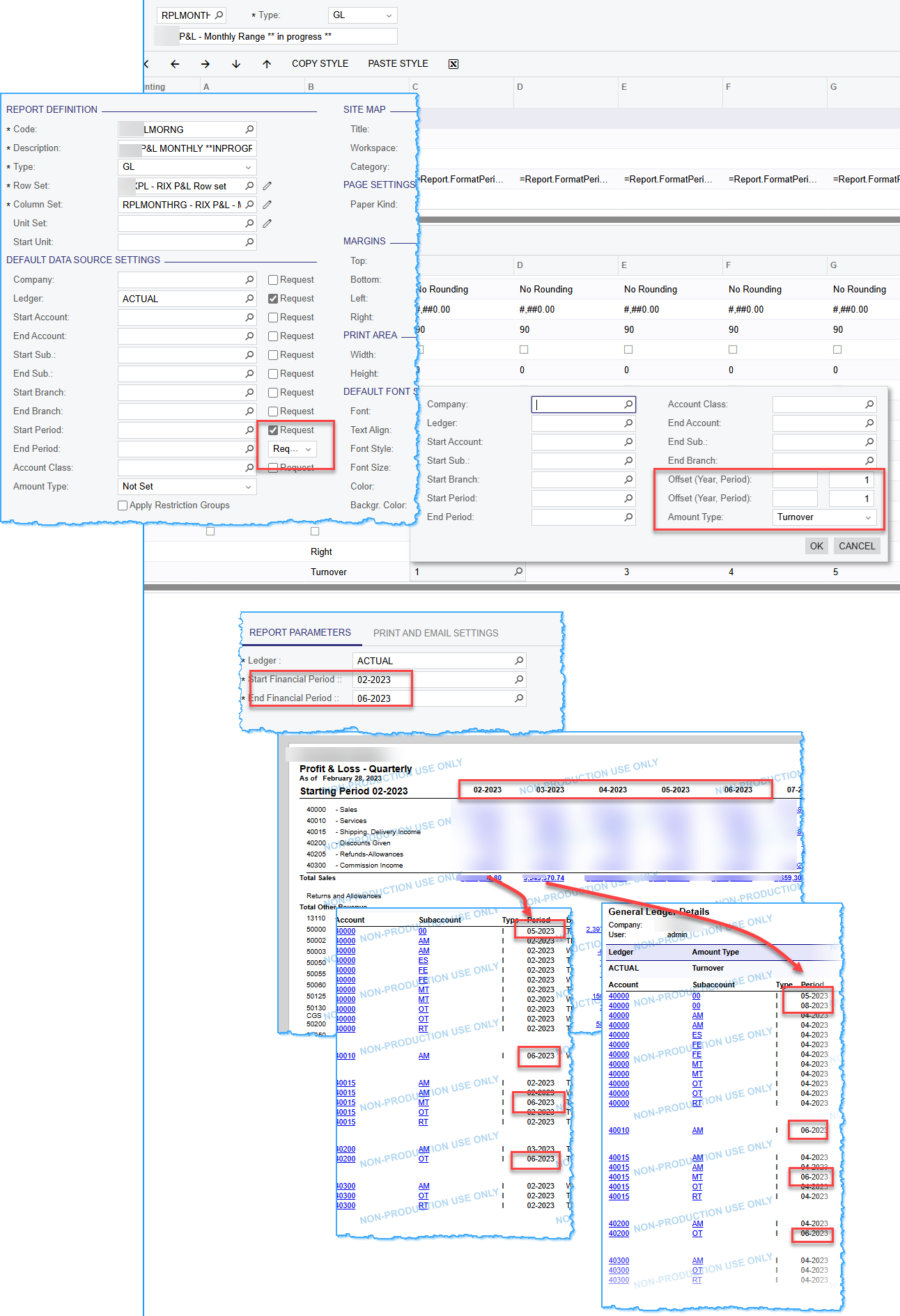
I have found good formulas to suppress printing periods not in the parameter selection. However, I cannot figure out how to get just the turnover for that period when I use a start and ending period in the parameter.


Thank you in advance!

Best answer by thoyt76

Here’s how I do my Rolling 12:


Then I set-up my Columns to Turnover, and -1 through -11 in Offset Period

I also have YTD and Prior YTD Displayed on mine using Ending Balance and -1 in Offset Year


I run a Rolling 12 each and every month this way.

I hope this helps for you too!!

3 replies

Forum|alt.badge.img+12
  • Acumatica Support Team
  • February 27, 2025

 Hi ​@debbiereed72 


With regards to first question, one can select Start and End period of more than one Financial year. However, you may need to check if it reflects correct numbers depending on the type of report you are trying to build. On P&L report, using more than one Financial year may not work. 


With regards to second question, here are the amount types you can select on Data source. 

https://help.acumatica.com/(W(12))/Help?ScreenId=ShowWiki&pageid=3b87b2cb-7620-441b-bbf9-ae19ed966d5f

Report Definitions (CS206000) form. The following types of amounts can be selected: Turnover, Credit, Debit, Beg. Balance, Ending Balance.

Regards,


debbiereed72
Varsity I
Forum|alt.badge.img
  • Author
  • Varsity I
  • February 27, 2025

@vkumar - thank you for responding.  I am aware that in the Report definition, you can have both a start and end period.  However, when I use an end period (ie: 02-2023 - 06-2023) the individual periods 02, 03, 04, 05, 06 are returning the turnover for that range of periods, not the turnover in that period.  It isn’t just the turnover for that individual period.  It is the turnover based on the range of periods.  I don’t want to specify the exact period on the report, I want it to be ‘rolling’ based on the starting period.


  • Answer
  • May 19, 2025

Here’s how I do my Rolling 12:


Then I set-up my Columns to Turnover, and -1 through -11 in Offset Period

I also have YTD and Prior YTD Displayed on mine using Ending Balance and -1 in Offset Year


I run a Rolling 12 each and every month this way.

I hope this helps for you too!!