Solved

Adding sales person to customer causes duplicates

  • February 12, 2026
  • 6 replies
  • 0 views

Forum|alt.badge.img

Hello,

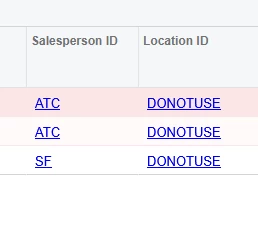
We have a customer that uses ‘locations’ to ship to the various stores under the main customer umbrella. We noticed that the sales person would need to be added to each individual location for them to be attached to it. However, when we do this, it duplicates the customer in its entirety. 

I have seen in my research about duplication verification, but that is not on my enable / disable list.  I’ve also read that this may not be possible yet (i may have been looking at an old post.)

 Has anyone else experienced this issue and possibly know a fix?

Best answer by prachodaya

Hi ​@kdolgner ,

I was able to replicate this, and it does not appear to be actual customer duplication.
In Acumatica, salespersons are assigned at the customer location level, not just the customer master. When you add a salesperson to a location, the system creates a record in CustSalesPeople for that specific BAccountID + LocationID, while the customer (BAccount) itself remains a single record.

If you’re seeing multiple rows in a GI, it’s typically due to joining Customer and Location, which returns one row per location rather than indicating a duplicate customer.

6 replies

Samvel Petrosov
Jr Varsity II
Forum|alt.badge.img+9

Where does it duplicate the customer? In the list of the customers or under the salesperson record?

If it is in the list of the Customers (typically AR3030PL screen ID), then there might be potentially a wrong relationship configured between the Customer and Salespersons tables.


mohammadnawaz51
Jr Varsity I
Forum|alt.badge.img+6

@kdolgner can you help me with the XML File, relations have to review.


  • Freshman II
  • Answer
  • February 13, 2026

Hi ​@kdolgner ,

I was able to replicate this, and it does not appear to be actual customer duplication.
In Acumatica, salespersons are assigned at the customer location level, not just the customer master. When you add a salesperson to a location, the system creates a record in CustSalesPeople for that specific BAccountID + LocationID, while the customer (BAccount) itself remains a single record.

If you’re seeing multiple rows in a GI, it’s typically due to joining Customer and Location, which returns one row per location rather than indicating a duplicate customer.


Forum|alt.badge.img
  • Author
  • Jr Varsity II
  • February 13, 2026

It looks like a few of my screen grabs didn’t paste and I did not proofread. Apologies. 

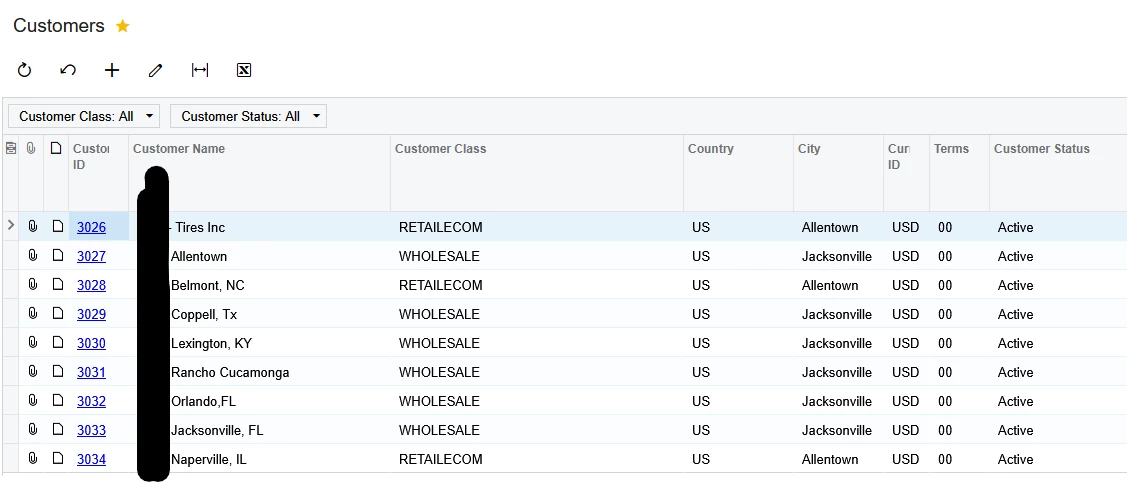
We have one customer, see above, that has different locations and a few have different sales persons. We had to lay the customer out with entirely different customer IDs due to this. 

When i go to add a sales person to a 1022 location, as in my first post, it will duplicate the customer entirely, 2x of 1022. This customer uses “Locations” to differentiate all of their locations, unlike separate customer ID’s like we do for 3026+

There has to be a way to add a sales person to all of those child locations without having 300+ identical customer lines, right?  


Forum|alt.badge.img
  • Author
  • Jr Varsity II
  • February 13, 2026

alright; playing around some more in test and i’m noticing that even though I’m adding the rep to locations, the location ID is not setting up correctly. it’s still using the main over arching parent billing location. so is it possible that while i’m “editing a location” i’m not really “editing a location”, but just an internal bit to the customer itself?


Forum|alt.badge.img
  • Author
  • Jr Varsity II
  • February 13, 2026

Hi ​@kdolgner ,

I was able to replicate this, and it does not appear to be actual customer duplication.
In Acumatica, salespersons are assigned at the customer location level, not just the customer master. When you add a salesperson to a location, the system creates a record in CustSalesPeople for that specific BAccountID + LocationID, while the customer (BAccount) itself remains a single record.

If you’re seeing multiple rows in a GI, it’s typically due to joining Customer and Location, which returns one row per location rather than indicating a duplicate customer.

After messing around a lot more it 100% is the way the inquiry is built. because of how we have other customer’s built i was worried it would ruin more in the back end of things. 

Thank you!