
Solved

2025 R2 SO Error: The document is out of the balance. Build 25.201.0213.2

  • March 31, 2026
  • 12 replies
  • 72 views

bzelinski
Semi-Pro I
Forum|alt.badge.img+1
 

Here’s our issue since upgrading to 2025 R2: This invoice is giving us the strange error message ‘SO Error: The document is out of the balance.
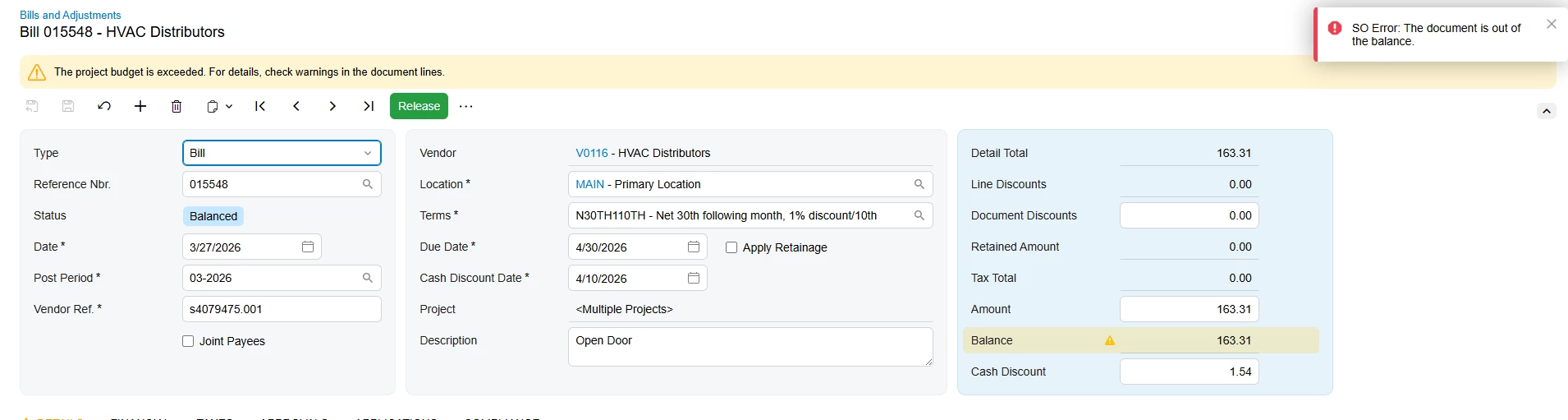
We understand the part about the project budget being exceeded. This is simply because of different model numbers being used in the quote that what are being used in this purchase order/bill.

We’ve already selected “Allow Adding New Items on the Fly” in the project settings.

The document appears to be in balance to me. Any thoughts?

Best answer by bzelinski

@Samvel Petrosov thanks for the input. we corrected that and it still would not release, but it helped me to solve it. I removed all the purchase order lines from the invoice, and it still showed a $6 balance. We could not figure out where that $6 was coming from, so we deleted the invoice and started with a new one, adding the same purchase receipt lines. It then worked! Problem solved.

12 replies

Laura03
Captain II
Forum|alt.badge.img+20
  • Captain II
  • March 31, 2026

Hello Brian, Is there any additional detail showing in Tools → Trace?


Is the screen customized?  See previous post. (link)


Does the same error appear if you temporarily revert to Classic View?


bzelinski
Semi-Pro I
Forum|alt.badge.img+1
  • Author
  • Semi-Pro I
  • March 31, 2026

@Laura03 

Hi Laura,

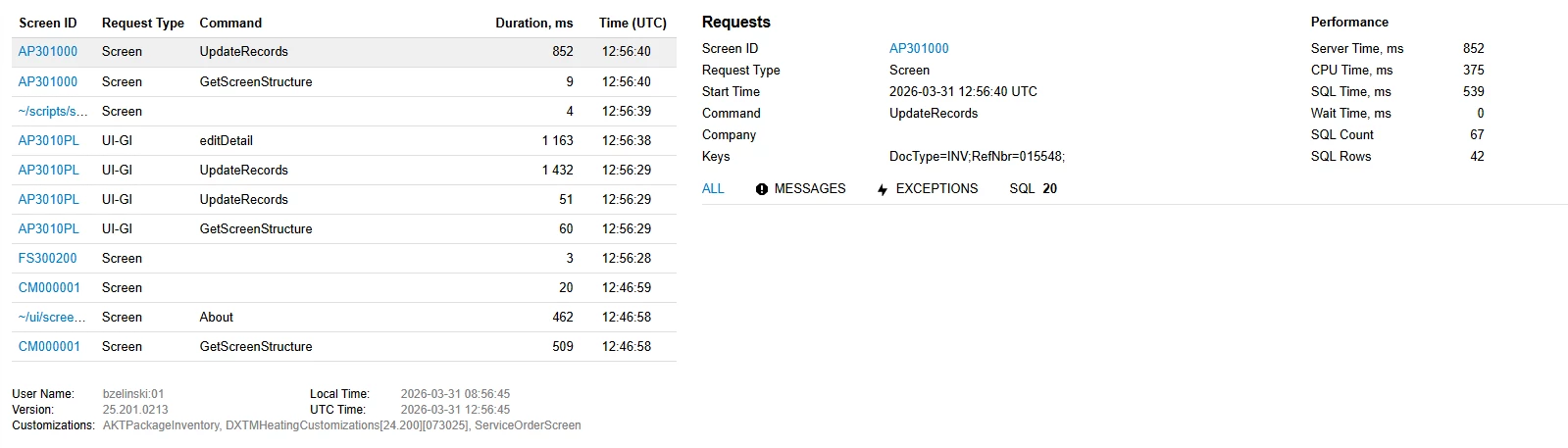
Here’s what I can see in the Trace:

The screen is not customized. I also thought about switching to classic view and have tried it already. It now gives the same error message.


Laura03
Captain II
Forum|alt.badge.img+20
  • Captain II
  • March 31, 2026

Hi,

Usually we can see red messages when viewing Trace immediately after an error appears on screen.  Nothing lights up red? (Checking on timing of above screenshot.)


bzelinski
Semi-Pro I
Forum|alt.badge.img+1
  • Author
  • Semi-Pro I
  • March 31, 2026

@Laura03 Yes, nothing lights up red on the Trace. I just tried to release it again and it gives the same error message, but no change on the trace.


Laura03
Captain II
Forum|alt.badge.img+20
  • Captain II
  • March 31, 2026

Hello,

Just to rule it out: you might try the same actions with customizations temporarily unpublished.

Then open a support ticket, since the problem started happening after your upgrade.

Laura


Samvel Petrosov
Jr Varsity III
Forum|alt.badge.img+9

Can you show the lines of the order as well? The only meaningful explanation I have so far is that there is some rounding happening an the Order Total is not exactly 163.31 but shown that as a result of rounding.


bzelinski
Semi-Pro I
Forum|alt.badge.img+1
  • Author
  • Semi-Pro I
  • April 1, 2026

@Laura03 Thanks again for your insight. Appreciate it.

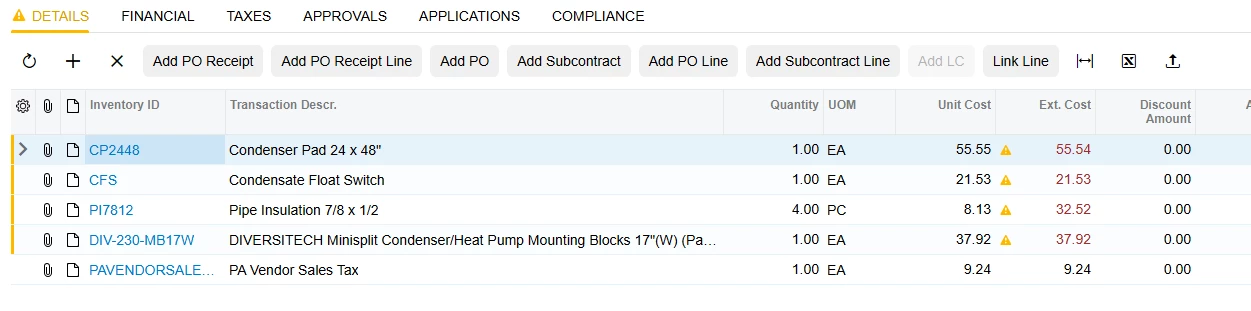
@Samvel Petrosov Here’s a view of the order lines:


Samvel Petrosov
Jr Varsity III
Forum|alt.badge.img+9

@Laura03 Thanks again for your insight. Appreciate it.

@Samvel Petrosov Here’s a view of the order lines:


Hm, your lines total seems to be 156.75 not 163.31. Is there anything else adding charges?

Also, on the first line the Unit Cost says 55.55 an then Ext Cost shows 55.54, is this manually adjusted or system rounded it? Might be the source of your out of balance error.


bzelinski
Semi-Pro I
Forum|alt.badge.img+1
  • Author
  • Semi-Pro I
  • Answer
  • April 7, 2026

@Samvel Petrosov thanks for the input. we corrected that and it still would not release, but it helped me to solve it. I removed all the purchase order lines from the invoice, and it still showed a $6 balance. We could not figure out where that $6 was coming from, so we deleted the invoice and started with a new one, adding the same purchase receipt lines. It then worked! Problem solved.


Samvel Petrosov
Jr Varsity III
Forum|alt.badge.img+9

@Samvel Petrosov thanks for the input. we corrected that and it still would not release, but it helped me to solve it. I removed all the purchase order lines from the invoice, and it still showed a $6 balance. We could not figure out where that $6 was coming from, so we deleted the invoice and started with a new one, adding the same purchase receipt lines. It then worked! Problem solved.

Do you have any customizations working with costs/quantities/amounts in the POs?

Usually this kind of wrong totals are caused by customizations updating/adding lines to transactions.


bzelinski
Semi-Pro I
Forum|alt.badge.img+1
  • Author
  • Semi-Pro I
  • April 7, 2026

@Samvel Petrosov As far as I know none of our customizations are related to these fields.


Samvel Petrosov
Jr Varsity III
Forum|alt.badge.img+9

@Samvel Petrosov As far as I know none of our customizations are related to these fields.

The usual scenario that breaks the total is if you have any customization modifying/adding/deleting lines on field updates, like if a specific item is added add another one, or if the total calculation itself was affected.

Basically customization running upon update of data might trigger another update and that often breaks a proper chain of events that recalculate the totals.

In some rare cases totals may get corrupted on their own as well 😁