Answer

Taxes not up to date (Avalara and Acumatica 2024 R2)

  • October 7, 2025
  • 3 replies
  • 66 views

I have seen a few older articles on this but we are on Acumatica 2024 R2 and I’m not sure what is causing the issue.


We are getting a warning, ‘taxes not up to date’ in Field Services (Service Orders and Appointments).  We are using Avalara as the external tax provider.  If we try to close the order or appointment, we get a actual error “Failed to get taxes from external tax provider.”

I’m able to make the issue go away by unchecking and re-checking the override address box but this does not seem logical as I’m not really changing anything.  The customer address was validated and not changed.


This seems like a bug but wanted to put it out here to see if anyone with Acumatica version 2024 and Avalara have experienced the same issue.


Best answer by KevinG

This has been resolved.  The issue was my truck warehouses did not have addresses (my main warehouses did which it why it was sporati.

3 replies

vdiaz
Acumatica Moderator
Forum|alt.badge.img+2
  • Acumatica Moderator
  • October 12, 2025

@KevinG 

Hi! Is this an error you started experiencing after sometime, of something that used to work fine and it was later broken?

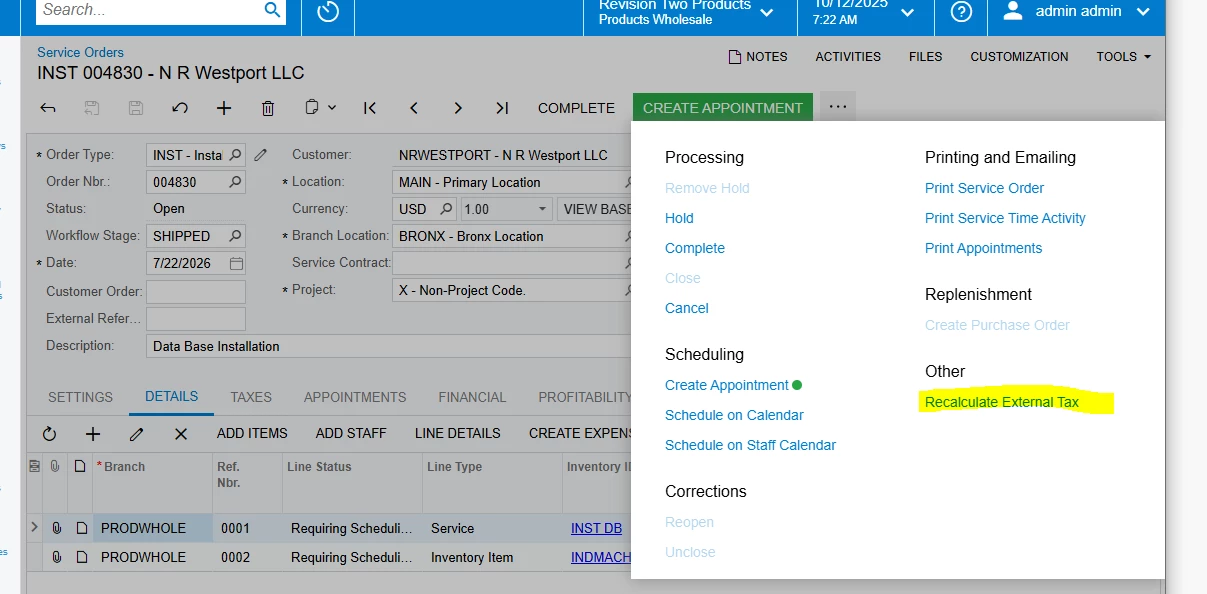
The warning simply indicates that taxes may not ba accurate becuase something was modified in the document. I’ve noticed that the warning comes up when if you make changes that won’t affect any of the taxable amounts, tax zones etc. So, I could say, the warning may no be always accurate. You can get rid of the warning by recalculating the taxes (by clicking on the Recalculate External taxes on the menu).


Usually the error “Failed to get taxes from external tax provider.” is related to the system to being able to connect with the tax provider for some reason:

  • Misconfiguration: wrong Avalara credentials, wrong company mapping
  • Invoice numbering: Avalara tracks all invoice nbrs and makes sure that they are unique. Acumatica on the other hand, may support different numbering sequences for documents, it’s possible that if you get the error while billing, the invoice nbr created was already recorded in Avalara.
  • Rarely happens, but it’s possible that the connection with Avalara is temporaruly unavailable

You mention that toggling the "override address" works. I would ensure the address is properly filled and saved before processing the service order. Even if the address appears validated, toggling the "override address" box may force the system to re-evaluate the address and resolve the tax provider error.

If errors persist, please don’t hesistate to create a support case so that the Acumatica support team can investigate this in detail.

I hope that helps. 


vdiaz
Acumatica Moderator
Forum|alt.badge.img+2
  • Acumatica Moderator
  • October 17, 2025

@KevinG  Were you able to get help about this issue?


  • Author
  • Freshman II
  • Answer
  • October 17, 2025

This has been resolved.  The issue was my truck warehouses did not have addresses (my main warehouses did which it why it was sporati.