


Question

Request for Help with Mandatory Attachment Customization

  • December 10, 2025
  • 3 replies
  • 16 views

Sagar Greytrix
Captain II
Forum|alt.badge.img+3

Hi team,


I want a customization where, when a user creates a claim, the attachment in the Details tab becomes mandatory. I tried many events like persist, persisted, rowSelected, but I’m getting an error. I’m unable to attach an attachment because the error still appears. Is there any solution?


using PX.Data;
using PX.Objects.EP;
using System.Linq;

namespace PX.Objects.EP
{
    public class ExpenseClaimEntry_Extension : PXGraphExtension<ExpenseClaimEntry>
    {
        #region Event Handlers

        /// <summary>
        /// Validates that expense claim detail has an attachment when InventoryID is blank
        /// </summary>
        protected virtual void _(Events.RowPersisting<EPExpenseClaimDetails> e)
        {
            EPExpenseClaimDetails detail = e.Row;
            if (detail is null) return;

            var claimGraph = (ExpenseClaimEntry)e.Cache.Graph;

            // Check if InventoryID is blank/null
            if (detail.InventoryID == null)
            {
                // Get files attached to the detail line
                var files = PXNoteAttribute.GetFileNotes(e.Cache, detail);

                // Use nullable bool to properly handle the null case
                bool? hasFiles = files?.Any();

                // If no files attached, show error dialog
                if (!(hasFiles ?? false))
                {
                    Base.ExpenseClaimDetails.Ask(
                        "Attachment Required",
                        "File attachment is required when Inventory ID is blank.",
                        MessageButtons.OK,
                        MessageIcon.Error
                    );
                }
            }
        }

        #endregion
    }
}


I referred to this blog, and I am also facing the same issue. The error message keeps getting triggered again and again, even if I want to add an attachment.
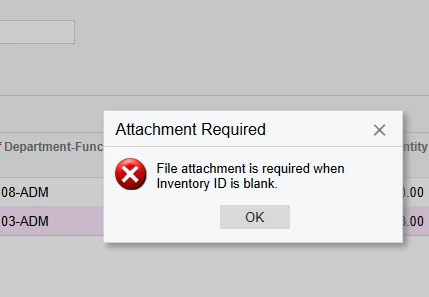


3 replies

Forum|alt.badge.img+3

Hi ​@Sagar Greytrix 
Try replacing your code with this adjusted version:

using PX.Data;
using PX.Objects.EP;
using System.Linq;

namespace PX.Objects.EP
{
public class ExpenseClaimEntry_Extension : PXGraphExtension<ExpenseClaimEntry>
{
#region Event Handlers

/// <summary>
/// Validates that expense claim detail has an attachment when InventoryID is blank
/// </summary>
protected virtual void _(Events.RowPersisting<EPExpenseClaimDetails> e)
{
EPExpenseClaimDetails detail = e.Row;
if (detail is null) return;

var claimGraph = (ExpenseClaimEntry)e.Cache.Graph;

// Check if InventoryID is blank/null
if (detail.InventoryID == null)
{
// Get files attached to the detail line
var files = PXNoteAttribute.GetFileNotes(e.Cache, detail);

// Use nullable bool to properly handle the null case
bool? hasFiles = files?.Any();

// If no files attached, show error dialog
if (!(hasFiles ?? false))
{
throw new PXException("File attachment is required when Inventory ID is blank.");
}
}
}

#endregion
}
}


Sagar Greytrix
Captain II
Forum|alt.badge.img+3
  • Author
  • Captain II
  • December 10, 2025

@aleksandrsechin 

Thanks for the response, but I am still facing the same issue. In the first scenario it works fine — I am getting the error message.


But if I try to attach a file, I still get the error. The attachment window does not open.

I don’t want Inventory attachments — I just want the normal File Attachment to be mandatory. The user should be able to attach a file, but the current code is causing an issue where the file window does not open for adding the attachment.

Do you have any other approach for this?


Forum|alt.badge.img+3

I have investigated this issue, and here’s what I found.

The most appropriate way to prevent records from being saved based on some condition is in the RowPersisting event handler.

To attach a file to a record, it must first be saved to the database. Therefore, when you try to add a file, it triggers RowPersisting. However, you can’t allow the save without the attachment.

So, probably there’s no straightforward way to implement this logic, or it would be quite difficult and require an unusual approach.

The only thing I would recommend for now is to display a warning instead of an error. Though, this will still allow the record to be saved without attachments.
