Ordered Incorrect Parts for Service 2024r2 and beyond

  • June 19, 2025
  • 5 replies
  • 176 views

Forum|alt.badge.img

Acumatica made a change and forgot to ask us first…

Prior to 2024r2, if users ordered parts by mistake via purchase order to service jobs they could simply remove/delete them from the job and those parts would land in inventory. This was actually a seamless and helpful nuance. I wish incorrect parts were never ordered, but any field service company knows better!

Starting in 2024r2 detail lines linked to purchase orders cannot be deleted from service orders. Once a purchase receipt is released, the only way to get that inventory out of a job is to contact acumatica support and request a custom script…

It’s not uncommon for my company to order $10k-$20k items. On occasion they may be incorrect or more often actually not needed. Acumatica’s current functionality leaves you the option to $0 bill these items or leave them in allocation purgatory forever.

How is everyone else solving this problem??? I can’t believe this oversight.

5 replies

DrewNisley
Pro I
Forum|alt.badge.img+3
  • Pro I
  • June 19, 2025

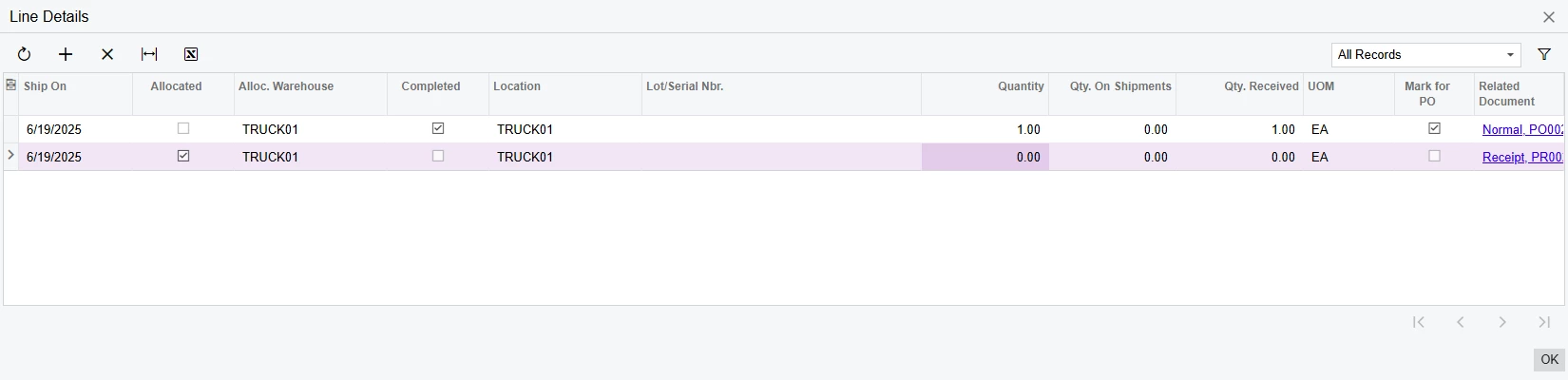
The way to do this is to go into the line details related to that line and change the qty on the receipt line to zero. This will allow you to to use that qty somewhere else other than this order. The line will still be on the service order, but the estimated qty will be zero so it won’t affect billing or scheduling. You can also do this partially, so if you receive 5 and only use 2, just change the qty to 2 in the line details. The other three will be available for use elsewhere.

Before changing it to zero

After changing it to zero


Forum|alt.badge.img
  • Jr Varsity III
  • June 19, 2025

@twheeler  - Yes!  We have the same issue and handle the problem now as ​@DrewNisley provided.  It has been an issue since we upgraded to 2024 R2.  


DrewNisley
Pro I
Forum|alt.badge.img+3
  • Pro I
  • June 19, 2025

I don’t think it is considered an issue, I think it is supposed to be this way to prevent people from accidentally deleting linked lines since there was no way to re-link a line to a PO after it was deleted from the order.


vdiaz
Acumatica Moderator
Forum|alt.badge.img+2
  • Acumatica Moderator
  • June 20, 2025

Hi! ​@twheeler ​@suebrown ​@DrewNisley 

While it's true that deleting the Line Details of lines related to purchase orders was possible in prior versions, the behavior was the result of a system loophole rather than intended functionality. Unfortunately, this led to frequent issues, including data corruption and broken relationships between service orders and purchase documents. To address this, we introduced a validation in 2024 R2 that prevents deletion once a purchase order has been created for the line.

We recognize that some users were relying on this workaround, but from a product stability and data integrity perspective, reintroducing that behavior is not something we consider safe or sustainable. We are exploring safer alternatives in the future, ut we have no concrete plans yet. 

In the meantime, customers can mitigate the impact with a few potential workarounds depending on the stage of the purchase receipt:

  • If the PO receipt has not been created:
    → Delete the PO, then delete/cancel the service order line or uncheck Mark for PO.
  • If the PO receipt has been created but not released:
    → Delete the receipt, then delete the PO and update the service order line as needed.
  • If the PO receipt has already been released:
    → The system prevents deletion to protect historical accuracy. In this case, the only option is to contact Acumatica Support for a potential script—with the usual caveats about risk.
  • As a preventive measure:
    → 
    Consider introducing an internal review step or limiting who can release PO receipts, to ensure corrections can be made earlier in the process.

You could also use the workaround suggested here: 

The way to do this is to go into the line details related to that line and change the qty on the receipt line to zero. This will allow you to to use that qty somewhere else other than this order. The line will still be on the service order, but the estimated qty will be zero so it won’t affect billing or scheduling. You can also do this partially, so if you receive 5 and only use 2, just change the qty to 2 in the line details. The other three will be available for use elsewhere.

Before changing it to zero

After changing it to zero


I hope this helps. 


Forum|alt.badge.img
  • Author
  • Freshman I
  • June 20, 2025

Thanks ​@DrewNisley . We will try the workaround. This was not previously suggested by Acumatica