Answer

Modern UI Calendar Board Help

  • October 14, 2025
  • 6 replies
  • 137 views

Forum|alt.badge.img+1

We were super impressed at Summit with the new Modern UI Calendar board.  Now that we’re finally on 25R1, I’ve enabled Modern UI for the Calendar Board screen in our Sandbox.  And I’m having a deer in the headlights moment.  I’m trying to remember what I can do with it.

I’m not sure if I can dig up the recording of the sessions from Summit, but I do know it’s getting used in the community.  Some of the things that our users have asked about are:

  • Can the axes be flipped, putting the time along the Y axis?
  • Can we control what the axes are?  Our team would rather look at staff specific (and I believe I can add filter tabs for different staff), and have the board display days across the top.
  • Can we control color coding of the calendar appointments?
  • Can we control what appears in the calendar box, as well as the pop up when you click the appointment?

I know some of these were a “Yes” during the training, but I can’t remember for sure, and I definitely can’t remember how to do anything with it.
Best answer by vdiaz

@lairdtim Hi!

I’m glad to hear you’re excited about the new Modern UI Calendar Board — it’s definitely a very powerful visual tool in Acumatica 25R1!

Let me clarify your questions:

Q: Can the axes be flipped (time along the Y axis)?
A: Not at the moment.

Q: Can we control what the axes are?
A: Not directly, but you can use filters very effectively. Filters can be created using almost any parameter and saved for quick access. Saved filters appear as tabs (similar to Acumatica Generic Inquiries), so you can easily switch between staff, branches, or other views.

Q: Can we control the color coding of calendar appointments?
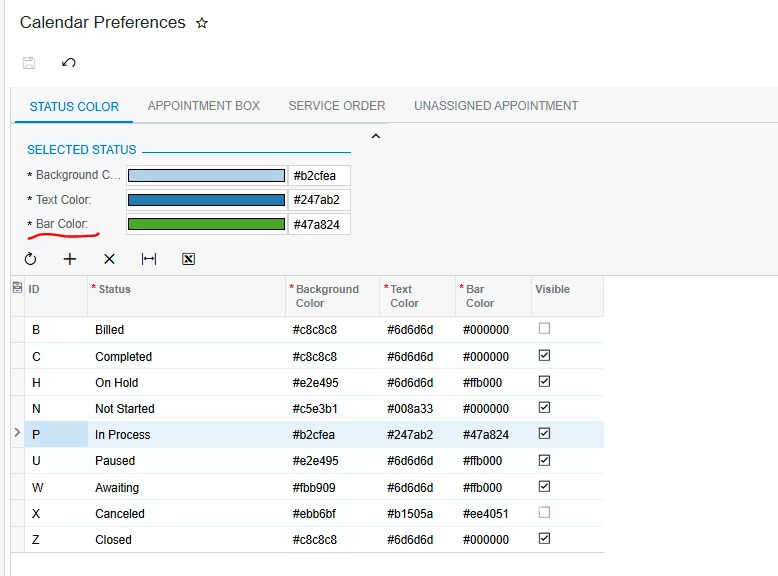
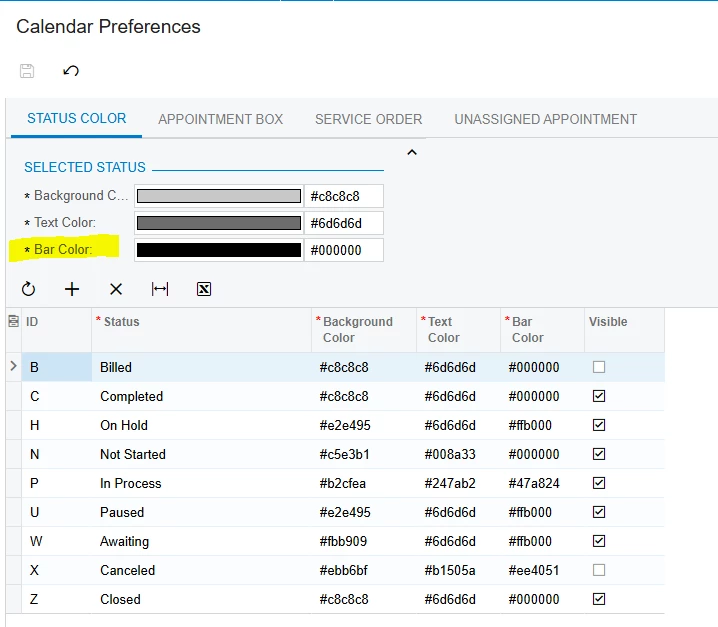
A: Yes! You can configure this under Calendar Preferences → Bar Color.


Q: Can we control what appears in the calendar box and in the pop-up when clicking an appointment?
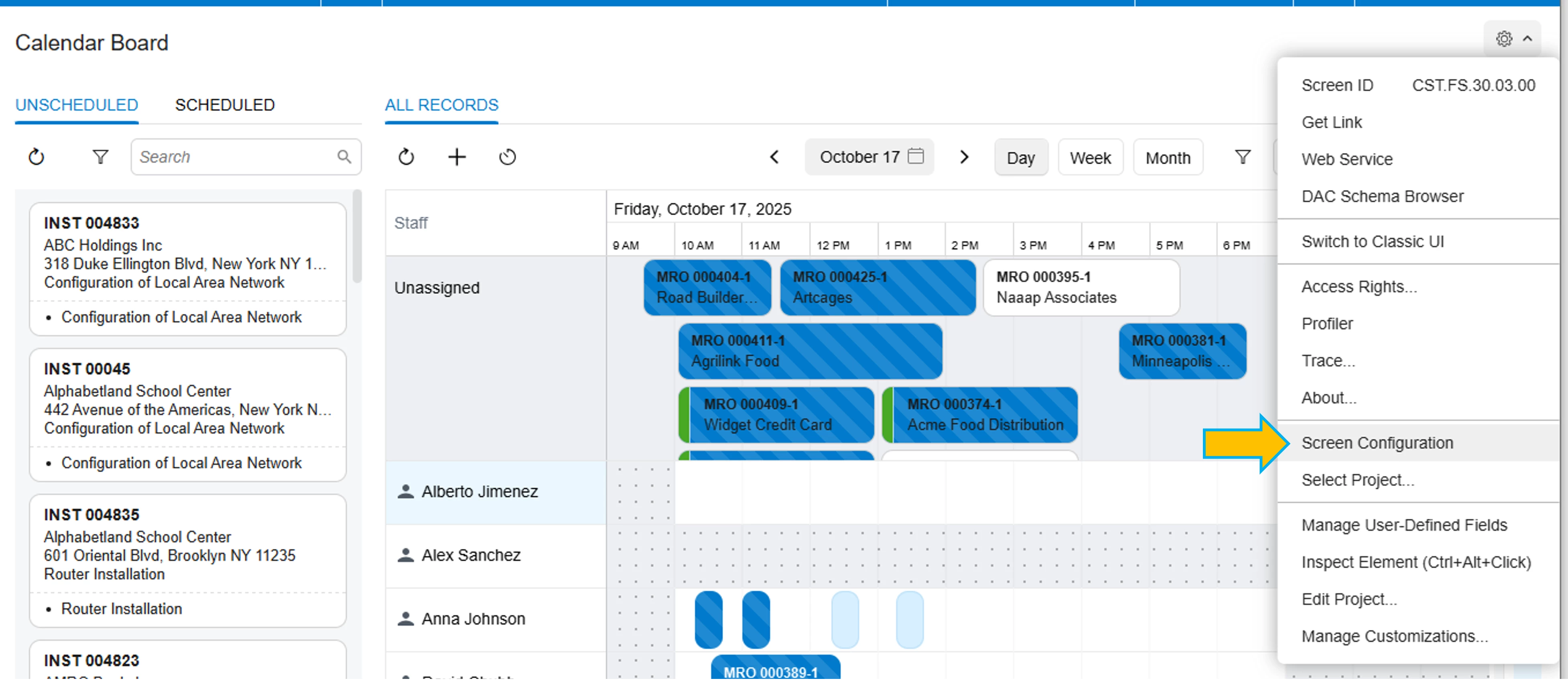
A: Yes. You can use the Screen Configuration (the standard UI Controls) to customize what’s shown in the appointment tiles, as well as other UI elements such as the Unscheduled and Scheduled columns.


You can find more details in the 2025 R2 release notes and here:


It might also be a good idea to organize a short webinar or demo session similar to the Summit presentation — and keep a recording available for reference. I’ll check internally if we can arrange that to make learning resources more accessible.

📌 Update: A Calendar webinar is coming before the end of the year! Keep an eye out for upcoming announcements.

6 replies

vdiaz
Acumatica Moderator
Forum|alt.badge.img+2
  • Acumatica Moderator
  • Answer
  • October 17, 2025

@lairdtim Hi!

I’m glad to hear you’re excited about the new Modern UI Calendar Board — it’s definitely a very powerful visual tool in Acumatica 25R1!

Let me clarify your questions:

Q: Can the axes be flipped (time along the Y axis)?
A: Not at the moment.

Q: Can we control what the axes are?
A: Not directly, but you can use filters very effectively. Filters can be created using almost any parameter and saved for quick access. Saved filters appear as tabs (similar to Acumatica Generic Inquiries), so you can easily switch between staff, branches, or other views.

Q: Can we control the color coding of calendar appointments?
A: Yes! You can configure this under Calendar Preferences → Bar Color.


Q: Can we control what appears in the calendar box and in the pop-up when clicking an appointment?
A: Yes. You can use the Screen Configuration (the standard UI Controls) to customize what’s shown in the appointment tiles, as well as other UI elements such as the Unscheduled and Scheduled columns.


You can find more details in the 2025 R2 release notes and here:


It might also be a good idea to organize a short webinar or demo session similar to the Summit presentation — and keep a recording available for reference. I’ll check internally if we can arrange that to make learning resources more accessible.

📌 Update: A Calendar webinar is coming before the end of the year! Keep an eye out for upcoming announcements.


  • Freshman I
  • November 4, 2025

I’m using 2025 R2 and the calendar preferences only work on the classic calendar board. It doesnt change on the Modern one. Also, we seem to have lost the time scale that was on the lower right of the calendar view. The one that allowed you to zoom in or zoom out to show say a months appointments. Am on 25.200.0048 which I think is the latest build


Forum|alt.badge.img
  • Varsity II
  • November 4, 2025

I’m using 2025 R2 and the calendar preferences only work on the classic calendar board. It doesnt change on the Modern one. Also, we seem to have lost the time scale that was on the lower right of the calendar view. The one that allowed you to zoom in or zoom out to show say a months appointments. Am on 25.200.0048 which I think is the latest build


Agree about the zoom, or maybe we just haven’t figured that out yet.   We like the overall look, but we’ve also been working with tech support on several feature hiccups.  e.g. Not blocking time for multiple techs on the same appointment, and not blocking time marked as unavailable through Staff Scheduling Rules.


vdiaz
Acumatica Moderator
Forum|alt.badge.img+2
  • Acumatica Moderator
  • November 5, 2025

@Andy Smith ​@gavinbell68 

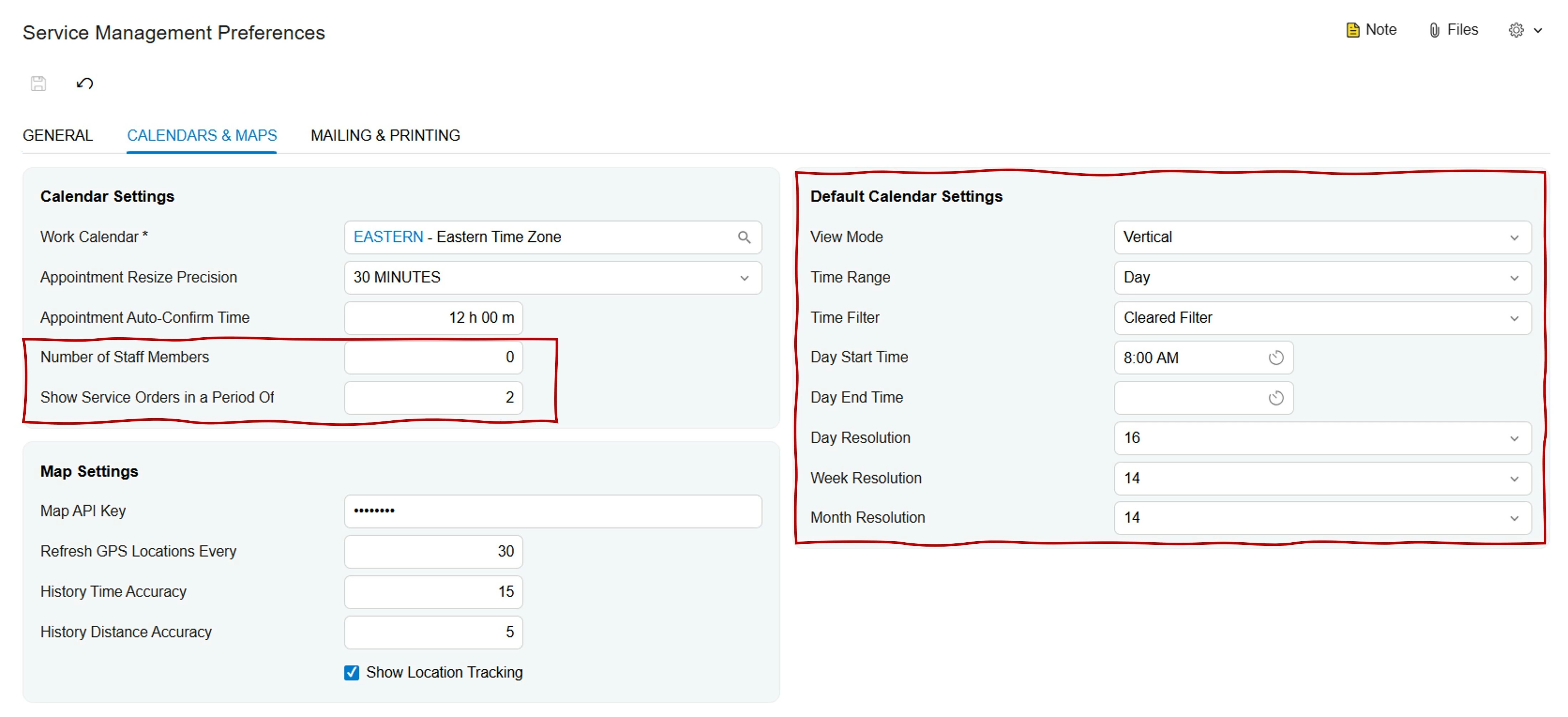
H! For those of you wondering about calendar preferences, the following preferences only work in the Classic UI (therefore will be removed at some point when it becomes obsolete):

  • Number of Staff Members
  • Show Service Orders in a Period Of
  • All settings under Default Calendar Settings section

Why? Some of these preferences don’t make sense in the Modern UI calendar, since new calendar doesn’t have the following functionality:

  • Pagination (now infinite scroll is available instead)
  • Vertical/horizontal mode
  •  Zoom (or resolution)                                            
  •  Predefined Time Filters (now advanced filters are available instead)

Regarding the zoom controls, as mentioned before, they are not implemented in the Modern UI right now. 

We’re still making improvements on each release. For example, the issue related to scheduling appointments to multiple employees will be fixed on the next release/service pack.

You’re feedback is highly appreciated and it helps us to keep making impactful improvements for our customers.

Maybe you can share with us how you were using the zoom controls so we can think about how to include such functionality in the near future.


  • Freshman I
  • November 5, 2025

I’m using the new Calendar in 2025 R2 latest build. I can’t get the calendar preferences to amend the colours and we also seem to have lost the zoom function that was on the bottom right of the classic UI. This enabled you to see a month view in one, which it looks like you can’t in the modern UI


vdiaz
Acumatica Moderator
Forum|alt.badge.img+2
  • Acumatica Moderator
  • November 5, 2025

I’m using the new Calendar in 2025 R2 latest build. I can’t get the calendar preferences to amend the colours and we also seem to have lost the zoom function that was on the bottom right of the classic UI. This enabled you to see a month view in one, which it looks like you can’t in the modern UI

Hi! ​@gavinbell68 

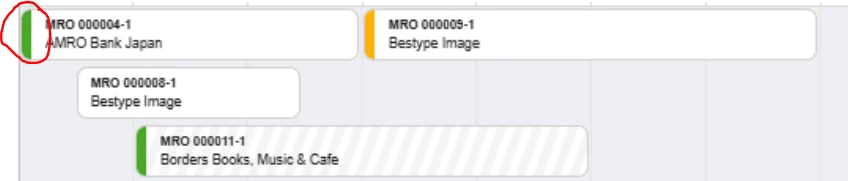
I forgot to mention something regarding the preferences (screen Calendar Preferences). The colors for the appointment tiles in the modern UI calendar are all fixed (background color and text color). The new control called “Bar Color”, allows users to select the color of the bar displayed on the tiles based on the status of the appointment. 

Appointment tiles on the calendar / Bar color

You can find more information reagrding the colors and more on the 2025 R2 Release Notes (pages 34-47). 

Finally, the zoom functionality is not implemented in the Modern UI.