Question

Equipment Information & Service Contracts

  • June 12, 2025
  • 6 replies
  • 129 views

We cannot figure out an easy way to store pertinent equipment information such as filter sizes, belt sizes, etc., for a piece of equipment where it will be easily accessed for appts and Service Contract work. 

If we store it in equipment attributes, is is not easily accessed for a technician who is doing the Service Contract work.  Each equipment file has to be opened to obtain the information. And in the equipment attributes, items for each attribute cannot be listed in list form.  It is in paragraph form which is difficult to read.  

Where can we store equipment consumable item information such as filter sizes, belt sizes, humidifier pad sizes, etc., where it is easily accessed in list form.  When a tech sees the list, he knows exactly what he needs to take with him to do the job.  


What do other companies do that use Field Service?  There has to be an easier way than using attributes.  

6 replies

CherryStreet
Jr Varsity I
Forum|alt.badge.img
  • Jr Varsity I
  • June 19, 2025

Hi there, we are doing final testing on our AI Assistant and trying to help put the community.  This is what I received with your scenario, hope it helps! 


You're exactly right — using Equipment Attributes in Acumatica Field Service for storing consumables like filter sizes or belt types isn't ideal for technicians during Service Appointments or Contract work. The Attribute UI doesn't support list-style presentation, and it requires extra clicks to access.

Here are supported, structured alternatives to achieve a technician-friendly, accessible, and maintainable list of equipment-specific consumables:


Recommended Approach: Link Stock Items via Equipment Parts Grid


🔹 1. Use the “Component” or “Part” Functionality (Documented in Equipment Management)

This is designed for listing physical components or consumables associated with a specific Equipment ID.

Benefits:

  • Visible directly on Service Appointments via links to Equipment.
  • Technicians can see part numbers, descriptions, and even quantities.
  • Structured like a parts list, not freeform text.
  • Compatible with reports or mobile views.
 

1. Prerequisites 🔐

  • Role: Field Service Manager or Service Dispatcher
  • Equipment tracking is enabled
  • Stock Items (filter pads, belts, etc.) are already defined in Inventory
 

2. Navigation 🗺️

  • Equipment Management
    Path: Field Services Profiles Equipment (FS203000)
 

3. Detailed Steps 🚀

Step 1: Open the Equipment Record

  1. Go to Field Services Profiles Equipment (FS203000).
  2. Select the Equipment ID you want to configure.

Step 2: Add Consumables as Components or Parts

  1. In the Components/Parts tab (name may vary depending on your build), click +.
  2. In the Inventory ID, select the item (e.g., 20x25x1 Filter).
  3. Optionally add:
    • Quantity
    • UOM
    • Notes or descriptions (optional)

Step 3: Save


4. Expected Results 👀

  • The list of required parts appears as a structured grid inside the Equipment profile.
  • When a Service Order or Appointment includes that Equipment, techs can access this list in the mobile app or from the Appointment form.
  • You can print or report this list using custom reports (if desired).
 

5. Helpful Next Steps ➡️

  • Add standard filter/belt/humidifier pad SKUs to Inventory to standardize your parts library.
  • Create custom reports or GI dashboards to export parts-per-equipment if needed for prep work.
 

6. ERP Pro Tips 💡

💡 Tip for Field Technicians: Use the mobile app’s Equipment tab in the Appointment to quickly view associated parts/consumables without needing to open the full Equipment screen.

💡 Tip for Dispatchers: Add the Equipment Parts list as a section on Appointment Reports so techs get a printable checklist.


7. Alternative Methods 🪄 (Less Recommended)

  • Custom Tab with a Child Table in Equipment DAC
    • Store consumables as structured rows with Inventory IDs and notes.
    • Requires customization but offers the best flexibility.
  • Notes with Smart Tags
    • Add notes to equipment with consumables listed using @tags or markdown-like symbols.
    • Still manual and unstructured, but more readable than attributes.
 

Final Thought

The Equipment Component/Parts grid is the best standard-supported method for your use case: readable, structured, filterable, and integrated into Service Appointments.


  • Author
  • Freshman I
  • June 23, 2025

Thank you for the response.  

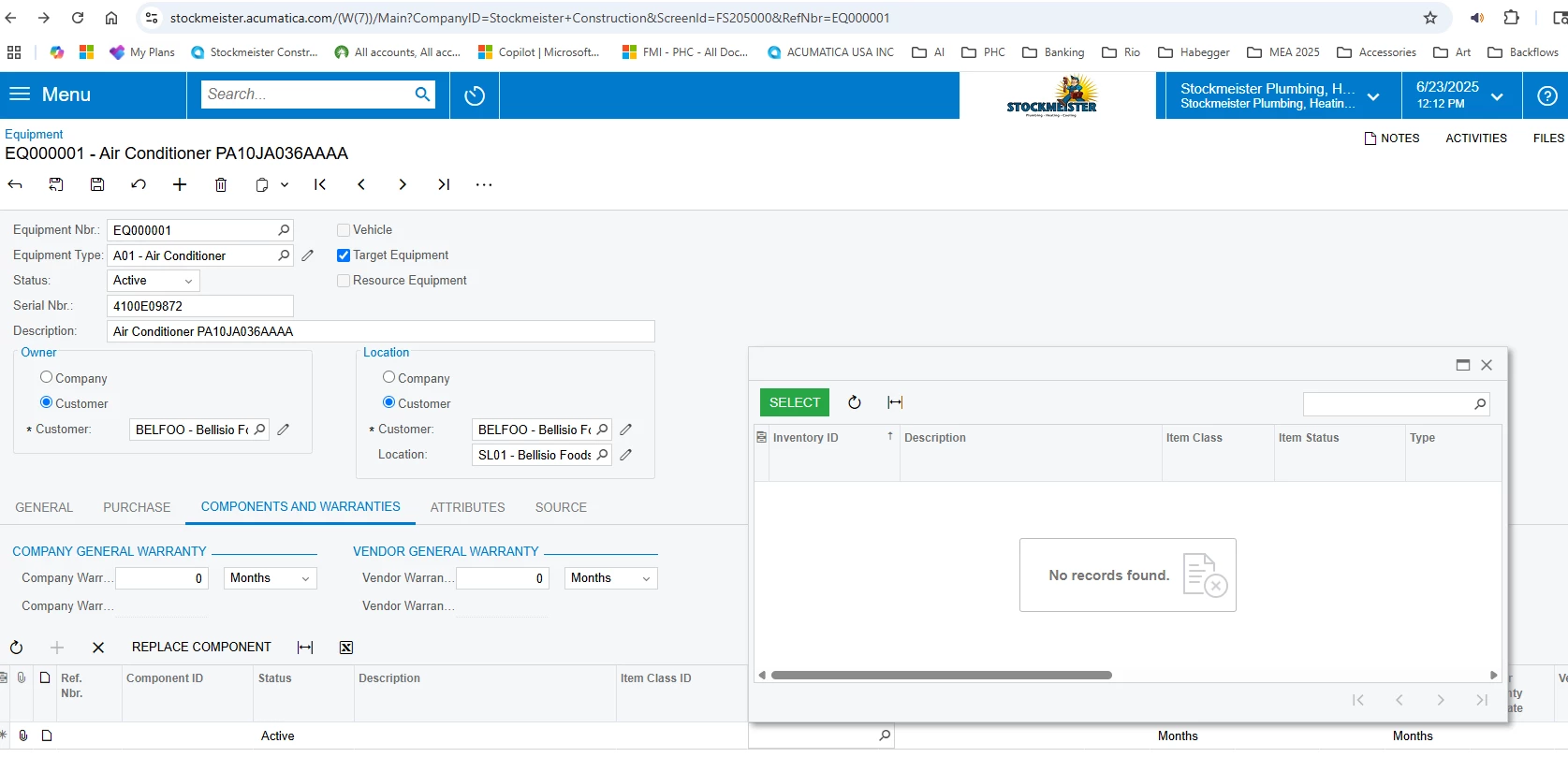
We followed the steps outline above.  We cannot get any items to populate from inventory.  Below is a screenshot.  What am I missing?


MichaelShirk
Captain II
Forum|alt.badge.img+5
  • Captain II
  • June 24, 2025

Hey ​@gball ,

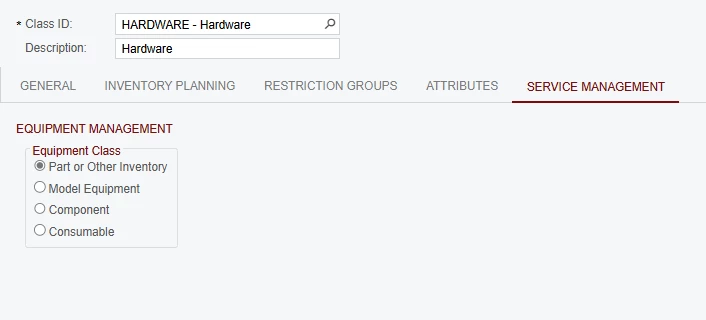
Check out the “Service Management” tab on the Item Classes. 
There you can set an item class as “Component”.
 

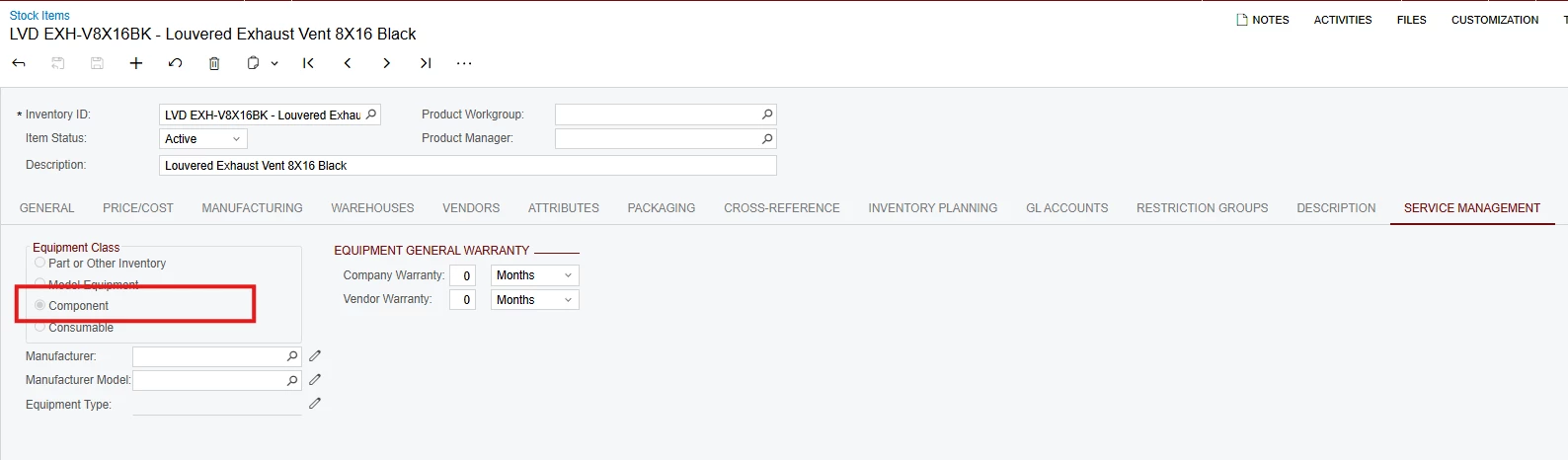
Now, new items created with this class, will be set as a Component. on the “Service Management” tab of the stock item.
(For some reason it isn’t enabled to be changed on the stock item itself.) 
 

For existing items, I had to change the item class to something else, then back to the correct one, in order for the Equipment Class to update.


Then it should be available to select as a component on the Equipment record.


  • Author
  • Freshman I
  • June 26, 2025

Thank you for the response.  

Unfortunately, We are not able to change any of the options for the Equipment Class under the Service Management tab.   All options are grayed out. 


MichaelShirk
Captain II
Forum|alt.badge.img+5
  • Captain II
  • June 26, 2025

@gball  Are you on the Item Class record for the class of the item that needs to be a component? 
I wasn’t able to change it directly on the item either. Rather, I had to set it on the Service Management tab of the item’s Item Class record, then on the item I had to change the Item Class to something else, then back to the correct Item Class, this triggered the Equipment Class to update on the Service Management tab of the item. 

Does that make sense?


Forum|alt.badge.img+3
  • Acumatica Employee
  • July 8, 2025

@gball were you able to add your items to the equipment?