Question

Creating a refurbishment process from scratch

  • September 23, 2026
  • 2 replies
  • 16 views

My company has certain service parts that can be refurbished and reused on the next call. Is there a way to receive these items back, refurbish them, and then add to stock as a refurbished item? My initial thought would be to RMA the item, receive, disassemble to a “core” item, then assemble the refurbished item with a tag to call it out (XXXXX-RFB). I feel there is a step missing in this thought. Does anyone have any experience with this scenario?

2 replies

bwhite49
Captain II
Forum|alt.badge.img+12
  • Captain II
  • September 23, 2026

Is the refurbished item a separate SKU/inventory ID?

If so, you will likely need to create a kit assembly, production order, or add an adjustment to convert the item to the new SKU and retain the correct costs. My preference would be a kit assembly for this scenario, but adjustment would be the easiest.

If using the same SKU, are these items lot/serialized? If so, you could add a lot/serial attribute to define the item as refurbished through an attribute.

From what you wrote, it also sounds like each item might have their own SKU. In which case, an item class to define the refurbished items in addition to item attributes would help. 


Steve Milner
Varsity III
Forum|alt.badge.img+4
  • Varsity III
  • September 23, 2026

@michailz You're close. I'd go with the kit assembly @bwhite49 prefers and add one piece: a holding spot for the used units between the RMA and the refurb. With that in place you can skip the core item and the disassembly.

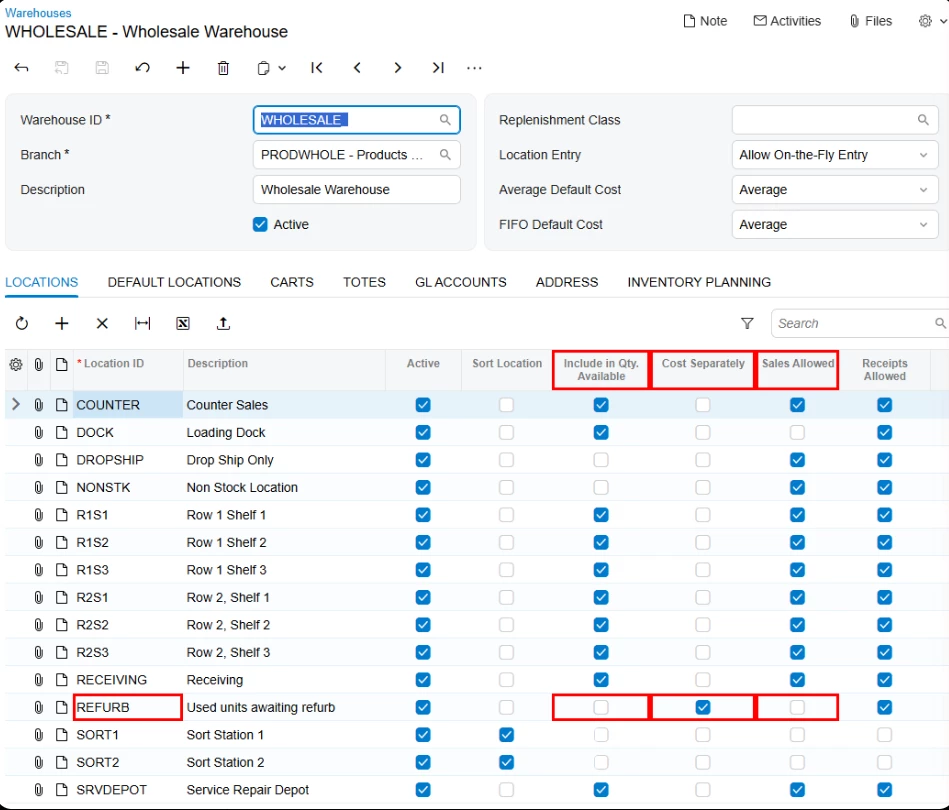
On Warehouses (IN204000), add a location like REFURB. Clear Include in Qty. Available and Sales Allowed, and select Cost Separately. Then make it the RMA Location on the Default Locations tab. RMA receipts land there automatically. The used part counts as on hand but not available, and sales shipments won't pull from it.

On the RMA line, set Unit Cost to what the core is worth. Otherwise it comes back at the item's current average cost. Since REFURB costs separately, that lower value stays out of the average on your new stock.

For the refurb, make XXXXX-RFB a stock kit on Kit Specifications (IN209500) with XXXXX as its component, plus any replacement parts or labor. One Kit Assembly (IN307000) then turns the used unit into XXXXX-RFB. On the component line, change the location to REFURB. It defaults to your regular bin and would consume a new unit.

I ran this end to end on 2026 R1 with an Average-cost item, and the RFB unit came out at the core cost. The RMA Location setting applies to every return into that warehouse, so try it in a sandbox first.