

Answer

Bill Service Order using a Sales Order with Reason codes?

  • August 26, 2025
  • 2 replies
  • 66 views

We use a Sales Order type that is set to use Reason Codes for the Sales Account. This is due to a piece of equipment that we sell and also do long term rentals on. We use an asset account instead of COGS for these orders. 

This equipment needs to have some service items performed on it as well as some additional components added before it is ready to install. 

We would like to start with a service order and have the equipment, components and service items all on the service order so our techs can see what is all needed to be prepped.

I am wanting to bill the service order using the sale order type that is set to use reason codes, but I get an error due to the reason codes being empty.

Does anyone have ideas on a work around?

We could turn on Field Service in this sales order type and then only mark the service items as needing an appointment and creating a service order from the sales order.

The problem here is that the tech will need to go to the sale order to know what equipment he is getting ready. We are currently using multiple documents that aren’t tied together for this and are trying to bring this all together for better records.

Another work around I am considering is a nonstock item that is just used as a note to add a line to the Service Order to show the equipment that is on the Sales Order.


Any else encounter this or have ideas on how to handle this?
Best answer by vdiaz

@thinkinkllc 

Hi! 

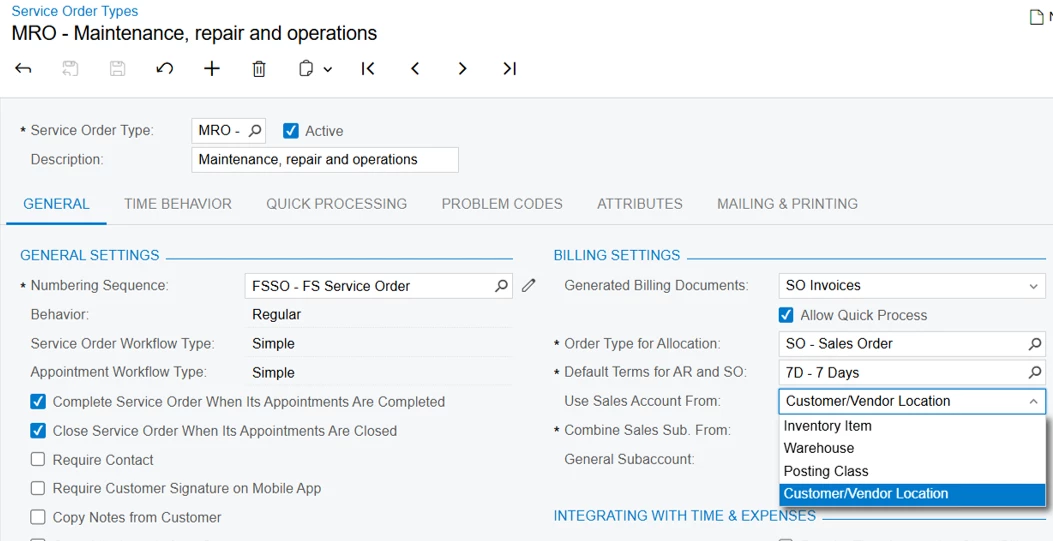
When a Sales Order is generated from a Service Order (via the Run Billing action), the Sales Account and Subaccount come from the Service Order and its Service Order Type settings. Since Service Order Types don’t support Reason Codes, that’s likely why you’re running into the error with your current setup.

From what you’ve described, starting with the Service Order does sound like the right direction, since it lets your technicians see the full picture (equipment, components, and service items) in one place. The main limitation is exactly what you’ve noticed — Reason Codes aren’t available in this flow.

I hope this helps. 

2 replies

vdiaz
Acumatica Moderator
Forum|alt.badge.img+2
  • Acumatica Moderator
  • Answer
  • September 29, 2025

@thinkinkllc 

Hi! 

When a Sales Order is generated from a Service Order (via the Run Billing action), the Sales Account and Subaccount come from the Service Order and its Service Order Type settings. Since Service Order Types don’t support Reason Codes, that’s likely why you’re running into the error with your current setup.

From what you’ve described, starting with the Service Order does sound like the right direction, since it lets your technicians see the full picture (equipment, components, and service items) in one place. The main limitation is exactly what you’ve noticed — Reason Codes aren’t available in this flow.

I hope this helps. 


  • Author
  • Freshman I
  • October 3, 2025

Thank you for taking the time tor reply.

