Answer

Appointment tab Log, Line Status

  • February 26, 2025
  • 3 replies
  • 70 views

szur
Freshman I

Hi,

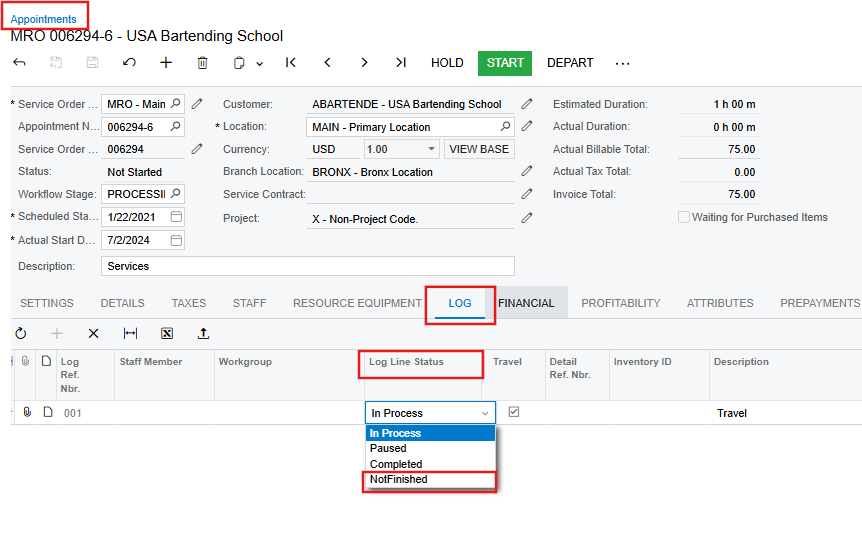
In appointments, in the log tab, we have the following line statuses:

  • In Process
  • Paused
  • Completed

However the Details tab statuses are:

  • Not Performed
  • Not Finished
  • Completed
  • Canceled

Our service technicians (property management) need to have the option to log “Not Finished” for a task for reporting purposes - what is outstanding on a service request.


How would we go about to make this change.  I can find not preferences for appointment logs.
Best answer by Ankita Tayana

Hi @szur,

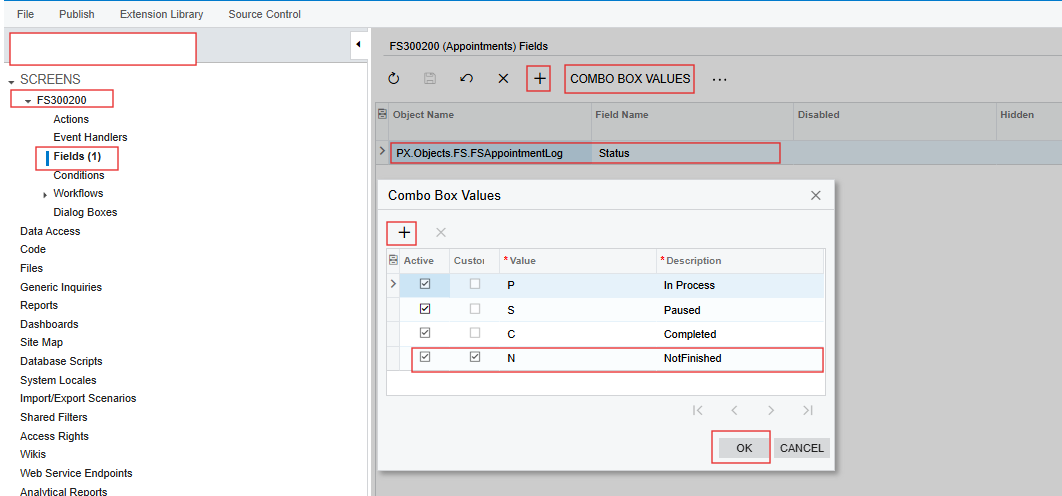
I believe to do this, you need to do small customization , from Low Code, No Code you can add status to the dropdown.


Please check below screenshot.


Hope this helps.

3 replies

Forum|alt.badge.img+5
  • Jr Varsity I
  • Answer
  • February 27, 2025

Hi @szur,

I believe to do this, you need to do small customization , from Low Code, No Code you can add status to the dropdown.


Please check below screenshot.


Hope this helps.


vdiaz
Acumatica Moderator
Forum|alt.badge.img+2
  • Acumatica Moderator
  • February 27, 2025

@szur 

What  Ankita ​@Ankita Tayana suggested makes sense.

Out of the box, Acumatica does not have a "Not Finished" status for Log Lines. This means you would need to add it through a customization. Hopefully, her suggestion is simple enough to implement.


szur
Freshman I
  • Author
  • Freshman I
  • February 27, 2025

Yes, we have made the no-code change and its currently in testing.  Thank you Ankita Tayana