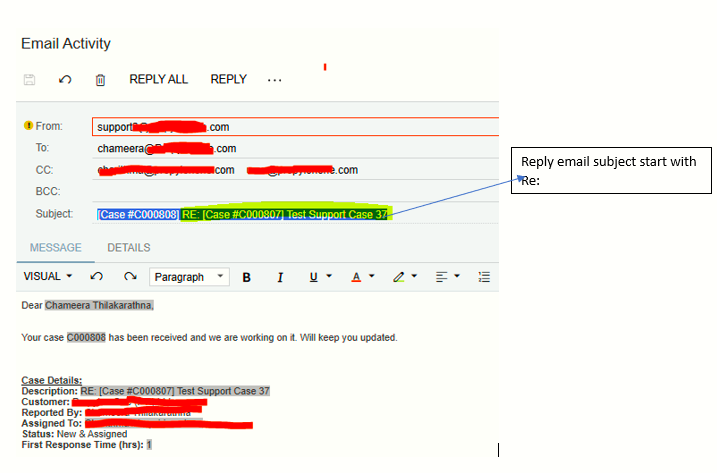
When a customer sends an email for the support portal and when some one(including sender) reply to that email, it creates a new support case rather than looping with the first case.
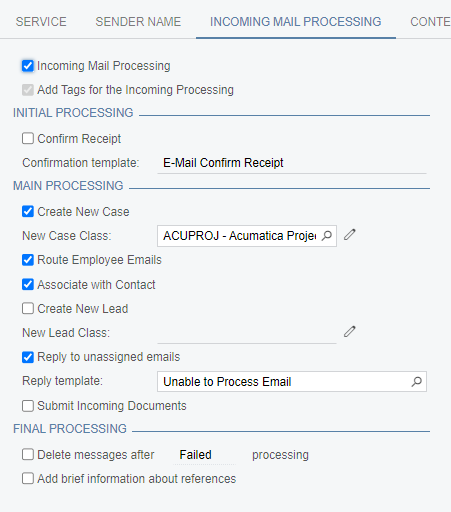
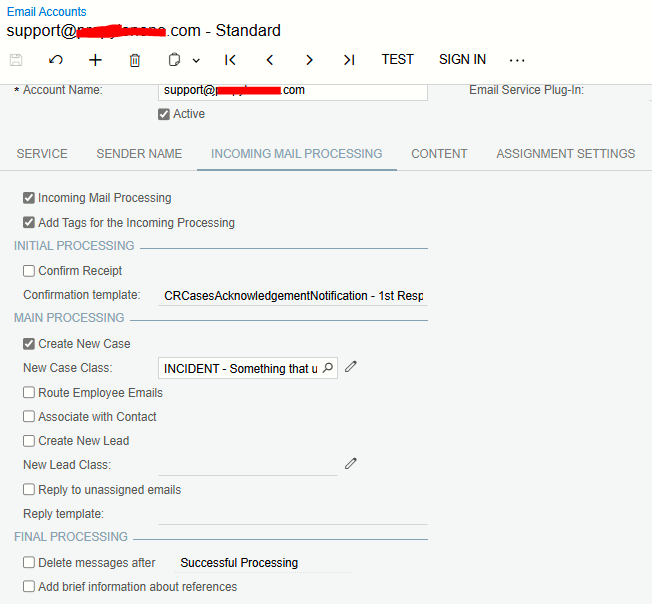
Email account settings are as attached.
Has anyone got this issue any found a solution.
Best answer by meganfriesen37
Try selecting “Create New Case” and then delete your “new case class” item and then deselect the Create new case option? I’m wondering if having the new case class there is overriding the unselected check box?
Are these emails that are creating new cases sent from Acumatica? Or are they being sent from Outlook/Gmail/etc. If emails are being sent from within Acumatica either as replies or new emails linked to the case, they should have the requisite tags to keep them linked to the case, but if you’re sending emails from outlook/gmail/etc. they may not be linked to the case
Here’s the settings we have on our support email and the only time we sometimes get an erroneously created new case is when we get an automatic “out of office reply” (I think because the tag information gets gets lost).
Try selecting “Create New Case” and then delete your “new case class” item and then deselect the Create new case option? I’m wondering if having the new case class there is overriding the unselected check box?
Are these emails that are creating new cases sent from Acumatica? Or are they being sent from Outlook/Gmail/etc. If emails are being sent from within Acumatica either as replies or new emails linked to the case, they should have the requisite tags to keep them linked to the case, but if you’re sending emails from outlook/gmail/etc. they may not be linked to the case
Here’s the settings we have on our support email and the only time we sometimes get an erroneously created new case is when we get an automatic “out of office reply” (I think because the tag information gets gets lost).