



Is there a way to set up a default task in acumatica that has preset sub tasks?
For example if we want to create a task to process a customer refund and what some of the bigger steps associated with that task as sub tasks, is there a way to have that pre-programmed in Acumatica?
Thanks!
Solved
Task Creation
Best answer by pranavkhare34
Hi
Acumatica does have a Tasks form where tasks can be created and assigned to an employee or a workgroup. However, in standard Acumatica, there is no way to automate or template tasks with preset, system-tracked sub-tasks.
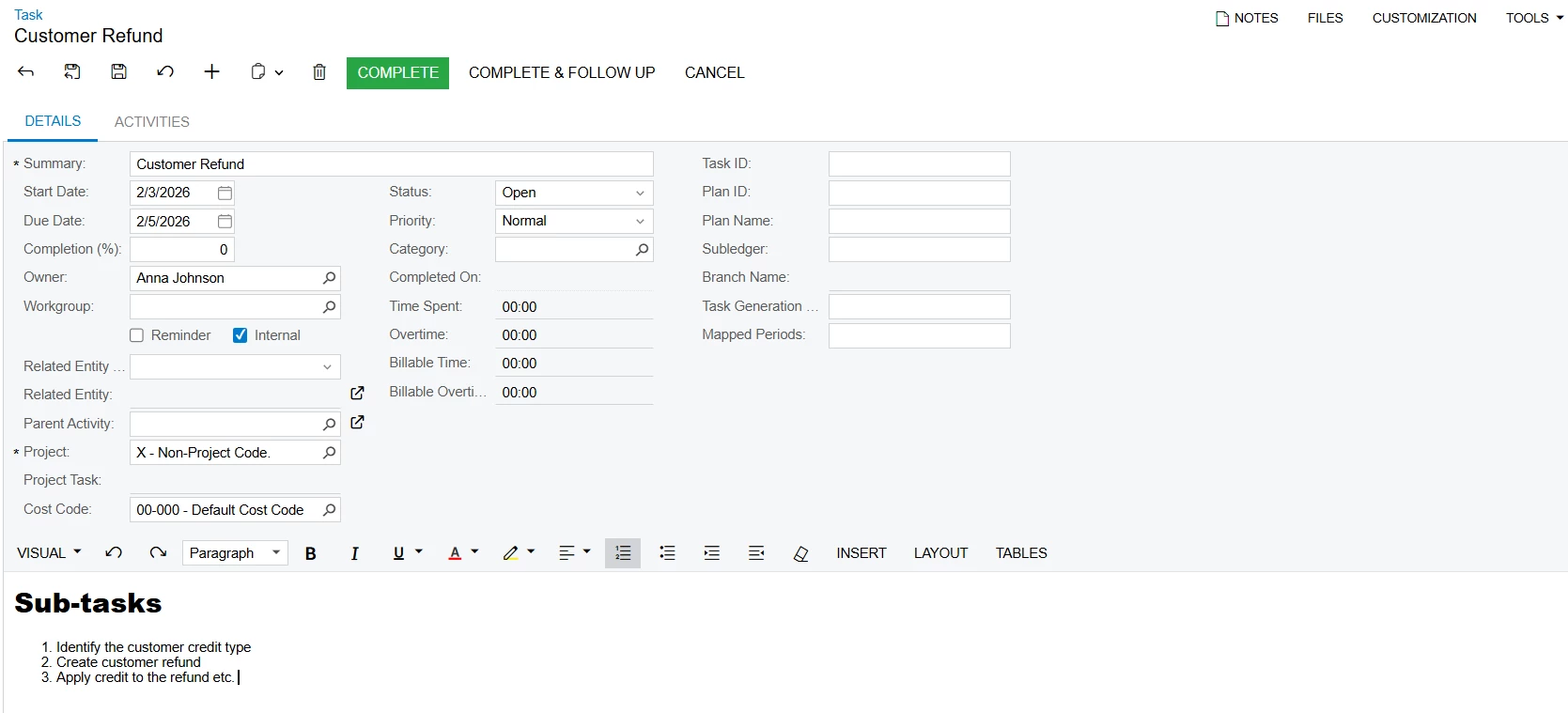
A possible workaround is to manually create a task such as “Customer Refund”, assign it to an employee or workgroup, and document the required sub-steps in the Details section of the task. The task can also be assigned a start date, end date, and priority.
Once the start date is reached, the assigned employee will see the task in their task list and perform the required work in the relevant Acumatica screens. After completing all the documented steps, the employee must manually return to the Tasks form and mark the task as Completed.
The system does not validate whether the documented sub-steps have actually been completed.
Please refer to the following screenshot:
Hope this helps.


Enter your E-mail address. We'll send you an e-mail with instructions to reset your password.