Question

Reorder User Filters

  • June 12, 2025
  • 11 replies
  • 121 views

Forum|alt.badge.img

Is it possible to reorder the user filters on a List/GI?

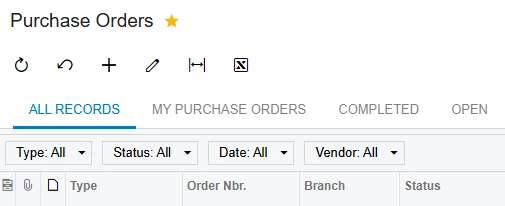
It seems to keep them in the order they were created which isn’t necessarily the order we’d like to see them.

For example: a filter to show today’s Purchase Orders would be very handy to have right next to the ALL RECORDS filter regardless of when the filter was created.

A drag/drop of the filters (like column headers on a grid) would be nice but even a simple feature to reorder the filter tabs like the column chooser would be helpful.

I have figured out how to do it manually directly in the database so I know it can be done but that’s not practical for the users.

Any thoughts would be appreciated.

Thanks
 

11 replies

mblassingame35
Semi-Pro II
Forum|alt.badge.img+3

There is already an idea on the community for this feature. Below is the link to vote for this. 


Forum|alt.badge.img
  • Author
  • Freshman II
  • June 12, 2025

I voted but the topic hasn’t been updated by Acumatica in 4 years.


mblassingame35
Semi-Pro II
Forum|alt.badge.img+3

It doesn’t have enough votes to be looked at by Acumatica. 


Forum|alt.badge.img
  • Author
  • Freshman II
  • June 12, 2025

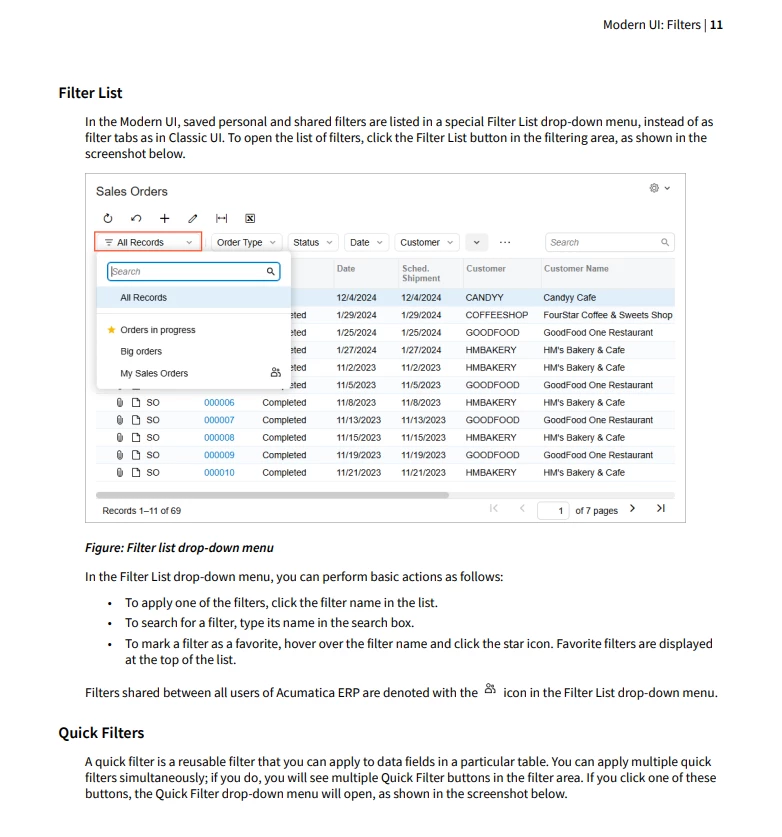
That topic was linked to another topic which seems to have more votes.  It appears they’ve done something with Modern UI but they removed the filters as tabs and made them into a drop down.  You can “star” the filter to move it to the top of the list but that’s not what we’re looking for.


mblassingame35
Semi-Pro II
Forum|alt.badge.img+3

I would comment on the idea about this and let them know that this is not what you were looking for. 


Forum|alt.badge.img
  • Author
  • Freshman II
  • June 12, 2025

I did.


darylbowman
Captain II
Forum|alt.badge.img+15

...they removed the filters as tabs and made them into a drop down...

I believe only the filters exceeding the available space to display as tabs are displayed in a dropdown.


Forum|alt.badge.img
  • Author
  • Freshman II
  • June 12, 2025

@darylbowman that’s in the classic UI.  In Modern UI they did away with the tabs and made a drop down of all filters.


darylbowman
Captain II
Forum|alt.badge.img+15

Ok, on a GI, you’re right.

...I have figured out how to do it manually directly in the database...

Is this by changing the FilterOrder?


Forum|alt.badge.img
  • Author
  • Freshman II
  • June 13, 2025

@darylbowman yes, that’s what I did.  I edited the data directly in SSMS and changed the sql to filter down to the user, company, screen and then edit the FilterOrder values to set them in the correct order.

I’m not sure why the order is not 1-# 

It may be because of the shared filters from others.

Should be a fairly straight forward customization to allow a batch edit of the filters for a user/screen and change the title and sequence.

I do remember after editing I had to reset the App Pool but it may just need a flush of the cache.


darylbowman
Captain II
Forum|alt.badge.img+15

I was going to suggest that you could expose the field to the UI in some way, if that would suffice.