Question

No Relative Date Filter on Automation Schedule?

  • February 14, 2026
  • 3 replies
  • 43 views

Forum|alt.badge.img


I’m trying to set an Automation Schedule for the Recalculate Customer Balances mass-process screen. The client hasn’t locked any periods, so the filter defaults to the first period in the system.

In 24R1 I could use the Relative checkbox to adjust the period. In 25R1 Acumatica got rid of the box and says the date-relative options can be used, but I can’t enter @PeriodEnd in the Filters to Apply tab.

Is it a permissions thing or roles?

Release Notes
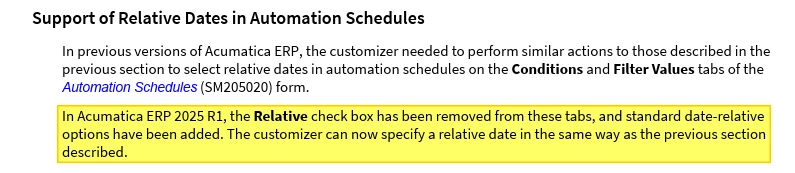
2024R1 Auto. Schedule
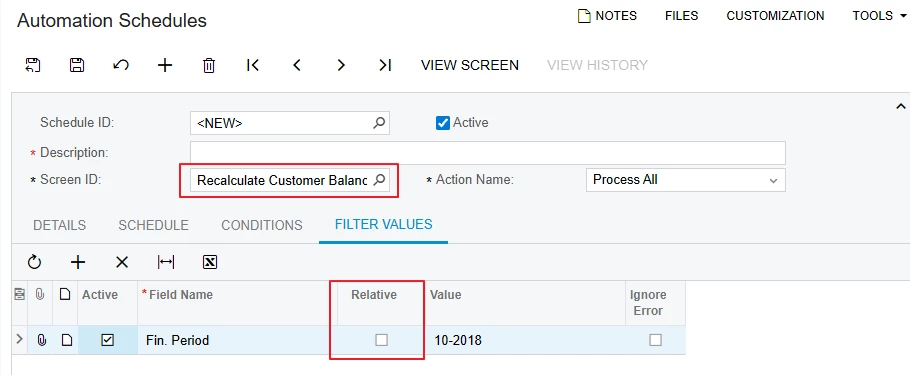
2025R2 Automation Schedule 
 

3 replies

mohammadnawaz51
Jr Varsity I
Forum|alt.badge.img+6

@tonym68 It is removed from 25r1. Please refer the release notes,


abhimanyuprajapati52
Jr Varsity I
Forum|alt.badge.img

Hi @tonym68,

This is not related to permissions or roles.

In Acumatica 2025 R1, the Relative checkbox was officially removed from the Automation Schedules (SM205020) screen. Specifically, Conditions.Relative and FilterValues.Relative were removed, as documented in the 2025 R1 Release Notes for Developers under Screen API Changes.

So the behavior you’re seeing in 25R1 is expected and by design.


Manikanta Dhulipudi
Captain II
Forum|alt.badge.img+16

@tonym68 

We have verified this and found that in the 25R1 release notes, Acumatica has removed the relative field. Instead, they have added standard date-relative options. For your reference i have added release notes as well.

Support of Relative Dates in Automation Schedules
In previous versions of Acumatica ERP, the customizer needed to perform similar actions to those described in the
previous section to select relative dates in automation schedules on the Conditions and Filter Values tabs of the
Automation Schedules (SM205020) form.
In Acumatica ERP 2025 R1, the Relative check box has been removed from these tabs, and standard date-relative
options have been added. The customizer can now specify a relative date in the same way as the previous section
described.