Solved

New Acumatica Roles in recent release

  • November 25, 2025
  • 7 replies
  • 101 views

Forum|alt.badge.img

Hi Community,


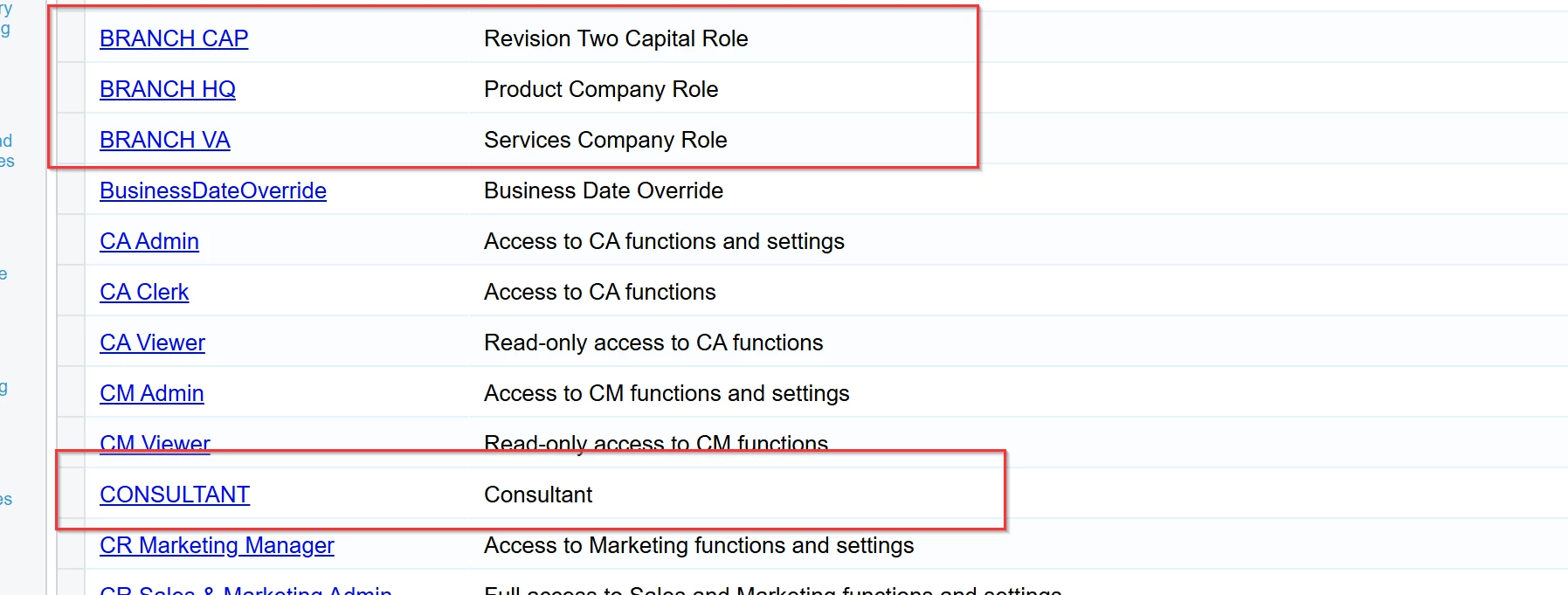
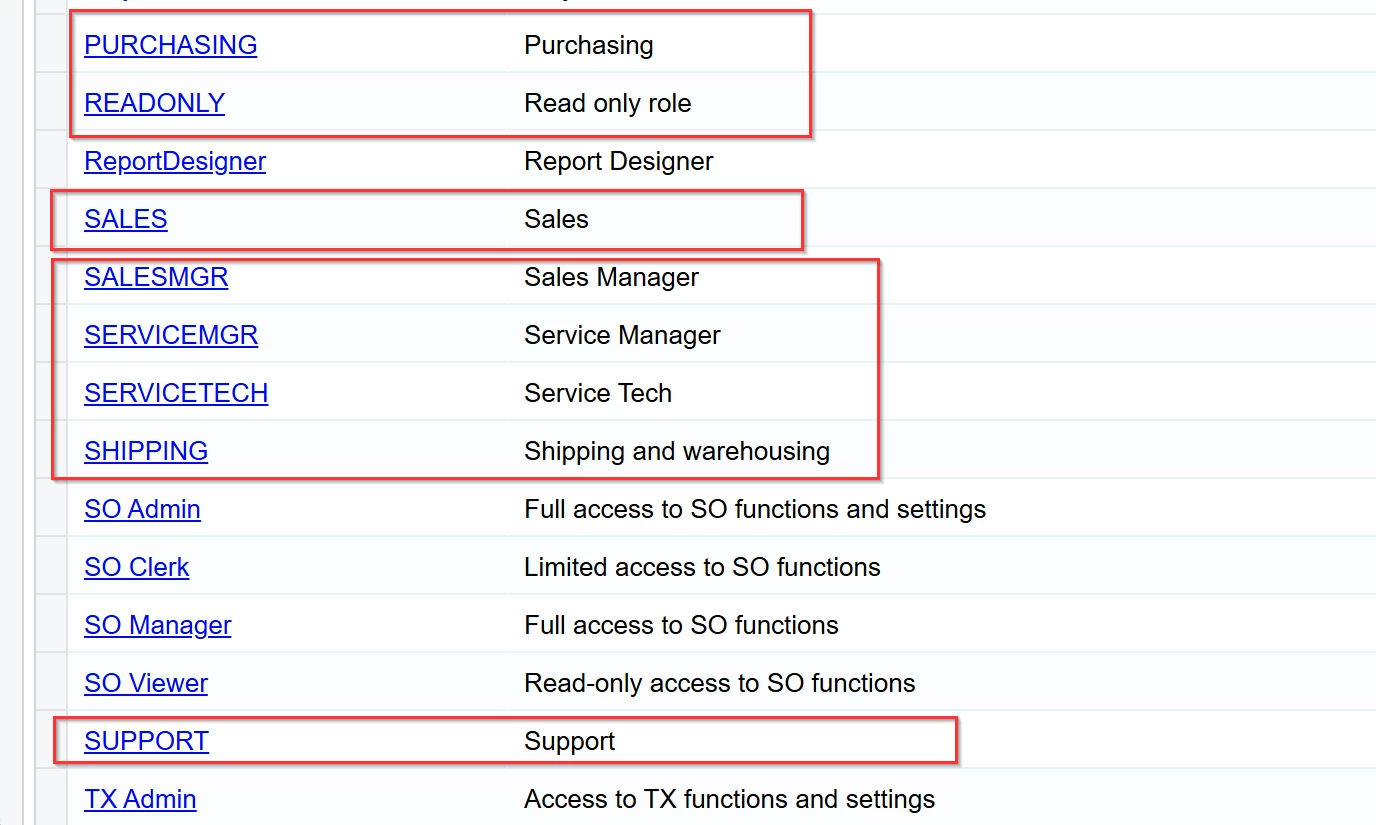
Acumatica seems to have recently inserted new Roles that do not follow their normal naming convention nor have any sort of information for their descriptions. Does anyone know when/ why these roles were added? And what their access is to the system?

Thanks,
RJ

Best answer by rkenna

I wanted to share that these roles are a bug in the system reported to me from the Acumatica RnD team.


These roles (BRANCH CAP, BRANCH HQ, BRANCH VA, DEMO, EMPLOYEE, SALES, SUPPORT, etc.) are Sales Demo roles that were unintentionally included in an earlier version of the PDF Annotator integration customization (maybe some other one too). When that customization was published, the system created these roles.

Although the PDF Annotator customization is not in the Customization Projects (SM204505) list for my tenant, unpublishing or removing a customization does not delete database entities that were created by it (including roles), so the roles remain in the system.


Impact and cleanup:

  • The presence of these roles alone does not grant any extra permissions; users only get additional access if they are explicitly assigned to these roles.
  • As a cleanup step, please:
  1. Open User Roles (SM201005) / User Role Descriptions. 
  2. Locate the Sales Demo roles (BRANCH CAP, BRANCH HQ, BRANCH VA, CONSULTANT, DEMO, EMPLOYEE, PURCHASING, READONLY, SALES, SALESMGR, SERVICEMGR, SERVICETECH, SHIPPING, SUPPORT).
  3. Make sure no users are assigned to them.
  4. Delete these roles from the system.


This is the recommended workaround for this issue.


Starting from 26R1, PDF Annotator will be delivered as part of the product core (not as a separate customization) with a dedicated built‑in security role. In this model, the integration will no longer include Sales Demo roles, so this problem will not reoccur on future versions.


7 replies

vshashkova
Acumatica Moderator
Forum|alt.badge.img+1
  • Acumatica Moderator
  • November 25, 2025

@rkenna hi! Is it 25R2? Which dataset are you looking to? Looks like a demo dataset.


Forum|alt.badge.img
  • Author
  • Captain I
  • November 25, 2025

Hi ​@vshashkova,

We have a few member’s on 2025R1 who are seeing these new roles that seemingly do not match what Acumatica traditionally has. What are these roles? What access rights do they have? And why has Acumatica added them without the normal naming convention? 


vshashkova
Acumatica Moderator
Forum|alt.badge.img+1
  • Acumatica Moderator
  • November 25, 2025

@rkenna These roles come from the SalesDemo dataset and are used only for demonstration. They are not part of the standard product and should not be visible to the customers unless they use the SalesDemo dataset for some reason. You can report a case so support can check what happened in the customer databases where these roles appear.


Forum|alt.badge.img
  • Author
  • Captain I
  • December 3, 2025

Hi ​@vshashkova,

I am in escalations with Acumatica about this. I will update this post when I hear back from them.


vshashkova
Acumatica Moderator
Forum|alt.badge.img+1
  • Acumatica Moderator
  • December 3, 2025

@rkenna, it seems this issue appears if there are some integration customizations such as PDF Annotator or ESign published. 


Forum|alt.badge.img
  • Author
  • Captain I
  • Answer
  • December 11, 2025

I wanted to share that these roles are a bug in the system reported to me from the Acumatica RnD team.


These roles (BRANCH CAP, BRANCH HQ, BRANCH VA, DEMO, EMPLOYEE, SALES, SUPPORT, etc.) are Sales Demo roles that were unintentionally included in an earlier version of the PDF Annotator integration customization (maybe some other one too). When that customization was published, the system created these roles.

Although the PDF Annotator customization is not in the Customization Projects (SM204505) list for my tenant, unpublishing or removing a customization does not delete database entities that were created by it (including roles), so the roles remain in the system.


Impact and cleanup:

  • The presence of these roles alone does not grant any extra permissions; users only get additional access if they are explicitly assigned to these roles.
  • As a cleanup step, please:
  1. Open User Roles (SM201005) / User Role Descriptions. 
  2. Locate the Sales Demo roles (BRANCH CAP, BRANCH HQ, BRANCH VA, CONSULTANT, DEMO, EMPLOYEE, PURCHASING, READONLY, SALES, SALESMGR, SERVICEMGR, SERVICETECH, SHIPPING, SUPPORT).
  3. Make sure no users are assigned to them.
  4. Delete these roles from the system.


This is the recommended workaround for this issue.


Starting from 26R1, PDF Annotator will be delivered as part of the product core (not as a separate customization) with a dedicated built‑in security role. In this model, the integration will no longer include Sales Demo roles, so this problem will not reoccur on future versions.



Chris Hackett
Community Manager
Forum|alt.badge.img
  • Acumatica Community Manager
  • December 11, 2025

Thank you for sharing the solution with the community ​@rkenna!