Answer

Is there a way to automatically send email when on a specified date/month?

  • October 24, 2024
  • 6 replies
  • 272 views

Forum|alt.badge.img

Hello! I want to send an automatic email to customers on December 1st to remind/teach them how to set up Fiscal Year for the next year. Is there a way to automatically send this email from the system if there is no event that triggers it? 

I thought about using Business Event but I can’t think any changes in the system that would process this, other than maybe when system date changes? But I’m not sure if that can be done with Business event.

I also thought of Automation schedules, but I don’t have a screen ID to use that would cause this email to send… 

Any ideas? Thank you!
Best answer by lauraj46

Hi @jzhu ,

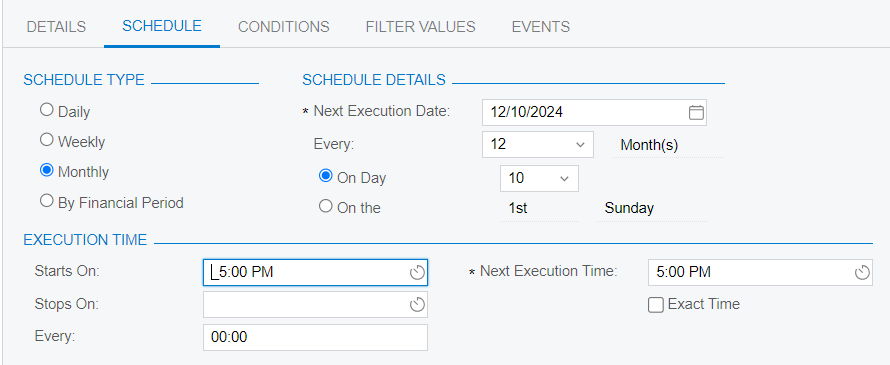
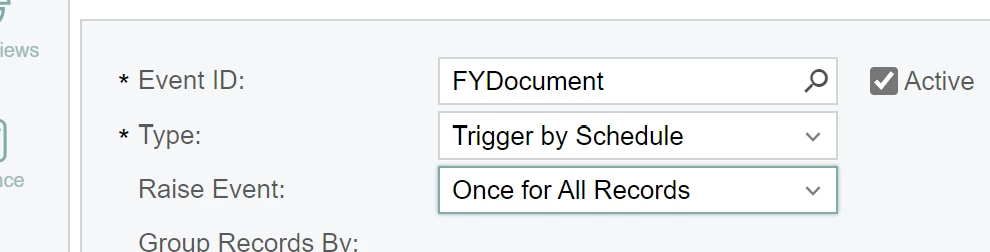
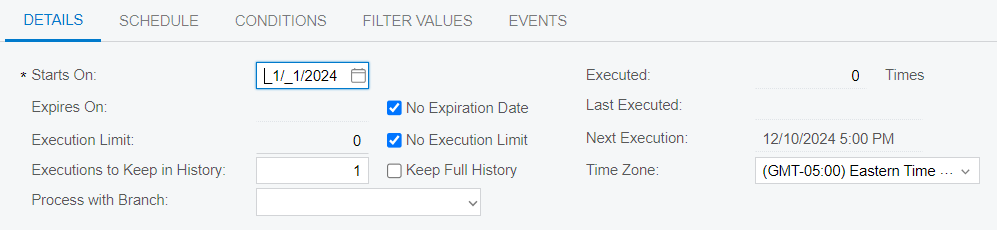
You should be able to do this using a business event set to “Trigger by Schedule”.  The screen will be a Generic Inquiry that you create to select the customers with email addresses for distribution.  

For the schedule, you can choose monthly on a specific date, and set the recurrence to every 12 months.


Hope this helps!

Laura

6 replies

lauraj46
Captain II
Forum|alt.badge.img+8
  • Captain II
  • Answer
  • October 24, 2024

Hi @jzhu ,

You should be able to do this using a business event set to “Trigger by Schedule”.  The screen will be a Generic Inquiry that you create to select the customers with email addresses for distribution.  

For the schedule, you can choose monthly on a specific date, and set the recurrence to every 12 months.


Hope this helps!

Laura


Forum|alt.badge.img
  • Author
  • Semi-Pro III
  • October 24, 2024

@lauraj46 Thank you for this, I will try it out! What screen are you looking at in your screenshots? Is this in business event? I do not see the “Trigger by Schedule” option from the drop down in the ‘Type’ field in business event. 


Forum|alt.badge.img
  • Author
  • Semi-Pro III
  • November 1, 2024

Hi @lauraj46 I finally got to try out your suggestion and I think it is exactly what we needed! I do have one more question, should the raise event be ‘Once for All Records’ or ‘For Every Record’? I tested and it seems that the business event only sent email to the last user on my generic inquiry instead of all the records… I assumed it had to do with the raise event, am I missing something? Thanks!


lauraj46
Captain II
Forum|alt.badge.img+8
  • Captain II
  • November 1, 2024

Hi @jzhu ,

For Every Record is what you want in this case.  Let me know if that does the trick.

Laura 


rloetterle45
Freshman I
  • Freshman I
  • September 5, 2025

Hi ​@lauraj46, how would you do this for certain document types? We would like to schedule ProForma invoices to be sent out of the system once a month, but not hinder other emails being sent out of the system.


lauraj46
Captain II
Forum|alt.badge.img+8
  • Captain II
  • September 6, 2025

Hi ​@rloetterle45 ,

The business event will run based on the results of the associated generic inquiry.  You can configure this to filter on specific document types and it should affect any of the other automations.

Hope this helps!

Laura