Answer

How to use email address from contact on SO for Shipment Notification Email Template

  • December 23, 2024
  • 5 replies
  • 158 views

Forum|alt.badge.img

Hello,

Our current email template for sending shipment notifications utilizes the email address found under “Ship-To Contact” on the Addresses tab of the sales order.   This works fine,  however our sales and shipping team has asked that the Email address of the Contact listed in the header of the sales order also receive the shipping notification email.   

I have been looking at this and have not found a way to get the Email address of the contact on the Sales order on to the shipping notificaiton email.   I belive the issue is that the shipping notfiction email template is limited to using addresses from the SO.30.20.00 (Shipments) screen and I need to pull the address from the SO.30.10.00 (Sales Order) screen.   

Has anyone dealt with this in the past and can you provide any guidance on making this happen?

Best answer by Manikanta Dhulipudi

@MattWSM Check the below article about the settings 


5 replies

Laura03
Captain II
Forum|alt.badge.img+19
  • Captain II
  • December 23, 2024

Hello,

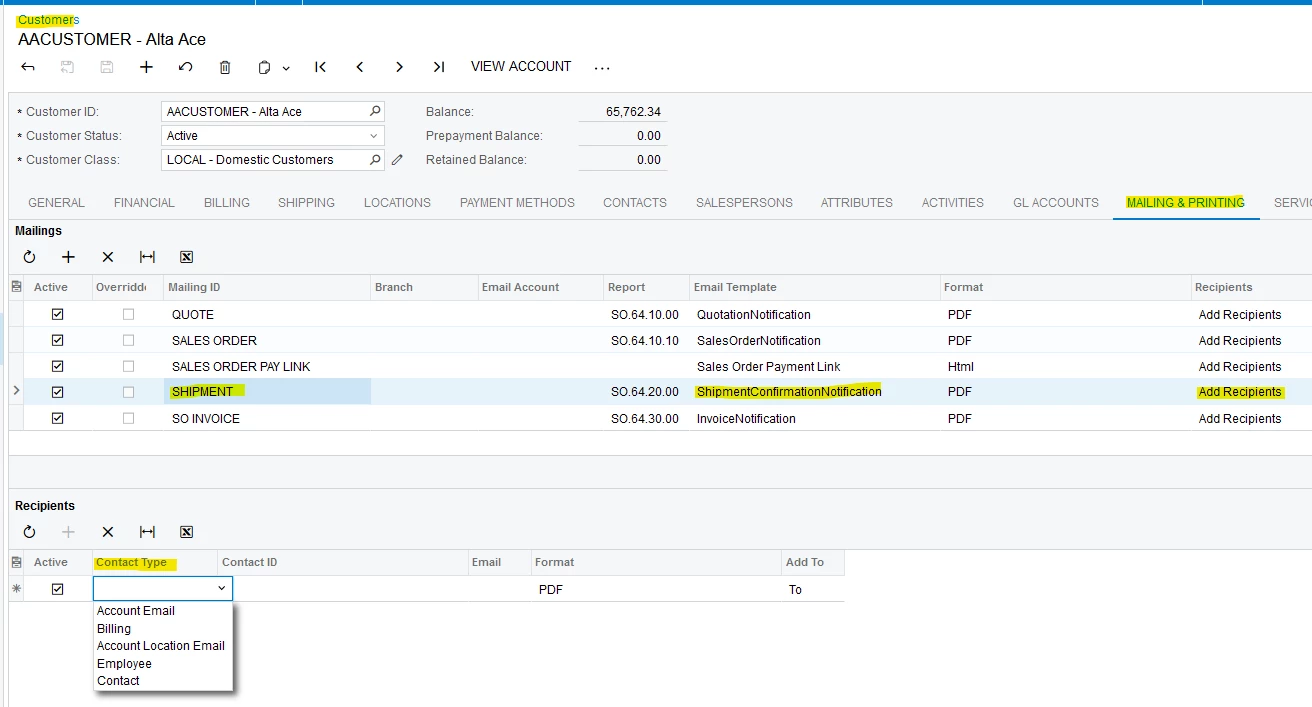
Did you already try the additional recipients that are available on Mailing tab of Customers profile screen?  Alas, I don’t see your first choice, email from Sales Order… but I do see Contact and hope the Contact listed in the header of your Sales Order could be accomplished with Contact option on the Mailings tab of the customers? I hope this idea helps you.

Laura


Forum|alt.badge.img
  • Author
  • Jr Varsity III
  • December 23, 2024

Laura,

I just took a look at that screen based on your suggestion.  I have not tested this to confirm,  but my understanding is that would allow me to define a “static” contact that always received the shipping notifications, and not a “dynamic” one based on which contact is selected on the sales order.     

Is my understanding of this functionality correct?  If so it, will not work for our use case as we need the contact to be dynamic based on which contact is selected on the sales order.   


Laura03
Captain II
Forum|alt.badge.img+19
  • Captain II
  • December 23, 2024

Yes, correct.  The setting on the customer will send to a specific contact, or billing contact, or default contact. It’s not exactly what you need but maybe could help for some customers.

If you decide to go with a customization, perhaps you could “piggyback” on the existing screen above to add Sales Order contact as an option.

Laura


Forum|alt.badge.img+1

Hello!


If you use the Sales Order screen ID (SO310000), then the notification template works


If the desired field can't be found to be added to the template, it's likely because that screen does not have access to that field. There are multiple reasons why this may happen


If I pick a payment and review it, I don't find a Bill-To contact anywhere. I do, however find a Sales Order:


If I review the Sales Order, I find a Bill-To Contact with an email address:


The Payment Information is also available from the Sales Order:


If that is where the information is that is required, then that is the screen that the email template must be associated with to retrieve the information (in this case, SO301000).


It can be seen here that the required fields are available to insert into this template:


If I then choose a sales order, and Print it:


Then click Send:


And Select Template:


And choose the template associated with the Sales order shown in the previous screenshot:


It can be seen that the template values populate:


If you are not using a Business Event, there is no need to create a custom GI


Manikanta Dhulipudi
Captain II
Forum|alt.badge.img+15

@MattWSM Check the below article about the settings