Answer

How to target specific bill type in GI results grid formula (e.g. "Bill" or "Debit Adj.")?

  • June 23, 2025
  • 2 replies
  • 53 views

Trying to show debit adjustments as negative values in my existing GI but I can’t figure out how to target them specifically. Below are the formulas I am attempting to use:


  • =IIF([APInvoice.DocType] = 'DebitAdj', -[APTran.CuryLineAmt], [APTran.CuryLineAmt])
  • =IIF([APInvoice.DocType] = 'Debit Adj.', -[APTran.CuryLineAmt], [APTran.CuryLineAmt])

Thanks
Best answer by mblassingame35

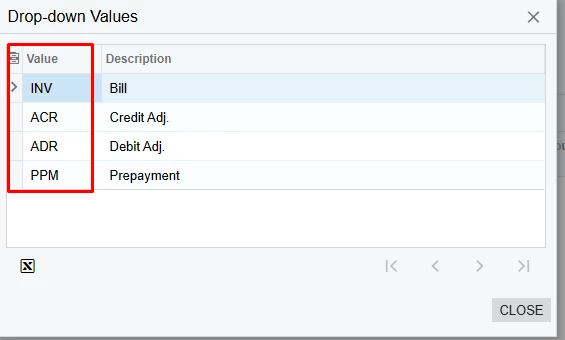
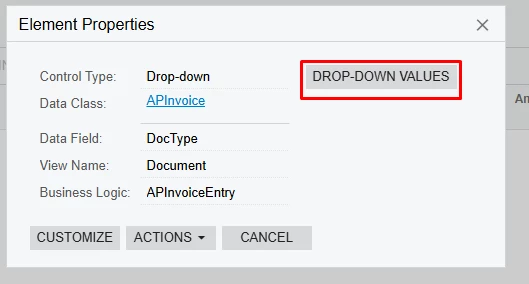
You need to use the Drop-Down Values and not ‘Debit Adj.’. 


I try to use a formula that will multiply the amount by -1. You can’t just put a “-” in front of it. It may not work if you are summing columns. 

2 replies

mblassingame35
Semi-Pro II
Forum|alt.badge.img+3
  • Semi-Pro II
  • Answer
  • June 23, 2025

You need to use the Drop-Down Values and not ‘Debit Adj.’. 


I try to use a formula that will multiply the amount by -1. You can’t just put a “-” in front of it. It may not work if you are summing columns. 


  • Author
  • Freshman I
  • June 24, 2025

Life saver! Thank you. Also, I was going to implement the “ * -1 ” but it worked perfectly fine with “ - ”