


Answer

Emailing reports weekly automatically with Financial Period parameters

  • May 29, 2025
  • 2 replies
  • 50 views

Forum|alt.badge.img

Hi community,


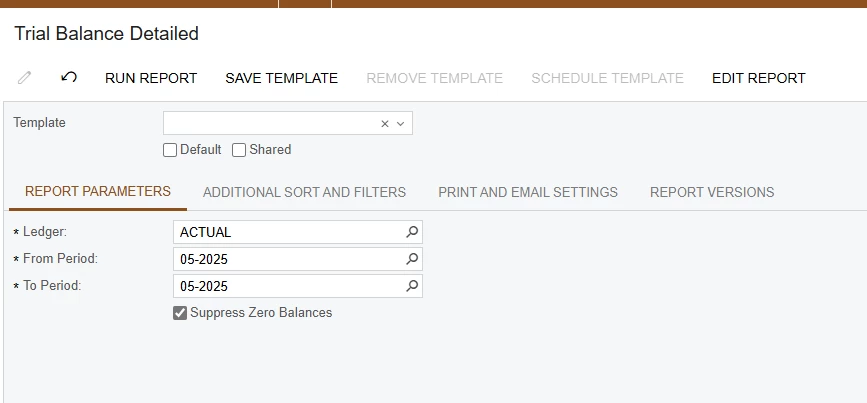
I am trying to setup a few financial reports to email weekly out of the system, and I know I need to save the template and then schedule the template. The issue I am running into are the financial period parameters.


Is there a way to set a template that dynamically pulls in the current financial period so that I can then put that template on a schedule? Otherwise, I don’t see a way around having to create a template for each period which wouldn’t work in the long run.
 

Thank you,

RJ

Best answer by rkenna

Hi Community,


I was able to figure this out. I created a new Screen ID for emailing purposes, and I saved the same report to that new Screen ID. This way the original report and version is untouched. From there, I made the parameters invisible in Report Designer, so I am able to save a template without designating the Financial Period. The Financial Period default still exists on the backend of the report. 

From there, I can create the schedule to email the report.

2 replies

Forum|alt.badge.img
  • Author
  • Captain I
  • Answer
  • May 30, 2025

Hi Community,


I was able to figure this out. I created a new Screen ID for emailing purposes, and I saved the same report to that new Screen ID. This way the original report and version is untouched. From there, I made the parameters invisible in Report Designer, so I am able to save a template without designating the Financial Period. The Financial Period default still exists on the backend of the report. 

From there, I can create the schedule to email the report.


Chris Hackett
Community Manager
Forum|alt.badge.img
  • Acumatica Community Manager
  • May 30, 2025

Thank you for sharing your solution with the community ​@rkenna!