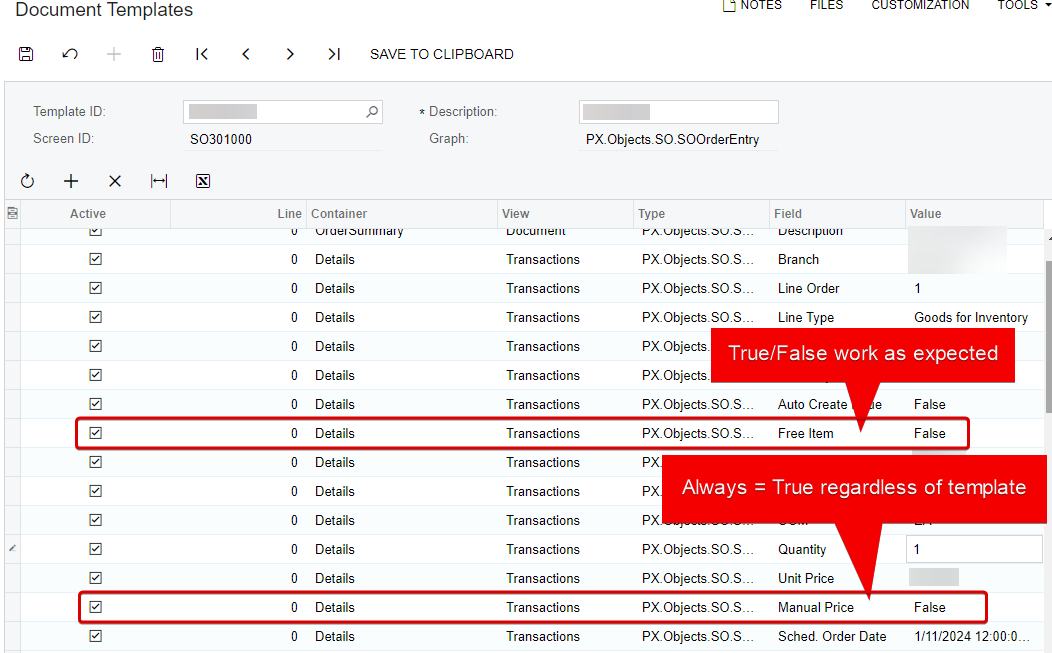
I created a template for adding specific line items to a sales order. When the line items are added, I want the Manual Price flag to be unchecked. I marked the manual price flag as False in the template. However, when the template is applied, the manual price checkbox is marked as true.
Best answer by variuxDavidE
Hi everyone,
I’ve made the GitHub repository for this fix public so the community can benefit from it. This solution addresses the issues with document templates and the Manual Price flag on Sales Orders, and it’s the first in a series of enhancements I’ll be releasing soon.
I’d love to hear your feedback or any issues you encounter with the package or its functionality. Your input will help make future enhancements even better!
@jinin It seems like your suggestion is what I was already doing. However, I tried again to validate. The Manual Price checkbox is ALWAYS true regardless of the values set in the template. I also tested the Free Item checkbox, and that one worked perfectly. It seems like this issue only affects the Manual Price checkbox.
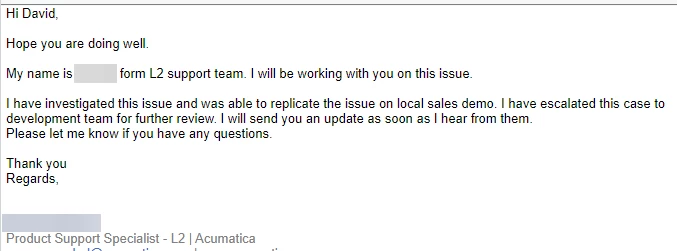
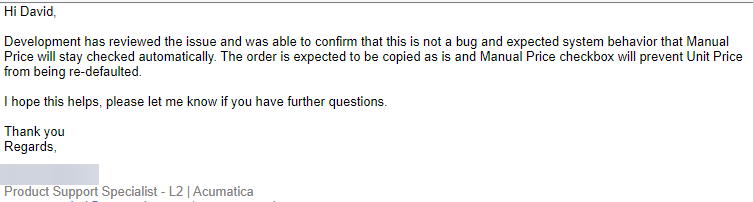
Hi @Chris Hackett I can confirm that support responded. However, according to these two emails it is “not a bug” with the statement.
Development has reviewed the issue and was able to confirm that this is not a bug and expected system behavior that Manual Price will stay checked automatically. The order is expected to be copied as is and Manual Price checkbox will prevent Unit Price from being re-defaulted.
See below:
I replied to the support agent today with the following
Thank you for the update. The true/false flag is clearly not working as expected. I am confused how this behavior is "expected behavior" when the template preferences are being overridden.
What is the proper way to get this escalated or reviewed as a bug?
While creating templates for adding line items to a sales order, it's important to understand that setting Manual Price to False just indicates that you want the system to automatically calculate the price based on the pricing setup, rather than manually entering it.
But if your system settings or configuration has been set up to always enable manual pricing by default on sales orders, then even if you set Manual Price to False in your template, it may still appear as True when you apply the template. This might be happening due to certain default settings or price classes that are set to manually adjust pricing.
I would suggest you to check your configuration and settings for any such defaults. If everything seems correct there, and you're still encountering this issue, it could be a bug. In such a case, it would be best to reach out to Acumatica support for further assistance.
Any update on this Case? I am running into the same issue! I want to just use the inventory ID in the template and then be able to automatically bring in that price on the inventory item. This allows for updates to happen to the item price and never have to update the templet.
Any update on this Case? I am running into the same issue! I want to just use the inventory ID in the template and then be able to automatically bring in that price on the inventory item. This allows for updates to happen to the item price and never have to update the templet.
Many thanks,
I can confirm the issue still persists on Acumatica Cloud ERP 2024 R1 Build 24.116.0026. We have to uncheck “Manual Price” after adding the item via Document Template
While creating templates for adding line items to a sales order, it's important to understand that setting Manual Price to False just indicates that you want the system to automatically calculate the price based on the pricing setup, rather than manually entering it.
But if your system settings or configuration has been set up to always enable manual pricing by default on sales orders, then even if you set Manual Price to False in your template, it may still appear as True when you apply the template. This might be happening due to certain default settings or price classes that are set to manually adjust pricing.
I would suggest you to check your configuration and settings for any such defaults. If everything seems correct there, and you're still encountering this issue, it could be a bug. In such a case, it would be best to reach out to Acumatica support for further assistance.
I spent time looking for settings that could be contributing to this. However, I didn’t find any. Did you have a specific setting/screen in mind? According to Acumatica support, this is working as designed (see my previous response from support).
We are trying to utilize it when creating a sales order. We wanted a shortcut to brining in specific inventory items into a sales order instead of having to look them up individually. We are trying to use the template to just bring in the inventory ID and the Project task that the item is mapped to.
@fkrug I had my dev team create an customization to force the expected behavior. This is an Alpha release, but if you would like access, I can invite you to the github to review. DM me.
Actually, I made a short demo video showing how it works. If anyone is interested to give it a try they can DM me or contact me at my email or LinkedIn:
I’ve made the GitHub repository for this fix public so the community can benefit from it. This solution addresses the issues with document templates and the Manual Price flag on Sales Orders, and it’s the first in a series of enhancements I’ll be releasing soon.
I’d love to hear your feedback or any issues you encounter with the package or its functionality. Your input will help make future enhancements even better!
I’ve made the GitHub repository for this fix public so the community can benefit from it. This solution addresses the issues with document templates and the Manual Price flag on Sales Orders, and it’s the first in a series of enhancements I’ll be releasing soon.
I’d love to hear your feedback or any issues you encounter with the package or its functionality. Your input will help make future enhancements even better!
Thank you, David
David, in my initial testing, this has worked just as you have shown it! Thank you for taking the time to develop something for this.