

If you’re comfortable with Generic Inquires , this is pretty easy to get access to
Join PX.Objects.AR.ARAddress to PX.Objects.AR.ARInvoice where ARinvoice.shipAddressID = ARAdress.addressID
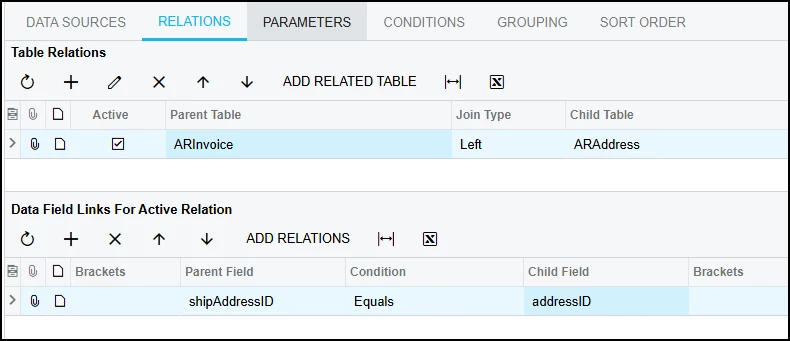
You could group by ARAddress.State or build a pivot table to summarize.
I will warn, we’ve noticed that despite states being a validated field, we still somehow end up with a few odd scenarios where a state name end up on the invoice instead of the abbreviation (i.e. California not CA)
@Tammy C it's pretty easy — you can create a custom GI for this. 1. Inspect the table for whichever data you want to show in the results 2. Add the tables you need — the key ones here are: • PX.Objects.AR.ARInvoice • PX.Objects.AR.ARAddress 3. Join both tables using Left Joins 4. Add the desired columns in the Result Grid tab 5. Set your filter conditions (DocType, Status, State, date range, etc.)
Once you save and run the inquiry, you can group by State to get the invoices broken out by ship-to state .and join both of them with left joins and add the desired result in the result grid
I will warn, we’ve noticed that despite states being a validated field, we still somehow end up with a few odd scenarios where a state name end up on the invoice instead of the abbreviation (i.e. California not CA)
If you group on state description, that usually solves the duplicate state problem.
I will warn, we’ve noticed that despite states being a validated field, we still somehow end up with a few odd scenarios where a state name end up on the invoice instead of the abbreviation (i.e. California not CA)
If you group on state description, that usually solves the duplicate state problem.
I haven’t bothered to track down the source, but I’m seeing the full name of the state in the state code field in ~1% of our transactions. This is likely coming from our eComm integration. On those transactions the state name (ARAdress.State_Description) is null, likely because the state code doesn’t match a state ID. When I try to add a pivot table to my report with state name as a row, they’re all null.
So, I’ve got it mostly fixed now using =IsNull([ARAddress.State_description],[ARAddress.State]). But then I still have a few oddballs that are coming with both ID and Description like this “GA -GEORGIA or MA - MASSACHUSETTS)
- For our needs, this isn’t an issue but there does seem to be some data issue here for us
@Tammy C - One thing important to note - You may want to exclude debit memos or credit write-offs. You’ll almost certainly want to reverse the totals of credit memos. For example, to get a document total amount, it looks like we used the following: =iif([ARInvoice.DocType]='CRM',-1*[ARInvoice.CuryOrigDocAmt],[ARInvoice.CuryOrigDocAmt])


