Answer

Cases: changing the default template for the 'create email' action

  • February 21, 2023
  • 16 replies
  • 934 views

peterj23
Freshman II
Forum|alt.badge.img

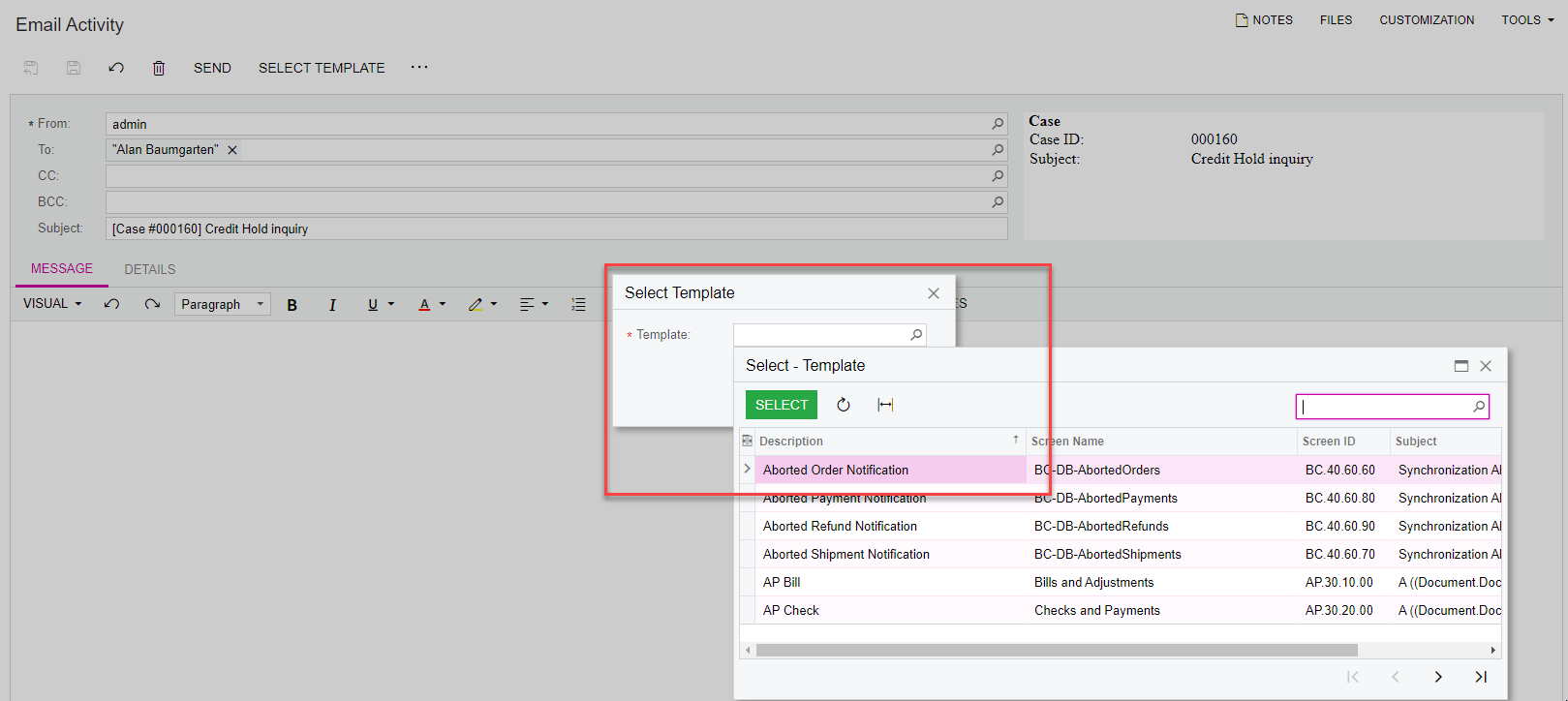
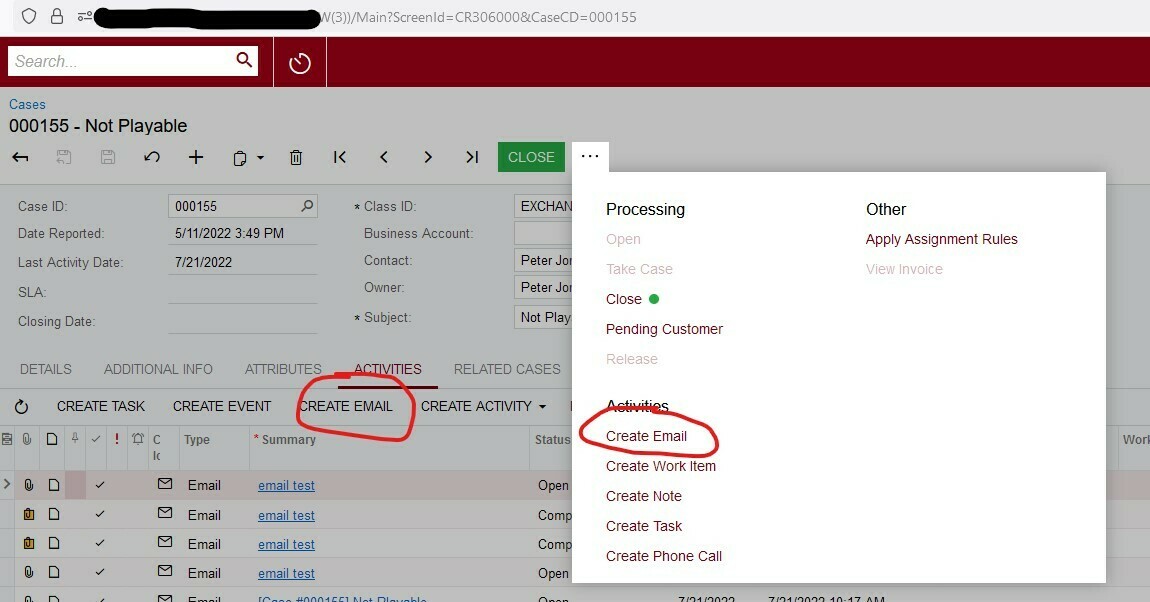
When working in cases, is it possible to change the default email template connected to the ‘create email’ action? (image below).


Thanks!
Pete


Best answer by Kandy Beatty

HI @peterj23 

You can change that under System Management> Email Templates.

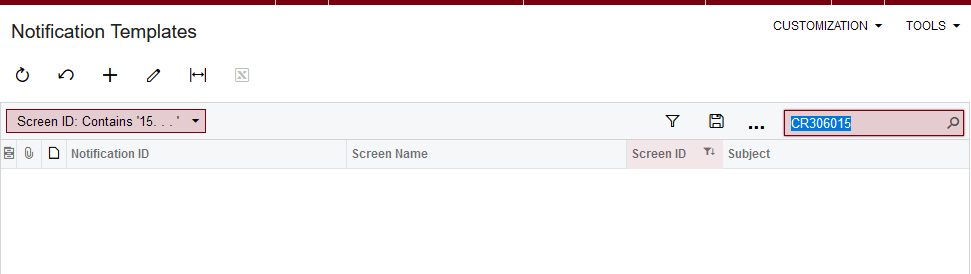
The Screen ID is CR306015
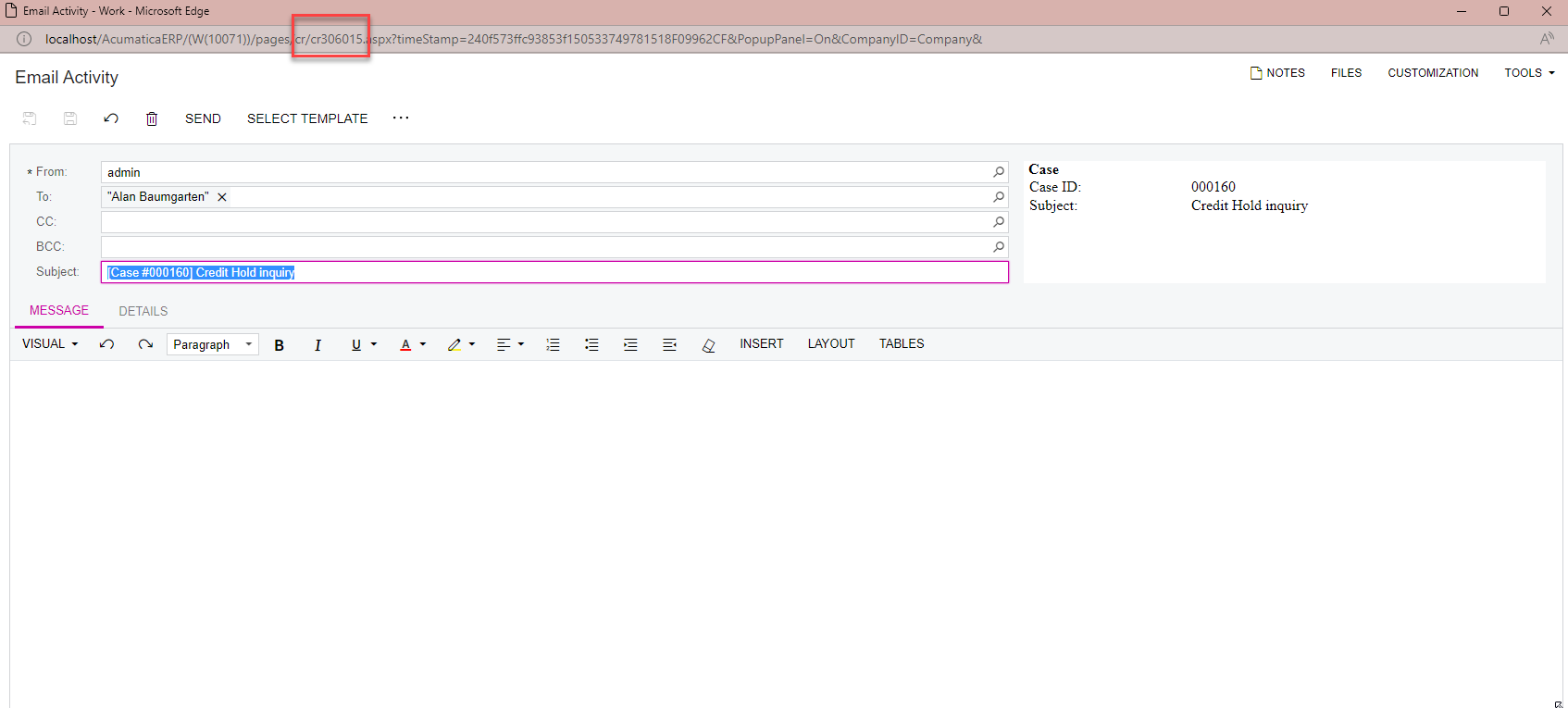
 

However, you can choose a different template for each email when you choose create email:


16 replies

Kandy Beatty
Captain II
Forum|alt.badge.img+17
  • Captain II
  • Answer
  • February 21, 2023

HI @peterj23 

You can change that under System Management> Email Templates.

The Screen ID is CR306015

 

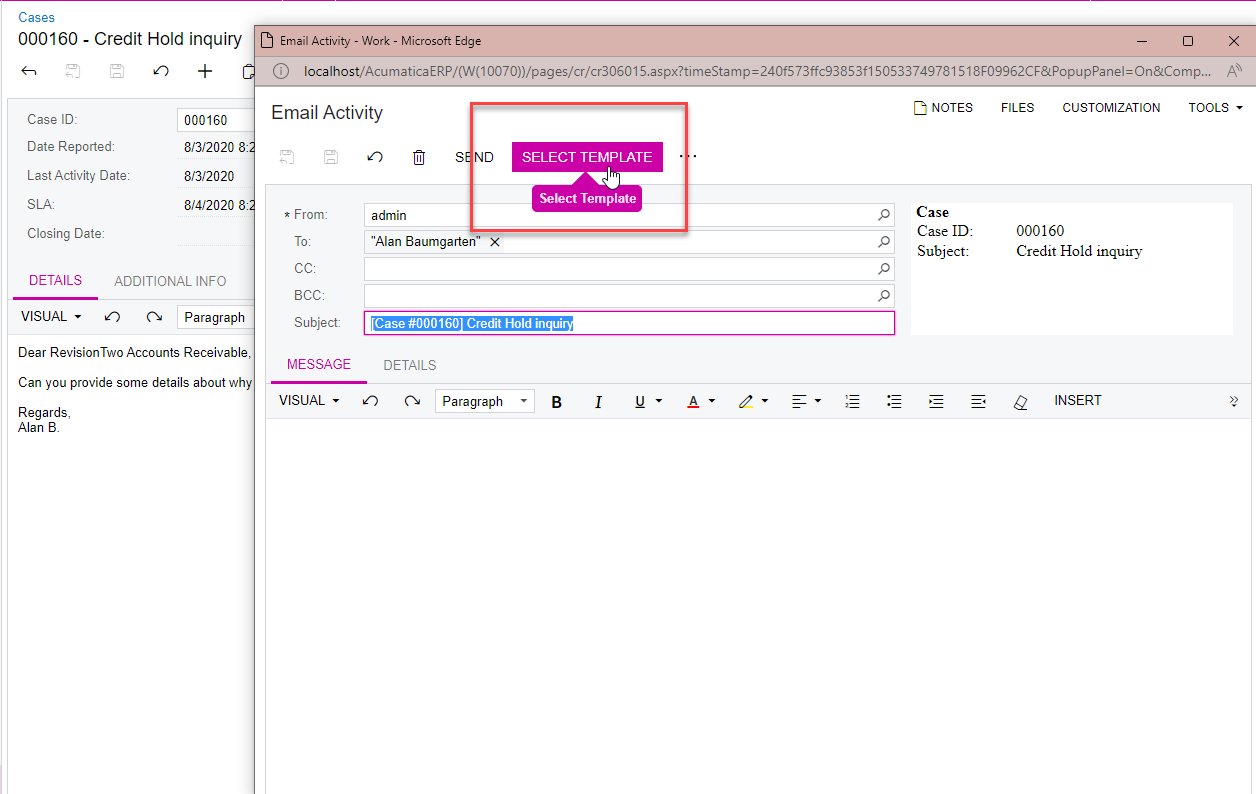
However, you can choose a different template for each email when you choose create email:


peterj23
Freshman II
Forum|alt.badge.img
  • Author
  • Freshman II
  • February 21, 2023

Hi @kandybeatty49, thanks for the reply!

I should’ve mentioned in the original post, but I already checked and couldn’t find a template associated with CR306015:

At the moment we are doing exactly as you suggested (changing the template manually for each email), but I’m hoping to eliminate this step. We use a single template for most of our case emails 


Kandy Beatty
Captain II
Forum|alt.badge.img+17
  • Captain II
  • February 21, 2023

Hi @peterj23 

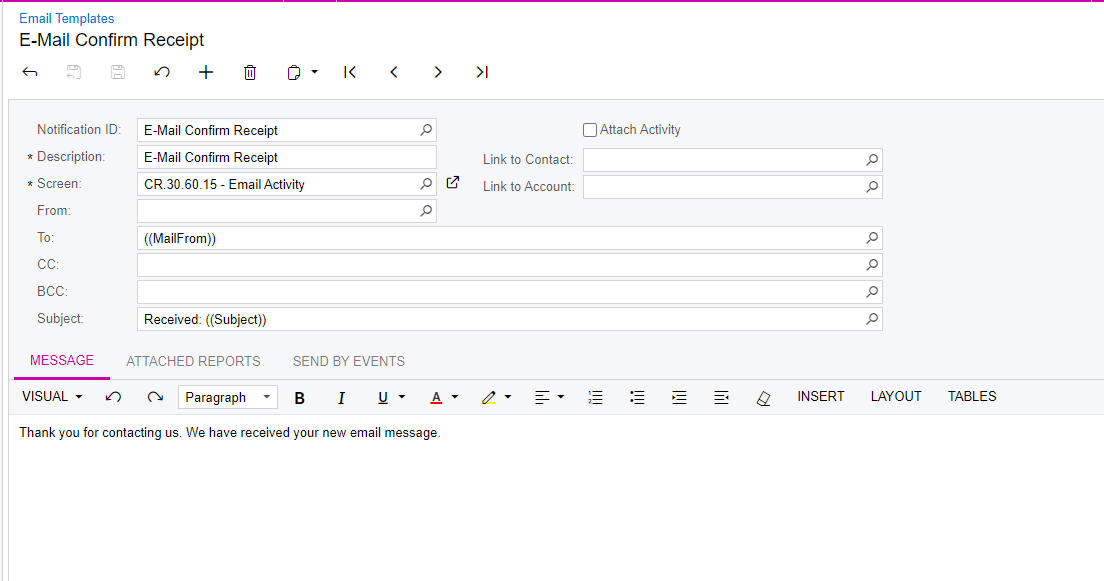
You could create one. Here is the one from the demo site:


peterj23
Freshman II
Forum|alt.badge.img
  • Author
  • Freshman II
  • February 21, 2023

Thanks so much for your @kandybeatty49, but unfortunately I couldn’t get it to work

I was able to create the new template, but I don’t know how to make it the default template for the ‘create’ email action.


Kandy Beatty
Captain II
Forum|alt.badge.img+17
  • Captain II
  • February 21, 2023

Hi @peterj23 

In the CRM module, I do not know of where you can make a default. The system wants to allow for templates so that various case templates can be used. 


Forum|alt.badge.img
  • Varsity I
  • February 9, 2024

Hi @peterj23 

In the CRM module, I do not know of where you can make a default. The system wants to allow for templates so that various case templates can be used. 

I believe this is the actual answer for the original question. There doesn’t seem to be a way to make a default email template for the Create Email action from Cases. Not the answer I was hoping for, but seems like the answer...


K2a
Jr Varsity III
Forum|alt.badge.img
  • Jr Varsity III
  • February 13, 2024

Hi @peterj23 

In the CRM module, I do not know of where you can make a default. The system wants to allow for templates so that various case templates can be used. 

I believe this is the actual answer for the original question. There doesn’t seem to be a way to make a default email template for the Create Email action from Cases. Not the answer I was hoping for, but seems like the answer...


Do we know how to change the default email template for any processes?  I’d like to modify the ShipmentConfirmation….


  • Freshman I
  • March 26, 2025

I have edited the email template: ShipmentConfirmationNotification.

But when I go to print and SEND a shipment confirmation, a generic, basic email template appears, not the one I edited. I have to select the template I edited for every shipment confirmation.

And I cannot determine what template is showing up when I choose SEND.

I would like to find the default email template that appears when I print and send a shipment confirmation.


jfbrut91
Jr Varsity II
Forum|alt.badge.img
  • Jr Varsity II
  • April 9, 2025

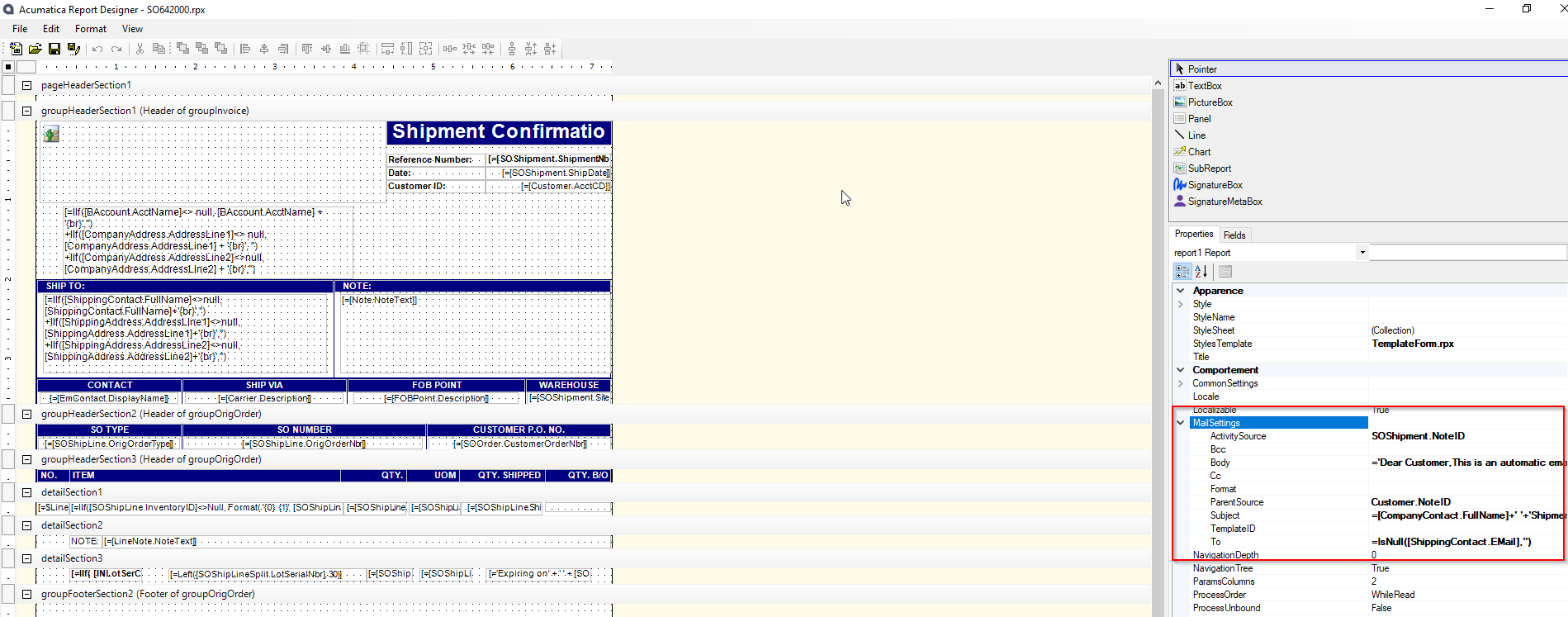
Hello ​@TomValerio , when you print and send a report, like shipment confirmation, the email template is available in the report. 

You should open the report in the report designer, in the MailSettings tab. By default, the mail body and other parameters are hard-coded, but you can enter a mail template in TemplateID


  hope this helps


  • Freshman I
  • April 26, 2025

Hello, JfBrut! I apologize for the delay in responding. I believe your guidance is precisely what I need.

I work for a small company—nine months into Acumatica, graduating from a DOS-style system. The learning curve has been steep.

I hope to report back with happy results after I spend more time understanding the Report Designer and gaining the necessary confidence to proceed.

Tom


jfbrut91
Jr Varsity II
Forum|alt.badge.img
  • Jr Varsity II
  • April 27, 2025

Hello ​@TomValerio 

I'm delighted to be able to help you, so please don't hesitate to contact me if you need any further information.


  • Freshman I
  • April 27, 2025

Well, I made some progress, JfBrut! I entered ShipmentConfirmationNotification as the email TemplateID to good effect.

But I saved to the server a new report that I would like to delete and don’t know how. (The junkie report probably isn’t doing any harm. It’s just an embarrassing artifact of my beginner’s status.

More importantly, I would like to add the email address of the default salesperson in the Cc: field in the ShipmentConfirmationNotification email, but it does not seem to be available to add in the Report Designer. The salesperson is specified on the Sales Order but not the email address, and the salesperson is nowhere on the Shipment Confirmation. And the best I can do is have the SalesPersonID, using =[SOOrder.SalesPersonID] which isn’t an email address but at least indicates whose email I should manually enter.

I’m so grateful for your assistance.

Tom


jfbrut91
Jr Varsity II
Forum|alt.badge.img
  • Jr Varsity II
  • April 28, 2025

Hello ​@TomValerio 

Hello Tom
for the first question, you can delete the sitemap report but it won't remove it from the database. Acumatica is not very well equipped with data purging tools in general.

If you have access to the server, you can remove the rpx file in the ReportsDefault or ReportsCustomized folder.

for the second question, Salesperson Email is not present in the notification data source, but you can work around this in the report.

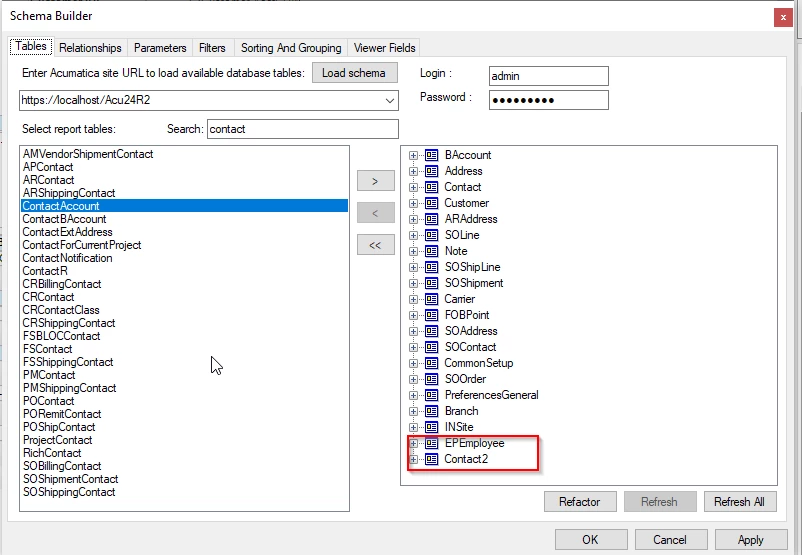
in the build schema of the report, add this DAC: EPEmployee and Contact2


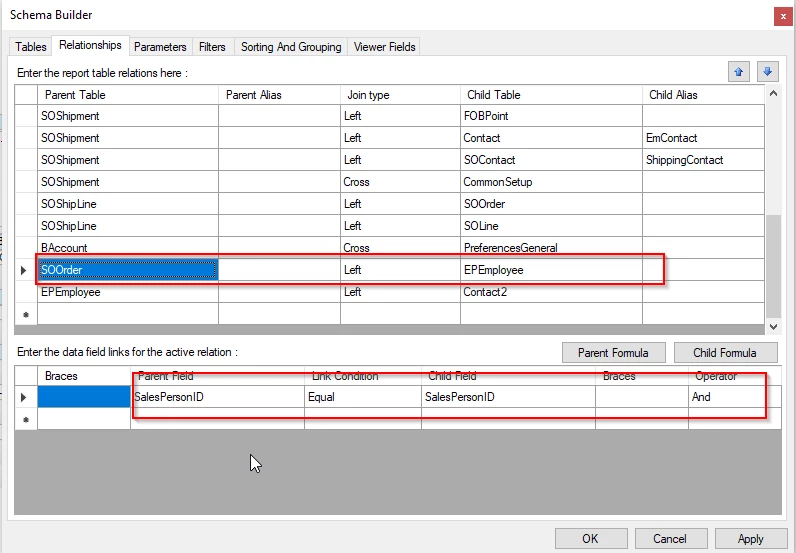
For relationships, link SOORder and EPEmployee by SalespersonID Fields

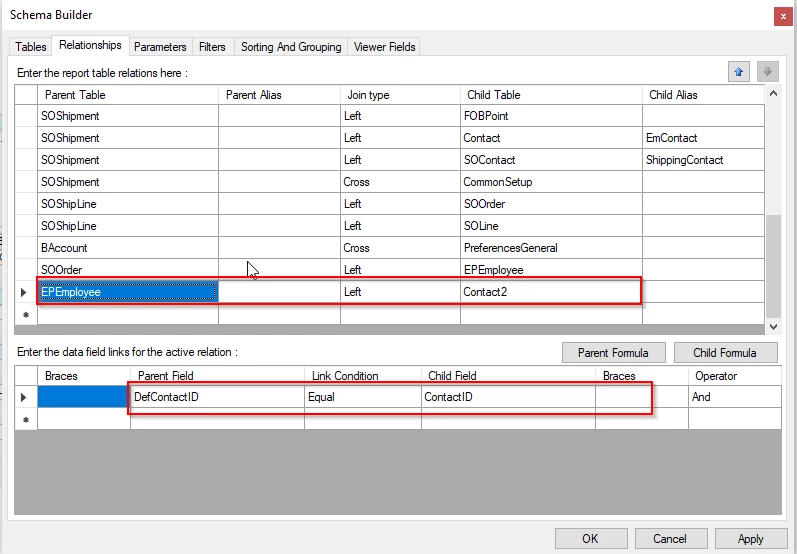
for EPEmployee and Contact2, you use DefcontactID equal ContactID


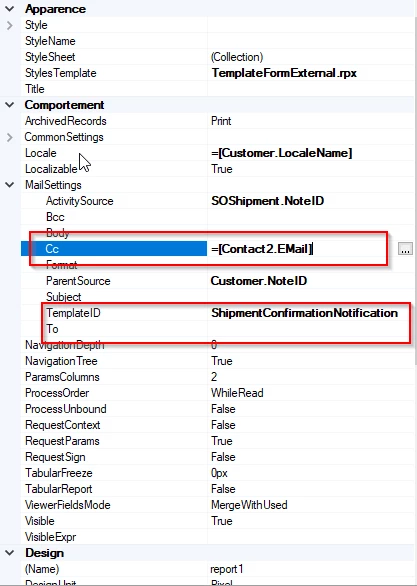
you can use this field: =[Contact2.EMail] in the report as the salesperson's e-mail

Be careful, the information in the report overwrites that in the mail template, so if you have put recipients in the To field of the mail template, I advise you to put =[Contact2.EMail] in the Cc field of the report.


  • Freshman I
  • April 29, 2025

I’ll have to take it a little slower than you are providing, JfBrut!

I’m not that far along or confident. But you are definitely addressing my concerns.

Thank you!

Tom


  • Freshman I
  • June 19, 2025

JfBrut,

I’m thrilled to report that I have made much progress and successfully implemented the instructions you provided.

I grew much more confident after studying the S150 Report Designer 2025 R1 course.

Thanks again for your guidance and screen shots!

Tom


jfbrut91
Jr Varsity II
Forum|alt.badge.img
  • Jr Varsity II
  • June 20, 2025

@TomValerio , it's always a pleasure to help members of the community.

Have a good day

JF