Answer

Business Event triggered Email Notification Lags up to 24 Hours

  • November 17, 2025
  • 4 replies
  • 45 views

nickcerri32
Jr Varsity III
Forum|alt.badge.img+1

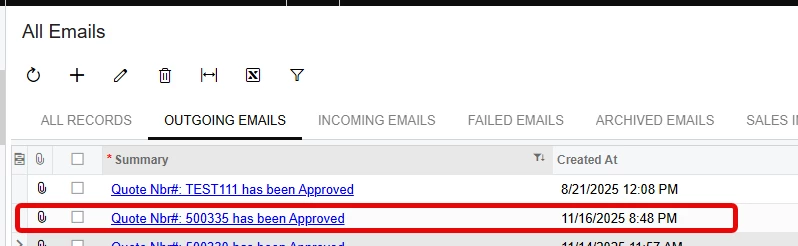
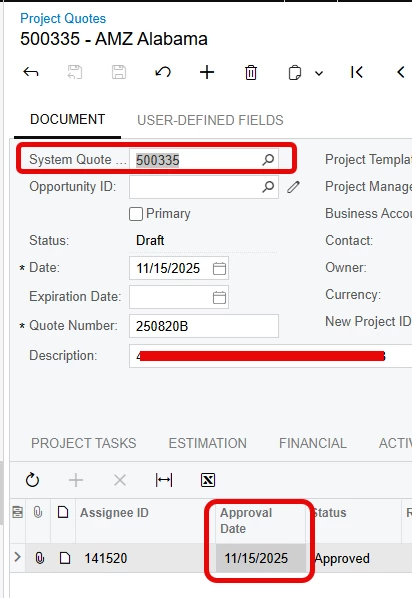
Hey, gang - I put together a business event for a client that triggers an email whenever a Project Quote is approved or rejected.  The client has mentioned that the corresponding email is not being sent for up to 24 hours after the document was approved. I’ve confirmed this below.  
 

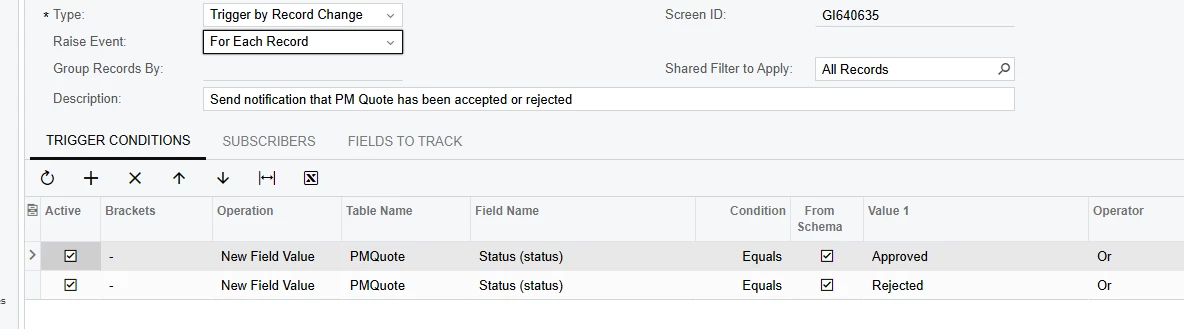
The business event triggers based on the Status changing to Approved or Rejected.  The Send and Receive Email process runs every 2 minutes.  The BE is based off of a very simple GI that pulls 4 fields from the PMQuote dac (QuoteNbr, Status, OwnerID, and Subject).  


Does this sound like a configuration issue or something I need to escalate as a case?

Best answer by bwhite49

Could you have some business events that might be consuming the queue? If there are business events that process 400 records every minute, then it’s likely you have a queue that is backed up. Acumatica will only process so many import scenarios and emails a minute and if that queue builds up, it could take a half a day to catch up to allow for any new items.

I would review to see if you have any BE’s that process a large list and try to slow those down.

4 replies

nickcerri32
Jr Varsity III
Forum|alt.badge.img+1
  • Author
  • Jr Varsity III
  • November 17, 2025

For some further information, the GI triggers instantly, but the Business Event doesn’t recognize the change right away.  How frequently is the system looking for a record change tied to a business event?  That seems to be the issue here.  


bwhite49
Captain II
Forum|alt.badge.img+10
  • Captain II
  • Answer
  • November 17, 2025

Could you have some business events that might be consuming the queue? If there are business events that process 400 records every minute, then it’s likely you have a queue that is backed up. Acumatica will only process so many import scenarios and emails a minute and if that queue builds up, it could take a half a day to catch up to allow for any new items.

I would review to see if you have any BE’s that process a large list and try to slow those down.


nickcerri32
Jr Varsity III
Forum|alt.badge.img+1
  • Author
  • Jr Varsity III
  • November 17, 2025

@bwhite49 - Thanks for the idea!  As it turns out, there happen to be 3 other business events that are processing at very high volumes and I’m not sure how.  I’ll see if suspending them for the time being has any impact.  


nickcerri32
Jr Varsity III
Forum|alt.badge.img+1
  • Author
  • Jr Varsity III
  • November 18, 2025

@bwhite49 So suspending the other business events did positively impact this business event, and the lag is now gone.  Thank you!