Answer

Business Event - Multiple Records per email notification

  • September 10, 2025
  • 4 replies
  • 85 views

Forum|alt.badge.img+1

Hi -

We need the functionality to send a business event email that contains a group of records from a GI, rather than separate emails for each records. This has come up in multiple scenarios, and it seems the only option is to create a custom report to attach to the email, or just send a generic email with a hyper link to a GI. This functionality is highly needed - we have consulted with our strategic partner and have been told it is not possible. Here are a couple of current scenarios, but I could see multiple areas this functionality would be necessary:

  1. Email that contains all purchase orders or purchased items that are more than 5 days late in arriving. Email would contain a list of each item with its description, project and promised date with a hyperlink to corresponding order.
  2. AP Approval emails - our employees are getting bombarded with many approval emails in a day. A more sustainable solution would be 1 single email daily with a summary of each item to be approved.

Best answer by leahcarpenito

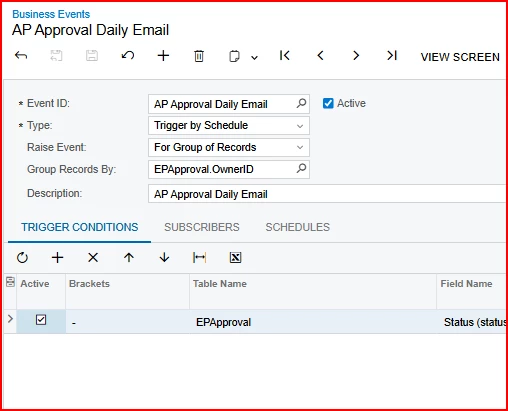
All, with the help of another Acumatica community post, I was able to solve for having multiple records in a business event email notification: 


4 replies

Forum|alt.badge.img+1
  • Author
  • Jr Varsity II
  • Answer
  • September 11, 2025

All, with the help of another Acumatica community post, I was able to solve for having multiple records in a business event email notification: 


Forum|alt.badge.img
  • Jr Varsity III
  • September 24, 2025

All, with the help of another Acumatica community post, I was able to solve for having multiple records in a business event email notification: 


Leah,

Did you create an event per employee for only their approvals or does the list include all employees? 

We’ve got a similar situation but only want to include those approvals that are relevant to the employee in question.  We are working on figuring out that piece and I’d hate to have to create an event per employee since there are so many!

Thanks,

Rena


Forum|alt.badge.img+1
  • Author
  • Jr Varsity II
  • September 25, 2025

Hi Rena -

No, I was able to do one business event.  I think there are three things you will need here. 

  1. A GI that has ALL company approvals in one master list.
  2. Create an Email Template that goes to the Approval Owner ID
  3. Create the Business Event referencing the GI screen from Step 1. Then make sure it group Records by Approval OwnerID. Doing this got the system to send separate emails to our employees and only include their approval lists.

Hope this helps!


Forum|alt.badge.img
  • Jr Varsity III
  • September 25, 2025

Hi Rena -

No, I was able to do one business event.  I think there are three things you will need here. 

  1. A GI that has ALL company approvals in one master list.
  2. Create an Email Template that goes to the Approval Owner ID
  3. Create the Business Event referencing the GI screen from Step 1. Then make sure it group Records by Approval OwnerID. Doing this got the system to send separate emails to our employees and only include their approval lists.

Hope this helps!


That worked!  Thanks so much!