

Hi Team,
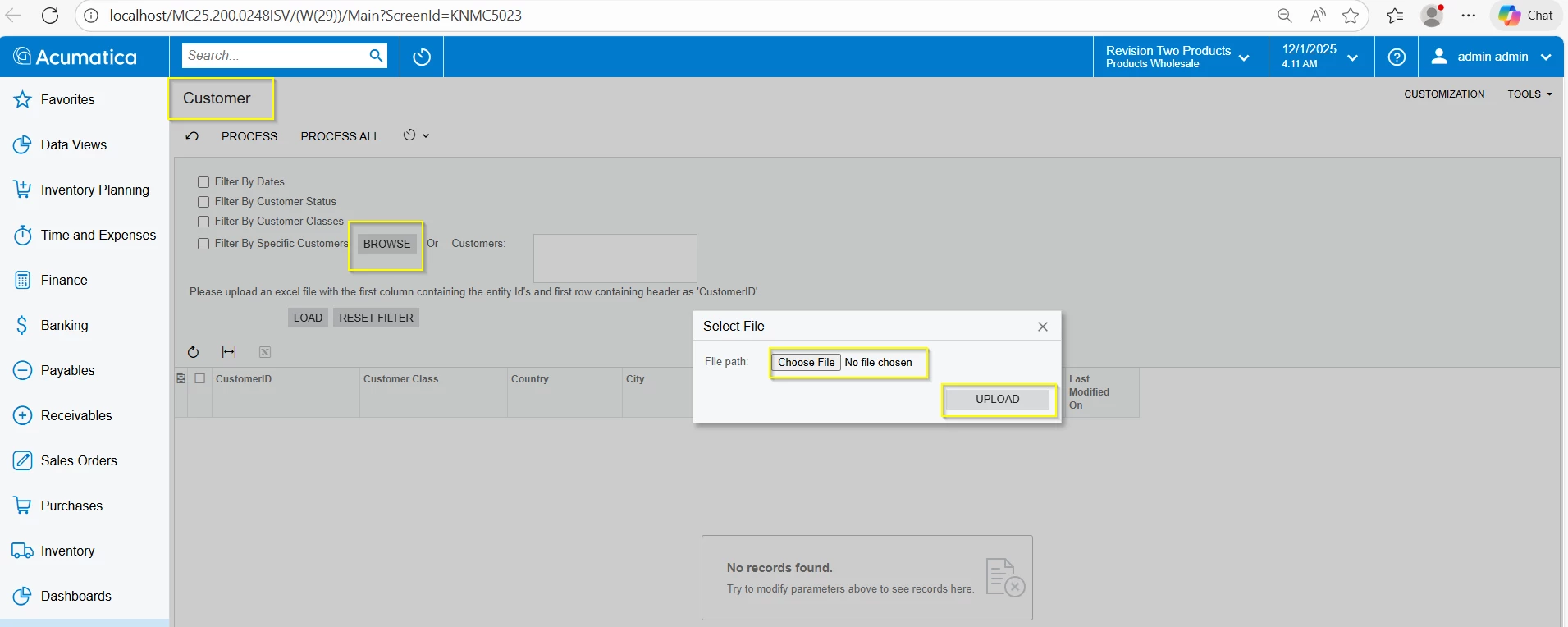
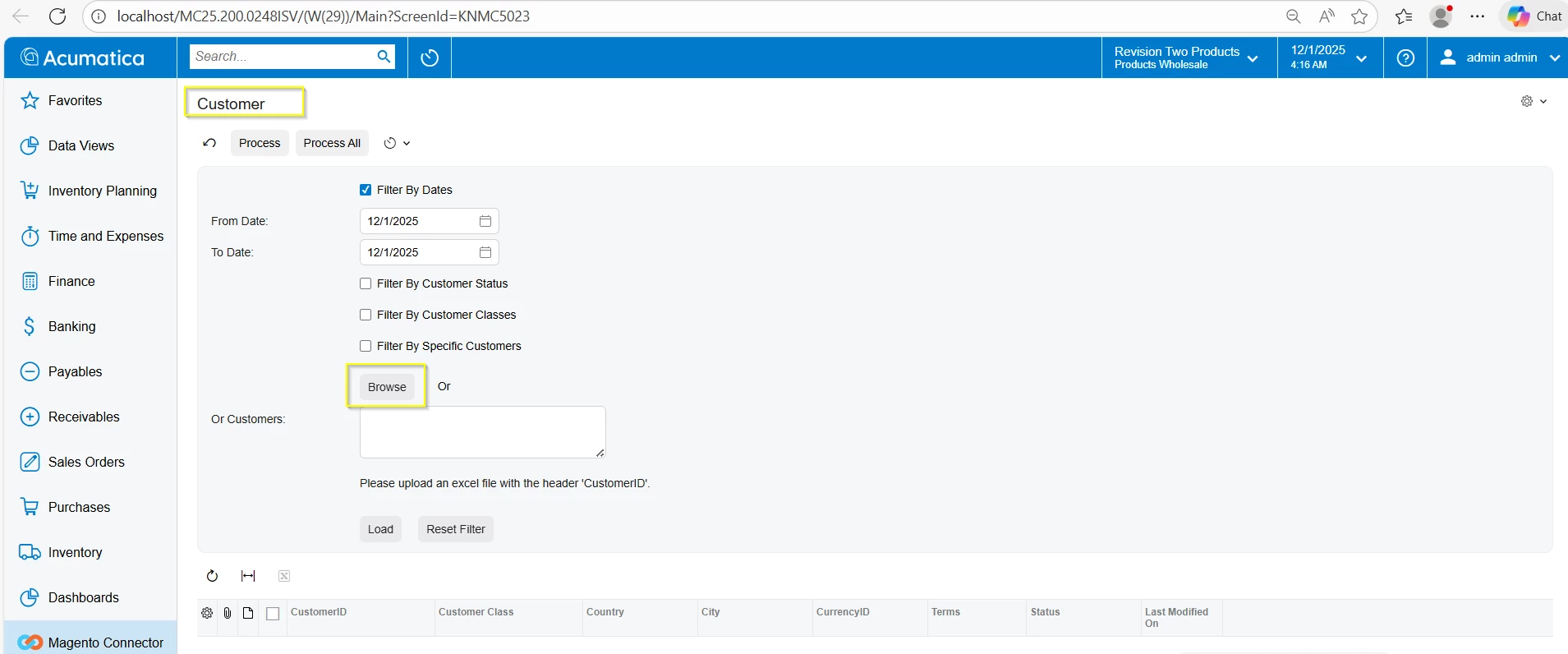
We have encountered an issue with the Browse button in the custom screens. The button is not functioning in the Modern UI. In the Modern UI, it should allow us to upload the file in the same way as it works in the Classic UI.
Please refer to the attached screenshots and files.
Screenshot 1: Customer screens Classic UI
Screenshot 2: Customer screen Modern UI:
We are using the following HTML, TypeScript, and Views files in the Modern UI:
KNMC5023.html
<template>
<!-- Upload Dialog -->
<qp-upload-dialog
id="UploadPackageDlg"
key="UploadPackagePanel"
session-key="KNMC5023_UploadPackage"
caption="Select File"
allowed-types=".xlsx">
</qp-upload-dialog>
<!-- Filter Section -->
<qp-fieldset id="Filter_form00"
wg-container="Filter_form"
view.bind="Filter"
class="label-size-sm">
<!-- Filter by Dates -->
<field name="FilterByDates" caption="Filter By Dates" control-type="qp-check-box"></field>
<field name="FromDate" caption="From Date:" class="col-6"></field>
<field name="ToDate" caption="To Date:" class="col-6"></field>
<!-- Filter by Customer Status -->
<field name="FilterByCustomerStatus" caption="Filter By Customer Status" control-type="qp-check-box"></field>
<field name="CustomerStatus" caption="Customer Status:" class="control-size-l"></field>
<!-- Filter by Customer Classes -->
<field name="FilterByCustomerClasses" caption="Filter By Customer Classes" control-type="qp-check-box"></field>
<field name="CustomerClasses" caption="Customer Classes:" class="control-size-l"></field>
<!-- Filter by Specific Customers -->
<field name="FilterBySpecificCustomers" caption="Filter By Specific Customers" control-type="qp-check-box"></field>
<!-- Browse Button Row -->
<field name="BrowseButton" unbound>
<div style="display:flex; gap:20px; margin-top:10px; align-items:center;">
<qp-button id="btnBrowse"
caption="Browse"
state.bind="Browse"
wg-name="BROWSE"
config.bind="{ popupPanel: 'UploadPackagePanel' }"
class="control-size-xs"
style="width:140px;">
</qp-button>
<span style="margin-left:8px; line-height:2.5;">Or</span>
</div>
</field>
<field name="CustomerFilter" caption="Or Customers:" class="control-size-l"></field>
<field name="InstructionLabel" unbound>
<qp-label id="PXLabel1"
caption="Please upload an excel file with the header 'CustomerID'."
style="margin-top:8px; margin-bottom:8px; display:block;">
</qp-label>
</field>
<!-- Action Buttons -->
<field name="ActionButtons" unbound>
<div style="display:flex; gap:20px; margin-top:10px;">
<qp-button id="btnLoad" caption="Load" state.bind="LoadRecords"
class="control-size-xs" style="width:120px;"></qp-button>
<qp-button id="btnResetFilter" caption="Reset Filter" state.bind="ResetFilter"
class="control-size-xs" style="width:140px;"></qp-button>
</div>
</field>
</qp-fieldset>
<qp-grid id="PXGrid1"
batchUpdate="True"
view.bind="BulkCustomerSync"
wg-container="BulkCustomerSync_BulkCustomerSync"
allowDelete="False" allowInsert="False" allowSelectAll="True">
</qp-grid>
</template>
KNMC5023.ts
import { PXScreen, graphInfo, PXActionState, viewInfo, actionConfig } from "client-controls";
import { createCollection, createSingle } from "client-controls";
import { KNMCBulkSyncFilter, KNMCBulkCustomerDetails } from "./views";
@graphInfo({
graphType: "KNMagentoConnector.KNMCBulkCustomerSyncProcess",
primaryView: "Filter"
})
export class KNMC5023 extends PXScreen {
@actionConfig({})
Browse: PXActionState;
@actionConfig({})
LoadRecords: PXActionState;
@actionConfig({})
ResetFilter: PXActionState;
@viewInfo({ containerName: "Selection" })
Filter = createSingle(KNMCBulkSyncFilter);
BulkCustomerSync = createCollection(KNMCBulkCustomerDetails);
}
views.ts
import { PXView, PXFieldState, gridConfig, treeConfig, fieldConfig, controlConfig, actionConfig, headerDescription, ICurrencyInfo, disabled, PXFieldOptions, linkCommand, columnConfig, GridColumnShowHideMode, GridColumnType, PXActionState, TextAlign, GridPreset, GridFilterBarVisibility, GridFastFilterVisibility, ISelectorControlConfig, ControlParameter } from "client-controls";
import { KNMC5023 } from "./KNMC5023";
// Views
export class KNMCBulkSyncFilter extends PXView {
FilterByDates : PXFieldState<PXFieldOptions.CommitChanges>;
FromDate : PXFieldState<PXFieldOptions.CommitChanges>;
ToDate : PXFieldState<PXFieldOptions.CommitChanges>;
FilterByCustomerStatus : PXFieldState<PXFieldOptions.CommitChanges>;
CustomerStatus : PXFieldState<PXFieldOptions.CommitChanges>;
FilterByCustomerClasses : PXFieldState<PXFieldOptions.CommitChanges>;
CustomerClasses : PXFieldState<PXFieldOptions.CommitChanges>;
FilterBySpecificCustomers : PXFieldState<PXFieldOptions.CommitChanges>;
@controlConfig({ rows: 3 })
CustomerFilter : PXFieldState<PXFieldOptions.Multiline | PXFieldOptions.CommitChanges>;
}
@gridConfig({
syncPosition: true,
allowDelete : false,
allowInsert: false,
showFastFilter: GridFastFilterVisibility.False,
preset: GridPreset.Details
})
export class KNMCBulkCustomerDetails extends PXView {
@columnConfig({allowNull: false, width: 30, allowCheckAll: true}) Selected : PXFieldState;
@columnConfig({width: 180}) CustomerID : PXFieldState<PXFieldOptions.CommitChanges>;
CustomerClassID : PXFieldState<PXFieldOptions.CommitChanges>;
Country : PXFieldState<PXFieldOptions.CommitChanges>;
City : PXFieldState<PXFieldOptions.CommitChanges>;
CurrencyID : PXFieldState<PXFieldOptions.CommitChanges>;
Terms : PXFieldState<PXFieldOptions.CommitChanges>;
Status : PXFieldState<PXFieldOptions.CommitChanges>;
LastModifiedDateTime : PXFieldState;
}
In the UI, the Browse button behavior is displaying as shown above screenshot2 .
Please suggest a solution so that the Browse button works the same way as it does in the Classic UI.
Thanks in Advance


