Question

Biz event to alert if the case is pending for more days

  • March 5, 2026
  • 6 replies
  • 44 views

Forum|alt.badge.img

Hello,

I have a requirement where if a case lies under Pending Customer status for more than 2 days it should trigger an alert to the Case Owner. How can I set this up in Acumatica?

6 replies

  • Freshman II
  • March 6, 2026

Go to System Management → Business Events, Click + to create a new Business Event

 Screen ID: Select the Case screen (CR306000)

Event Type: Choose "Record Change"

Trigger Conditions:

Status = "Pending Customer"

Add a condition using DateDiff function: DateDiff(Today,LastModifiedDateTime)>2

Configure it to run daily.


Forum|alt.badge.img+3
  • Jr Varsity II
  • March 6, 2026

Hi ​@Harry ,

  • Create a Generic Inquiry on CRCase filtering records where Status = Pending Customer and CreatedDateTime < Today() - 2 days.

  • Create an Email Template in System Management → Email Templates for the case alert.

  • Create a Business Event (Type: Scheduled, Source: the Generic Inquiry).

  • Add an Email subscriber using the template and send it to the Case Owner, then activate the Business Event.

Hope above helps!!


Forum|alt.badge.img
  • Author
  • Semi-Pro II
  • March 6, 2026

Hi ​@Rakshanda , ​@Meri36 ,
Thank you for your prompt responses. However my scenario is that the case would be changed manually to Pending Customer status from New to Open to In Process and when the end user would be waiting for a response from the Customer at that point of time the case’s status would be changes to Pending Customer.

  1. The CreatedDateTime records the Date & Time when the Case ID was created, which wont fulfill my condition.
  2. The Last Modified Date Time records not only the Status but also even if a minor modification would be made in the case screen it will be recorded under this field which would also not fulfill my requirement.

shushanna34
Jr Varsity I
Forum|alt.badge.img
  • Jr Varsity I
  • March 6, 2026

Hi ​@Harry ! You are completely right that both CreatedDateTime and Last Modified Date Time  will not work for your specific scenario because minor saves to the record will continuously reset the timer.

Here is how you can configure your Generic Inquiry to trigger the Business Event:
Please Create GI on CRCase
On the Conditions tab, set up the following filters using date-relative parameters
Status = Pending Customer
StatusDate < @Today - 2

Use this GI as the source for a Scheduled Business Event set to run daily.


Forum|alt.badge.img
  • Varsity I
  • March 6, 2026

Hi ​@Rakshanda , ​@Meri36 ,
Thank you for your prompt responses. However my scenario is that the case would be changed manually to Pending Customer status from New to Open to In Process and when the end user would be waiting for a response from the Customer at that point of time the case’s status would be changes to Pending Customer.

  1. The CreatedDateTime records the Date & Time when the Case ID was created, which wont fulfill my condition.
  2. The Last Modified Date Time records not only the Status but also even if a minor modification would be made in the case screen it will be recorded under this field which would also not fulfill my requirement.

You could turn on field level audit for the Case Status field. Then you could base your business event GI on the AuditHistory DAC. As long as you aren’t tracking other fields in the CRCase DAC, you should be good to use the AuditHistory.ChangeDate to track how long a case is Pending Customer. 


MissyMain41
Jr Varsity I
Forum|alt.badge.img
  • Jr Varsity I
  • March 6, 2026

Lots of fellow business event/automation lovers out here :) nice to see a new thread get so much attention haha. 
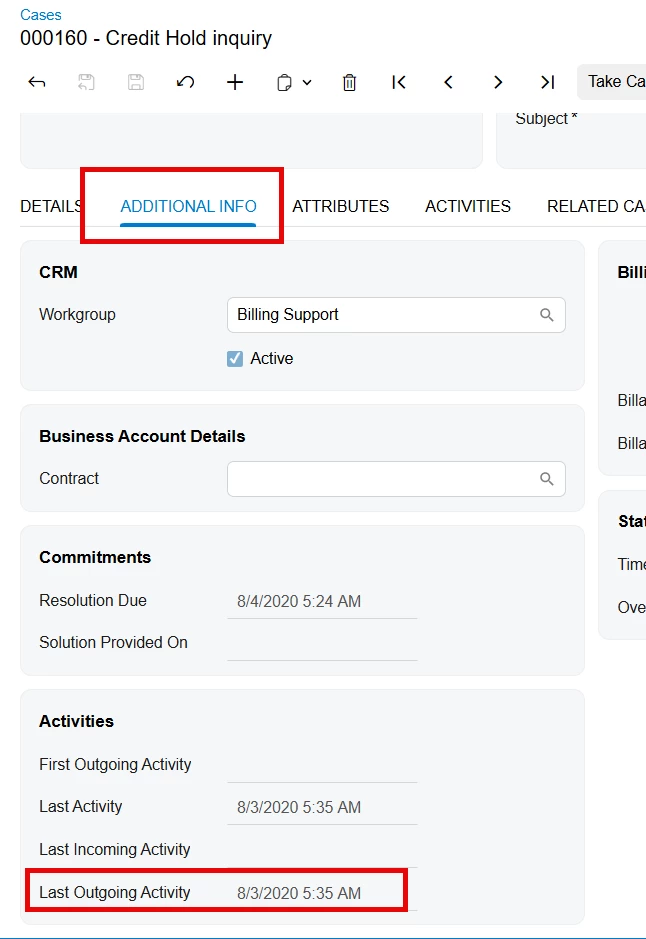
I’m just going to add my idea here as well -- If the user handling the case is to send an email to the client letting them know they are waiting for a response from the customer, then perhaps the field on “additional information” tab of the “last outgoing activity” could be used.