

Answer

AP Bill Incoming Document Mapping

  • June 23, 2025
  • 2 replies
  • 100 views

After getting our hands on AP Documents from PDFs: Detail Mapping, we may have made some small progress with the OCR on our invoices.  However, we are stuck on one quirk. 

Regarding detail lines:

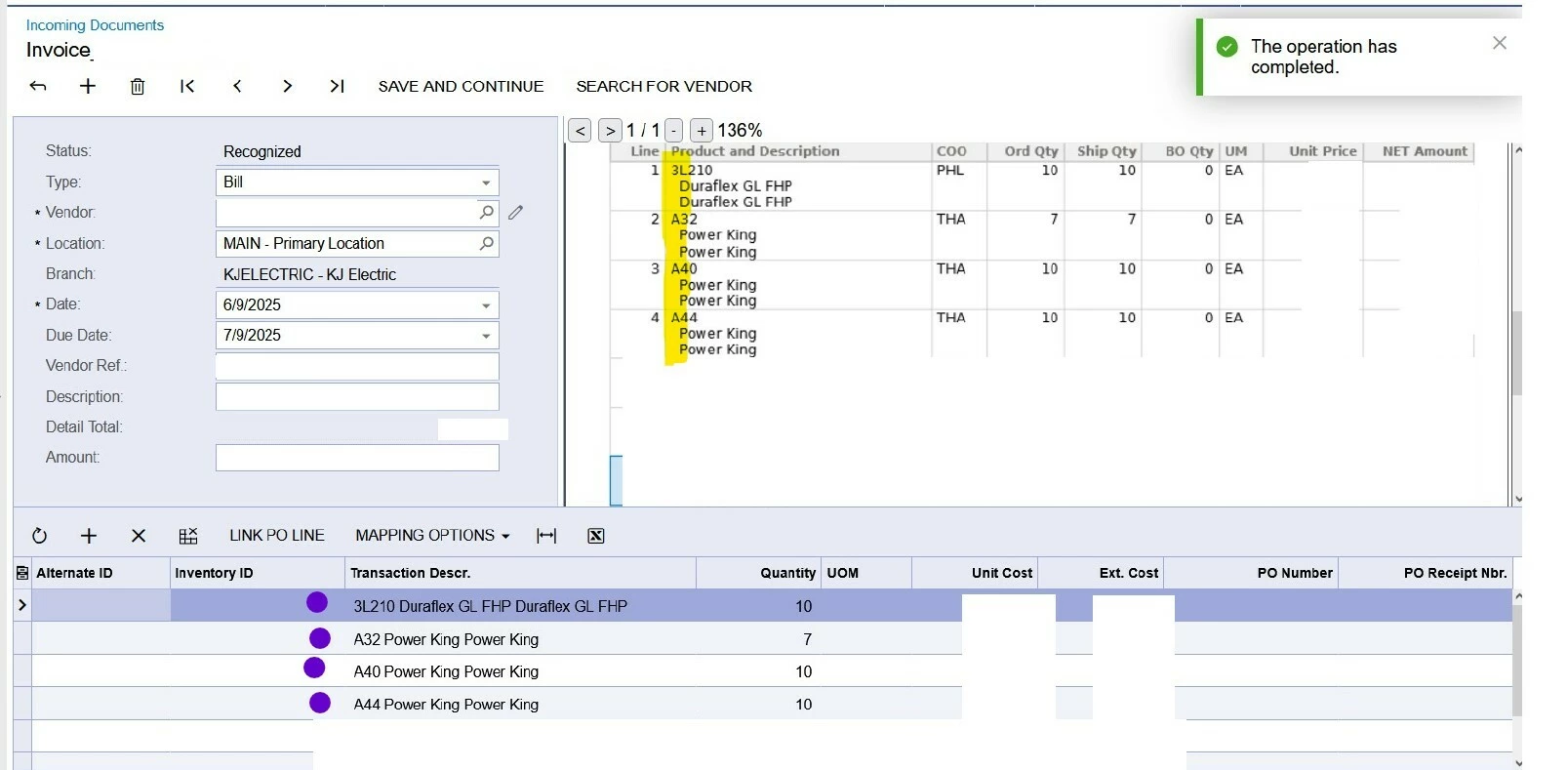
When we are in the mapping mode, we can not select part of a column.  When we are NOT in mapping mode, we can select part of a column.  None of what we do manually (not mapping) is learned, so we are trying just mapping corrections to the invoices.  We have a great many vendors that combine the item and description in the same column with indentation, perhaps.  Having just caught that ONLY THE HEADER IS LEARNING, which is unreliable for us, should we forget this functionality until the AI is “more globally applied”?  I can not fathom how you AI half of a document/process.  I will also take suggestions as to how I pass that specific piece of information on, diplomatically.  😂

I did upvote the request to complete the AI application to the entire process.

2024-R2
 

Best answer by JohnMichels

@Tiffany Seeland  You have described standard Acumatica functionality.  This form is a bit “clunky”.  


In the screen shot provided, ACU did not recognize the Vendor or the PO without which your results will be limited. In theory, the system will learn to how to extract this information. This will facilitate the population of the other fields in the document.

In my experience, AP Document Recognition is not “set it & forget it.”  There will be instances when a document will be FULLY recognized, but this will not be 100% of the time in its current configuration (ACU is still improving the functionality) 

2 replies

Forum|alt.badge.img+1
  • Jr Varsity I
  • Answer
  • July 2, 2025

@Tiffany Seeland  You have described standard Acumatica functionality.  This form is a bit “clunky”.  


In the screen shot provided, ACU did not recognize the Vendor or the PO without which your results will be limited. In theory, the system will learn to how to extract this information. This will facilitate the population of the other fields in the document.

In my experience, AP Document Recognition is not “set it & forget it.”  There will be instances when a document will be FULLY recognized, but this will not be 100% of the time in its current configuration (ACU is still improving the functionality) 


Forum|alt.badge.img+1
  • Jr Varsity I
  • July 2, 2025

….AP Doc Recognition should be looked at as a tool to improve efficiency- not replace a body (headcount reduction).  I have only implemented it, so I don't have long-term experience with the learning aspects of the recognition tool.
