Question

Add sort options for mobile app

  • March 23, 2026
  • 2 replies
  • 24 views

Hello!


I have made a few filters and want to show our “Default Salesperson” employees how to filter only their name. This is easy to do on desktop

 

However, when I go to the mobile app, the filter doesn’t show up correctly. When I click on their filter, it’s blank.
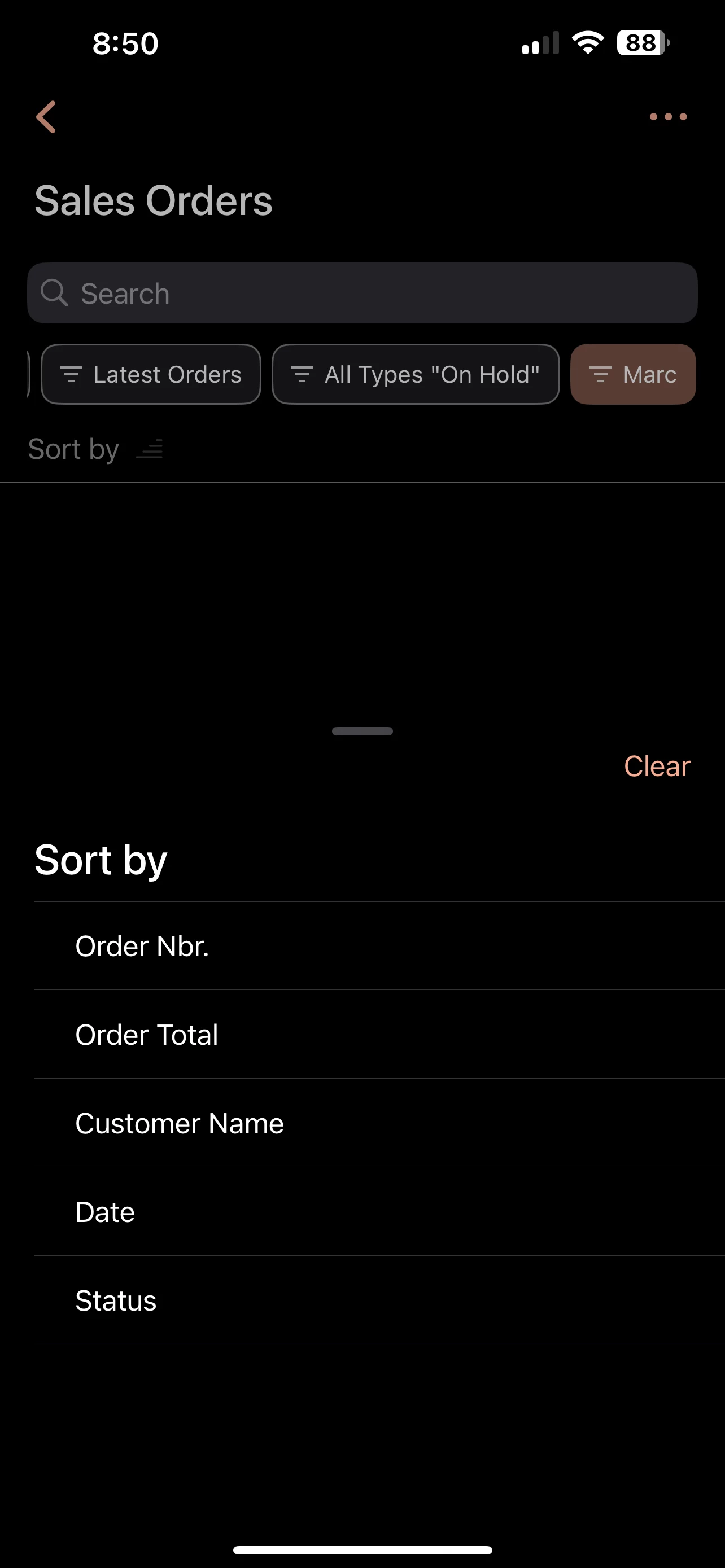
My initial guess is because there is no sort option for the salesperson on the app. Is this the case? If so, how do I add this as an option so our remote salespeople can see their sales more easily when they are travelling?


2 replies

BenjaminCrisman
Acumatica Employee
Forum|alt.badge.img+4
  • Acumatica Support Team
  • March 23, 2026

@JoshuaRichards I think you need to add a filter to the GI where the SalesPerson = @me, then they can just tap this filter and see only their lines. Have you already tried that?


@BenjaminCrisman 

Hello!

Our sales team isn’t completely separated by certain sections unfortunately so the salesperson and their user account isn’t tied together.

For example: Salesperson Marc can be filtered by any order he has with his name which could work!

But, sales person Rob and Josh are both salespeople for a “salesperson account” called OEM, not their name. So @me isn’t working to tie them in.


We are wanting to add something on the sales order app page that will have the salespersons name/identification here as well instead of only showing the order number, location, date, status, and total.