Answer

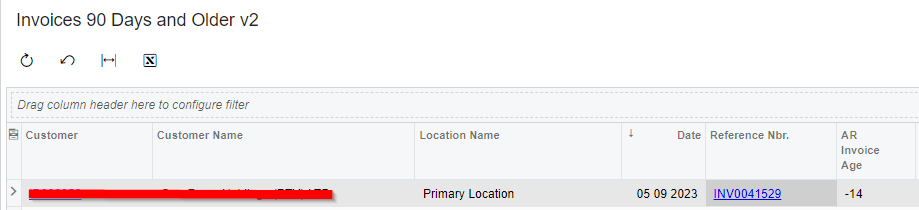
Why does my generic enquiry for Invoice age returns negative values

  • September 19, 2023
  • 6 replies
  • 160 views

Forum|alt.badge.img

I have created a generic enquiry to show the latest invoice age per customer but the ARInoice.DocDate seems to have a problem because my date values are all negative. My formula is =DATEDIFF('d',TODAY(),[ARInvoice.DocDate]). Could this be also because I’m grouping my data 
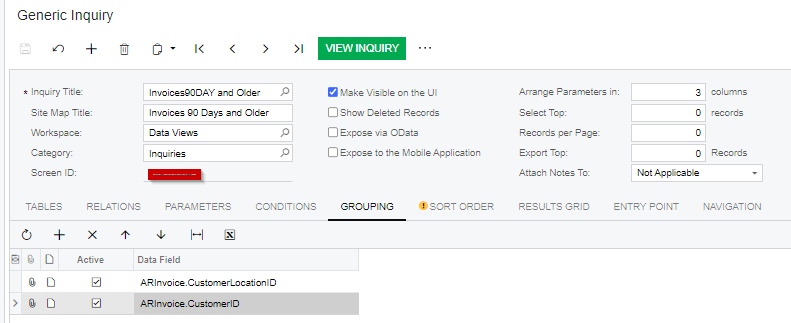
 

This also impact my options to filter because I would like to only get invoices older than 90 days

 

Best answer by ViweM

Well I removed the grouping, switched the formula and its reflecting the correct age but twist was actually put the aggregation as MIN

6 replies

dcomerford
Captain II
Forum|alt.badge.img+15
  • Captain II
  • September 19, 2023

The datediff will show a negative if the Todays date is greater than the DocDate. You could switch the dates around so DATEDIFF('d',[ARInvoice.DocDate],TODAY()) so you get plus numbers. I presume you have set the Total Agregate function to be Max so it shows the highest value for each customer location. 


Forum|alt.badge.img
  • Author
  • Freshman II
  • September 19, 2023

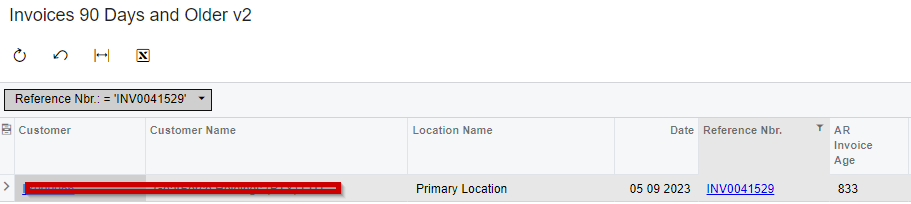
This doesn’t work, I have switched the dates around and that throws off my invoice age of.

An example let’s look at one invoice INV0041529 the correct age is 14 days, the formula applied below 

is DATEDIFF('d',[ARInvoice.DocDate],TODAY()).

Then I switch the formula around (=DATEDIFF('d',[ARInvoice.DocDate],TODAY())) and it gives

I’m totally shocked by this behavior, and the same thing is happening on the Sales Demo on my local


dcomerford
Captain II
Forum|alt.badge.img+15
  • Captain II
  • September 19, 2023

Can you share the GI as i use Datediff a lot and it works as expected.


Forum|alt.badge.img
  • Author
  • Freshman II
  • September 19, 2023

There you go


dcomerford
Captain II
Forum|alt.badge.img+15
  • Captain II
  • September 20, 2023

The DateDiff is working correctly it is your grouping that is causing the crazy numbers. As you have nothing set on the Total Agregate function on the Results grid. For numeric fields Acumatica will Sum the Days together for each Invocie per customer/location and give you a Total of all the DateDiffs (Sum is the default if nothing is set)


I believe what you are after is to set this to the MAX so it will display the highest DateDiff per customer/location


I would switch the DateDiff around as i suggested and turn of your grouping and validate the results are correct then turn back on your grouping and set the Total Aggregate function and you will see the affects


Forum|alt.badge.img
  • Author
  • Freshman II
  • Answer
  • September 20, 2023

Well I removed the grouping, switched the formula and its reflecting the correct age but twist was actually put the aggregation as MIN