



Best answer by meganfriesen37
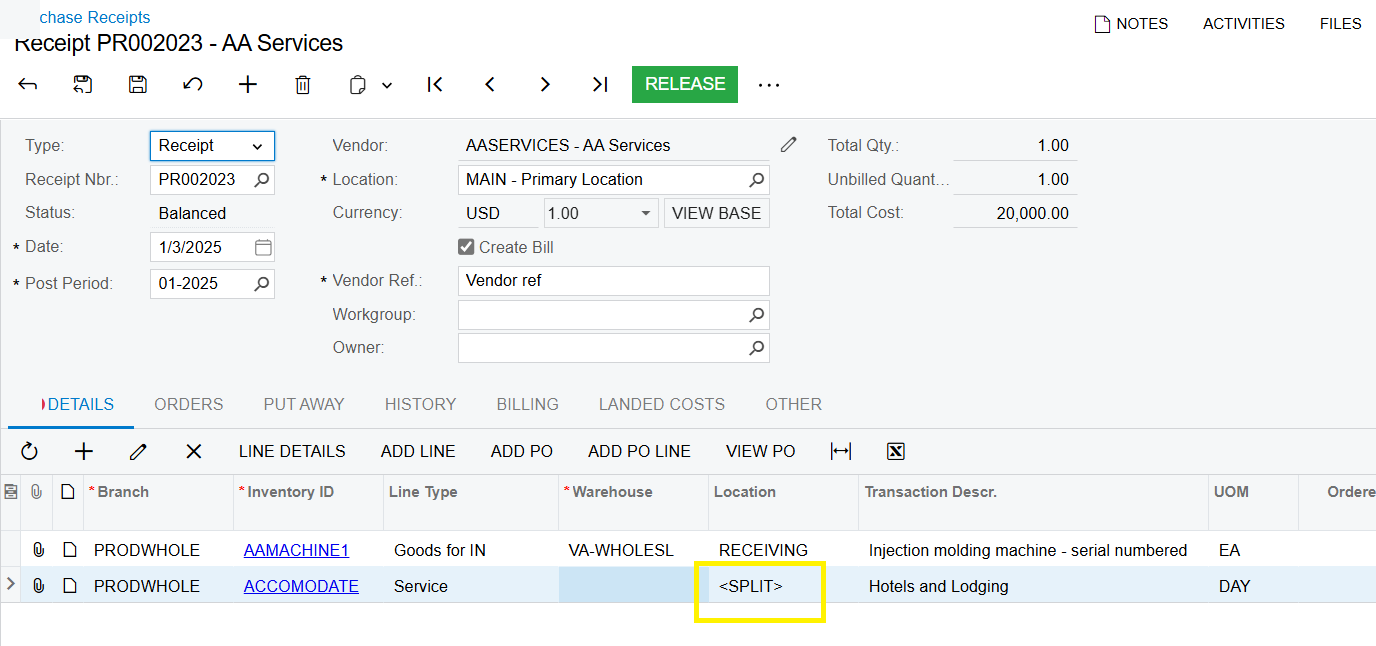
There’s a few different places where the <SPLIT> value shows up in the Inventory/PO/SO modules.
I’m used to seeing for stock items where items are in multiple locations or have multiple Serial Number / Lot Number / Expiry dates - if the line has multiple units with different locations/lot/serial/expiry dates then you have to use the “Line Details” button to enter/view the details for the individual records
According to the Acumatica documentation (https://help.acumatica.com/(W(2))/Help?ScreenId=ShowWiki&pageid=d9901c8d-486d-45ed-8088-ea3d8ee3af19)
| Location | The location of the specified warehouse where the item has been received. <SPLIT> is displayed if multiple locations are assigned to the received quantity of the item. |
In the scenario you have it above, because of the features enabled it wants to record a location, but the Accommodate item is a non-stock item so there isn’t really a location to record it against. In this scenario, you can leave the <SPLIT> and release the receipt to record your Purchase Accrual, but there’s no inventory/warehouse impact for the non-stock items.
No account yet? Create an account
Enter your E-mail address. We'll send you an e-mail with instructions to reset your password.


