Question

Stock Kit Component Substitutions

  • November 23, 2024
  • 7 replies
  • 187 views

We create kits that have multiple stock items, all of which can be substituted. I know about adding related items to the stock items, but I cannot use that function because each of the components of the kit are also sold individually and the items we might substitute for in the kit we would never substitute for on individual stock item sales.

I have a different, laborious solution (allowing component variances and listing ALL possible items, including subs, in the kit components and then adjusting the amount used to 0 for any not being used in assembly), but, I’m also trying to figure out how to use the Substitution tab in the Kit Specifications. It seems like you should be able to identify substitutions here, but I can’t figure out how to make it work and I can’t find any published information on it. Does anyone know how this tab functions?

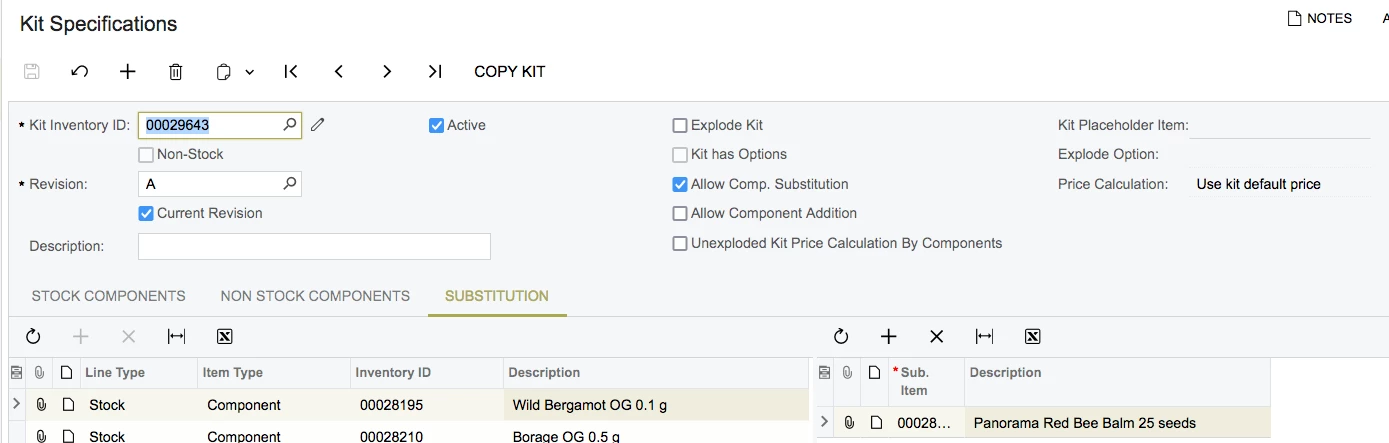
I’m including a screenshot of what it looks like. In this kit I have a stock item, Bergamot, where I’ve added a substitute of Panorama Bee Balm on this tab. But, when I go to do a kit assembly and there is no Bergamot to include, I cannot seem to find a place to add this substitute as identified in the Kit Specifications.

 

7 replies

saifalisabri
Jr Varsity II
Forum|alt.badge.img
  • Jr Varsity II
  • November 23, 2024

My response was crafted with AI assistance, tailored to provide detailed and actionable guidance for your query.


The Substitutions tab in the Kit Specifications form in Acumatica ERP is designed to help manage substitutions for kit components during the assembly process. 

  1. Kit Specifications (IN209500):

    • This is where you define the composition of kits, including components, quantities, and other details. The Substitutions tab allows you to specify alternative items for each component.
  2. Substitutions Tab Functionality:

    • When you add a substitute item for a component, the system recognizes this as an acceptable replacement during the kit assembly process if the original component is unavailable.
  3. Kit Assembly Process:

    • The substitution functionality works in conjunction with the kit assembly process (on the Kit Assembly (IN307000) form). During assembly, you can replace unavailable components with substitutes defined in the Substitutions tab.

Step-by-Step Guide to Using Substitutions

  1. Define Substitutes in Kit Specifications:

    • Open the Kit Specifications (IN209500) form.
    • Select the kit for which you want to define substitutions.
    • Navigate to the Substitutions tab.
    • Add rows for each component that can have substitutes, specifying the component and its alternative(s).
  2. Prepare for Kit Assembly:

    • When performing a kit assembly, ensure that the components are checked for availability.
    • If a component is unavailable, the system will not automatically replace it with a substitute, but you can manually select the substitute during the assembly process.
  3. Substitute Components During Assembly:

    • On the Kit Assembly (IN307000) form, when creating the assembly transaction, review the components.
    • For any unavailable component, replace it manually with a substitute from the Substitutions tab.
  4. Adjust Quantities if Necessary:

    • If you are using substitutes, ensure the quantities align with the kit's requirements, as the substitutes might have different usage rules.

Limitations and Additional Notes

  • Manual Intervention: The system does not automatically replace unavailable components with substitutes during kit assembly; you must make the changes manually.
  • Applicability to Kits Only: The substitution feature in the Substitutions tab applies only to kits and does not impact individual item sales.
  • Component Variance: If you're already using the component variance method, consider whether it might simplify some scenarios compared to managing substitutions manually.

Troubleshooting Substitutions Not Appearing

If you cannot find the substitute item during kit assembly:

  • Verify Substitution Definition: Ensure that the substitute is correctly defined under the Substitutions tab for the component in question.
  • Check Inventory Availability: The substitute item must be available in inventory for it to be selectable during the assembly process.
  • System Configuration: Ensure that the kit and components are configured correctly in the system, including availability settings.


  • Author
  • Freshman I
  • November 23, 2024

But this does not explain HOW to make the substitution during assembly, which is my question. I cannot locate where on the kit assembly form to actually choose substitutions that were provided on the kit specifications.


Chris Hackett
Community Manager
Forum|alt.badge.img
  • Acumatica Community Manager
  • January 23, 2025

Hi ​@aimeep were you able to find a solution? Thank you!


Forum|alt.badge.img+2

@aimeep Is the item you are trying to substitute a non-stock Kit item? Kits do not support the substitution for non-stock Kit items.


Please let me know you got answer for your question.


Dana Moffat
Community Manager
Forum|alt.badge.img+2
  • Community Manager
  • January 23, 2025

We have an Acumatica Labs Advanced Kitting feature. (non-stock kits with stocked components)

Please access this to read more about and if interested, there is a qualification form that we ask that you complete. 

Dana


  • Author
  • Freshman I
  • January 23, 2025

@aimeep Is the item you are trying to substitute a non-stock Kit item? Kits do not support the substitution for non-stock Kit items.


Please let me know you got answer for your question.


No. The kit and all its components are all stock items.


plambert
Semi-Pro I
Forum|alt.badge.img+2
  • Semi-Pro I
  • June 20, 2025

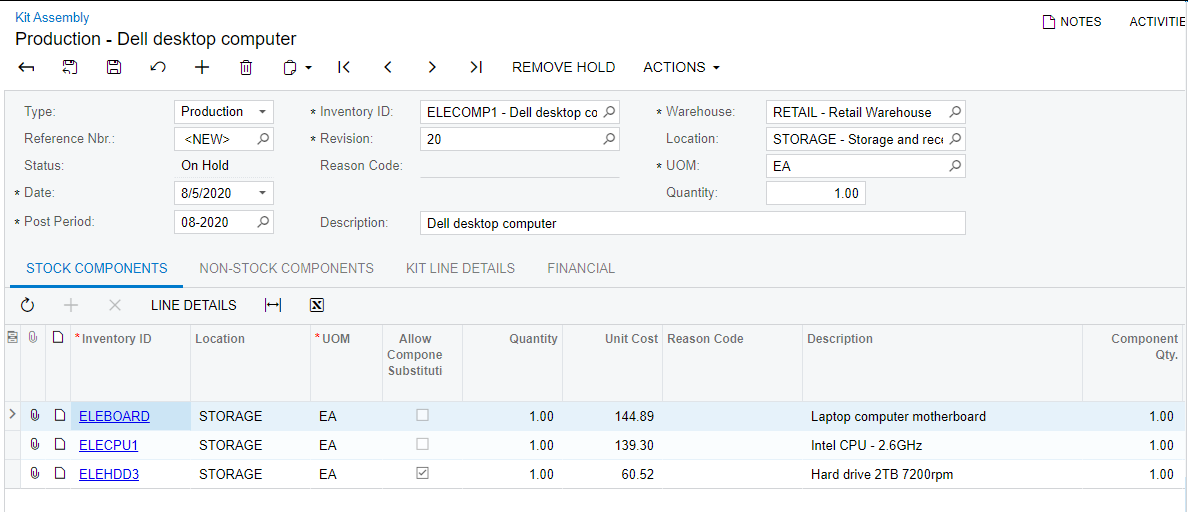
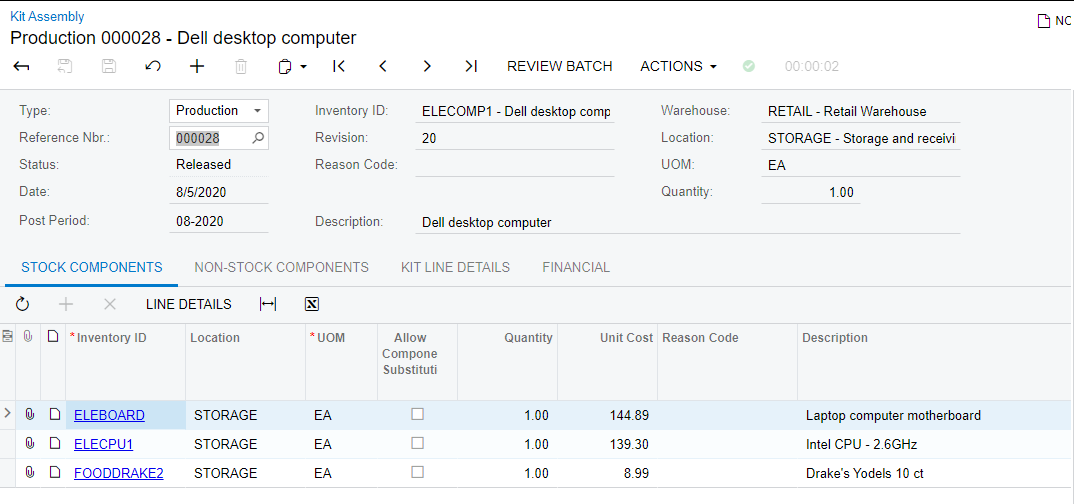
First understand that “Allow substitution” more means “allow overwrite” during assembly. The best explanation I’ve seen is from a very similar thread:

Once Allow Component Substitution is checked in the specification, you manually change the part number on the detail line.


Hard Drive Allows Substitution


Released with Substituted Item


Notice how the third line is changed because it is marked for component substitution allowed. Now, to what you need to change a particular line item to is up to institutional knowledge. There is not any sort of validation or configuration that will restrict with what you replace that item. Your process of having all possible components as part of the assembly and manually adjusting the quantities is more robust to restricting what can go into the assembled kit than what is natively provided.