Answer

Shipping Insturctions notes copied automatically from customer Locations notes to Shipment Notes

  • October 3, 2025
  • 24 replies
  • 200 views

Forum|alt.badge.img

My goal is to have shipping instructions auto populated to the Notes field in Shipment when the shipment is created.  The idea is to populate the insturctrions in the Notes of the location in the customer and have that note auto populate the Note of the shipment when a shipment is made with that customer.


I have tried the following but its not working so far and thought I would open up the conversation to the group for discussion.

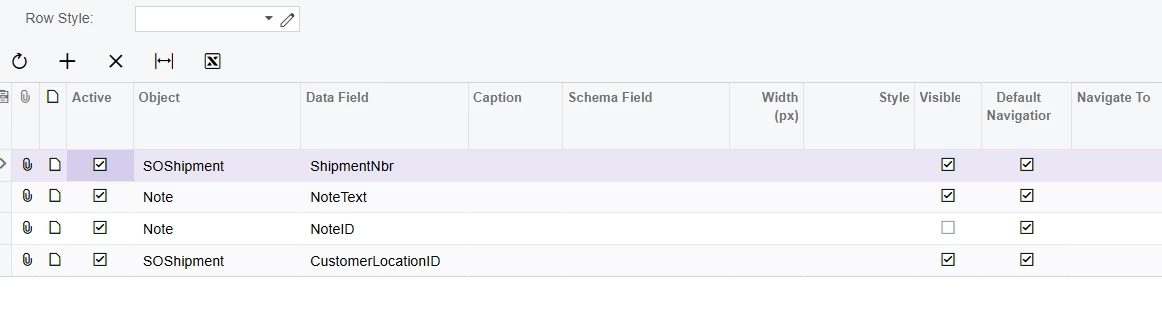
I created a generic inquiry to pull the notes
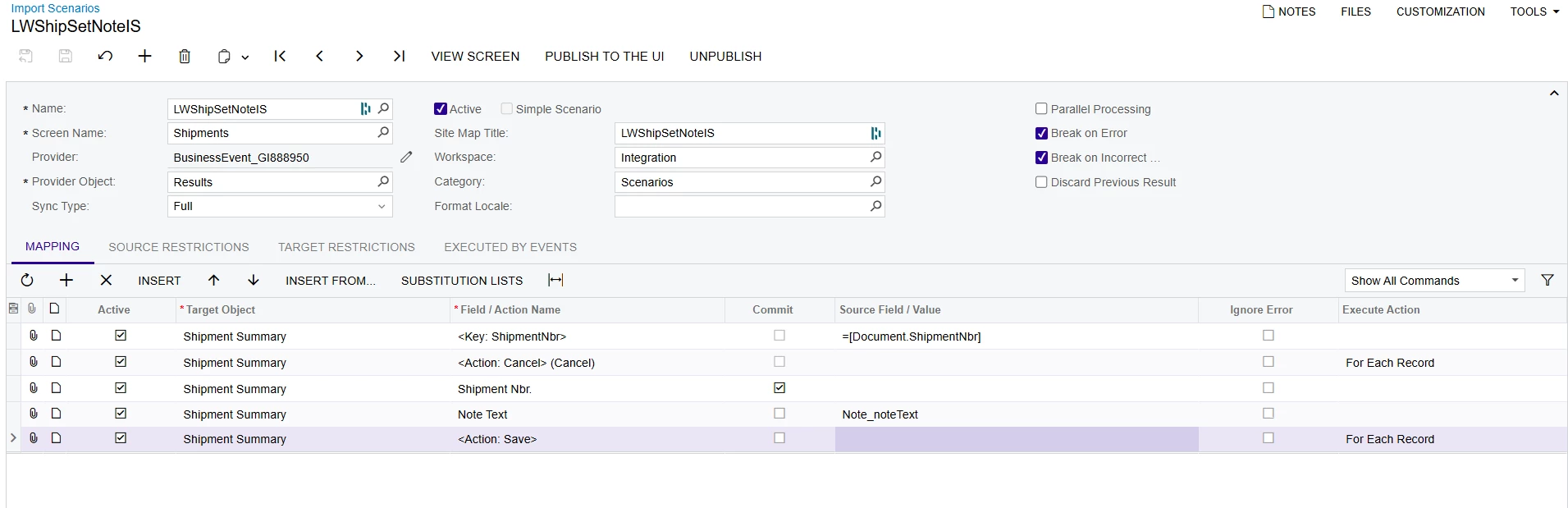
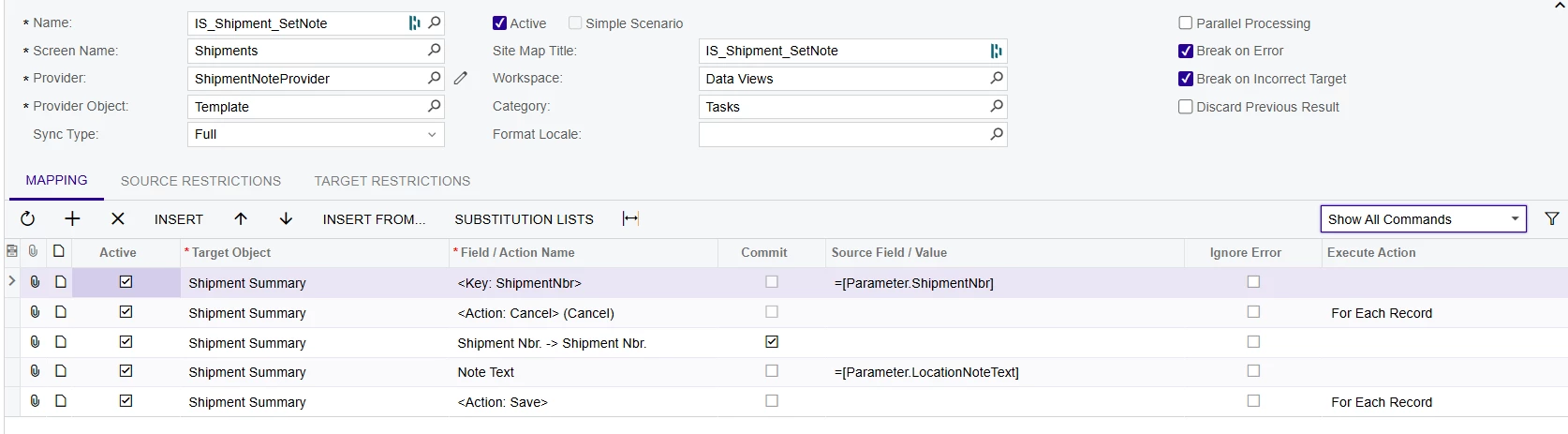
I built an import scenario 
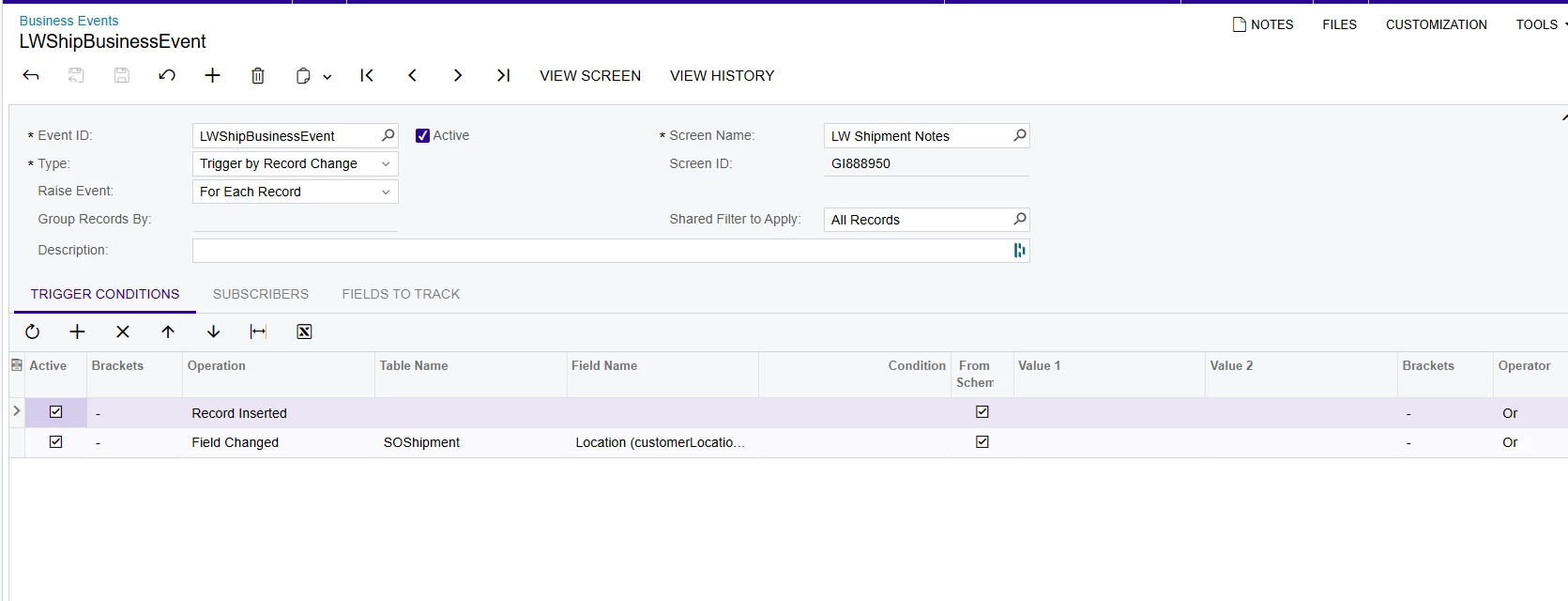
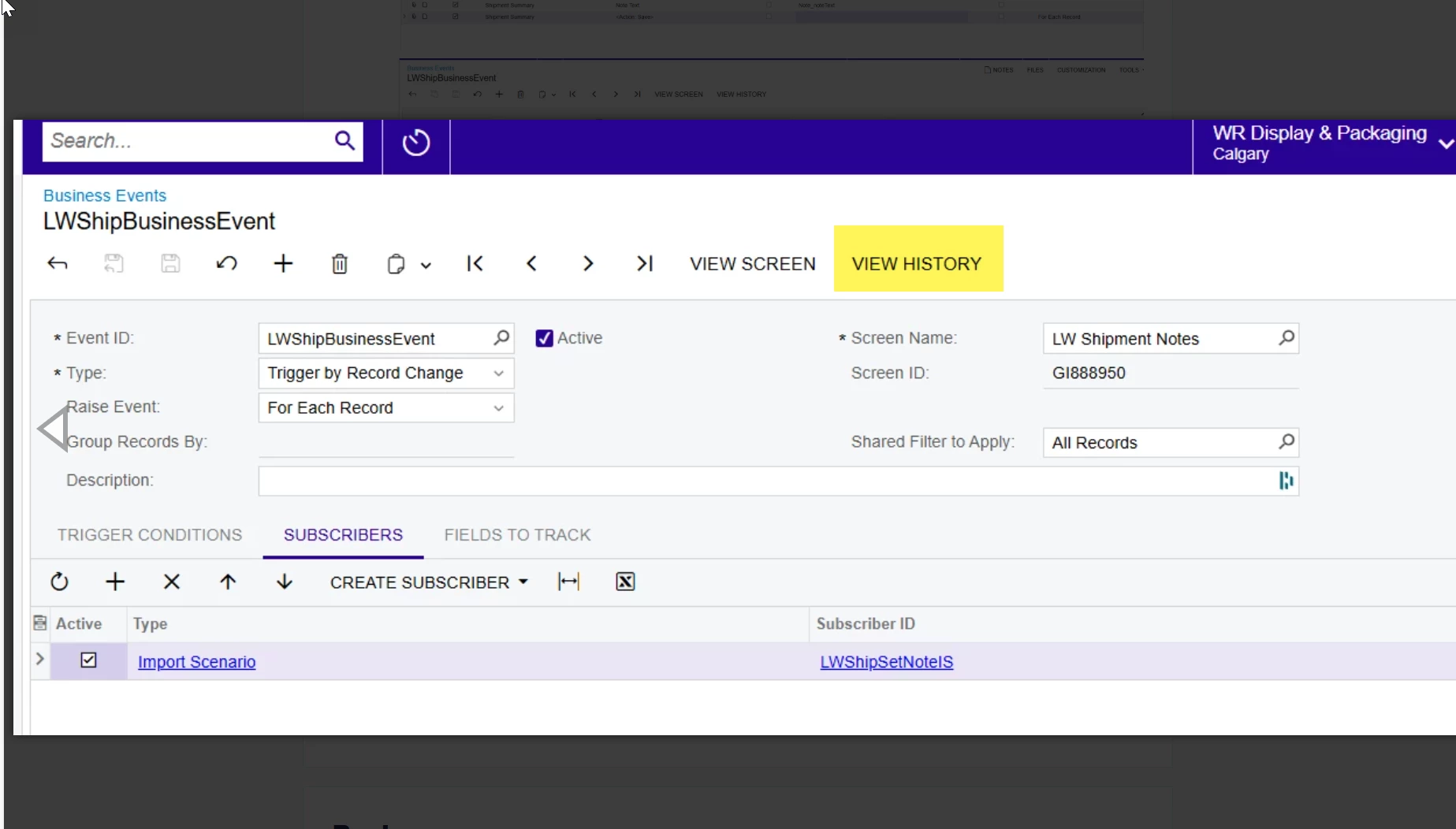
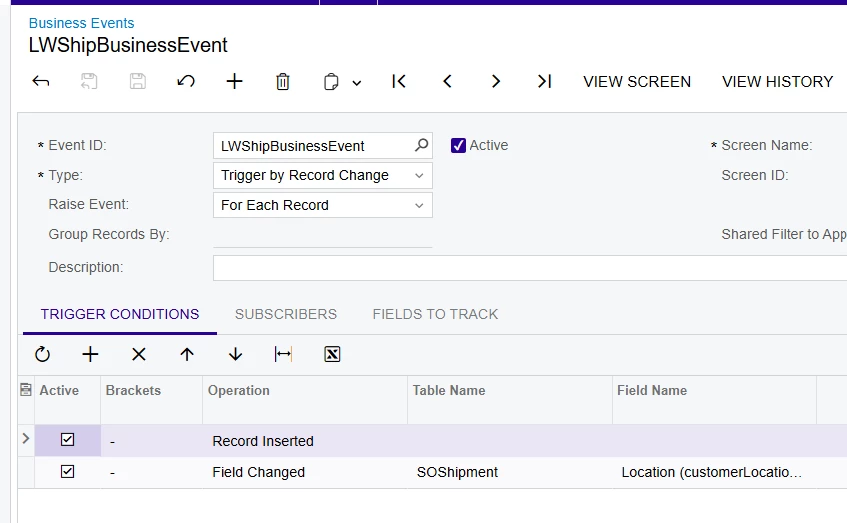
And the following business event to which I am not sucessfully able to attach a subscriber
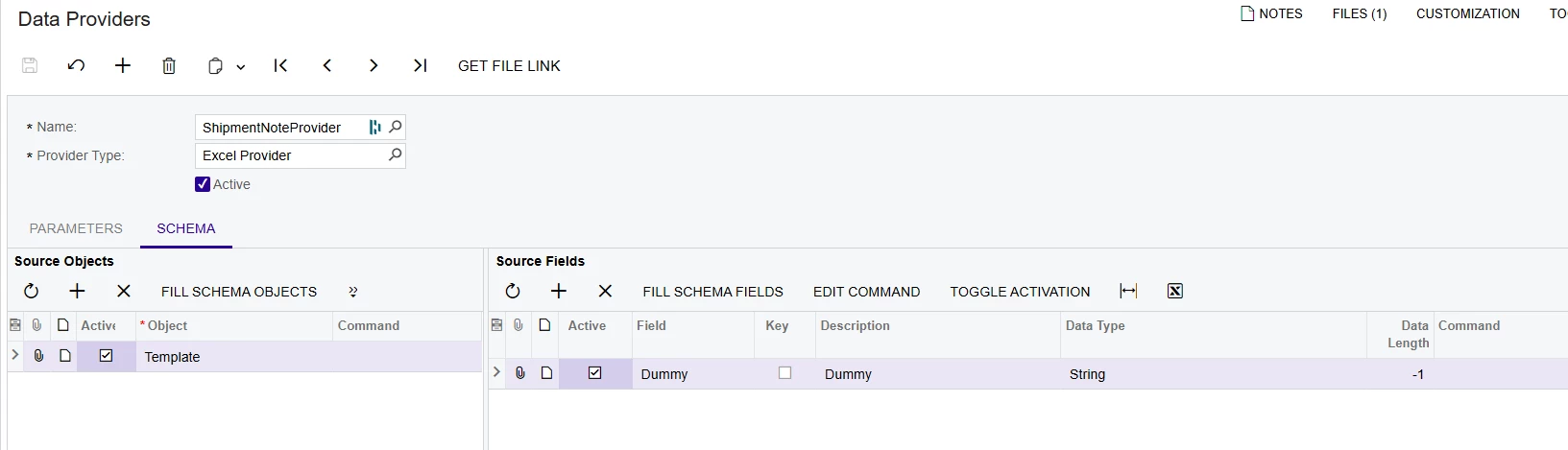
I succesfully created a data provider from excel but not able to achieve success creating a data provider from a GI
 

Anyway, its not working.


Perhaps there is a simpler solution?


What are your thoughts?

 

Best answer by bwhite49

Unfortunately, that is the problem with BE import scenarios. They function as a separate user making updates to the screen. So, if another user made an update to the shipment while you were also editing the same shipment and they clicked the save button before you did, you would receive the same error. 

If you create all of your shipments automatically through the “process orders” screen, then you might never know this BE exists.

If creating the shipment manually, you will just need to refresh your screen after shipment creation before making updates.

The alternative to all of this is customization, but that brings another layer of issues when it comes time for updates.

24 replies

bwhite49
Captain II
Forum|alt.badge.img+10
  • Captain II
  • October 3, 2025

I’m seeing a few issues.

  1. Your business event is not connected to the import scenario

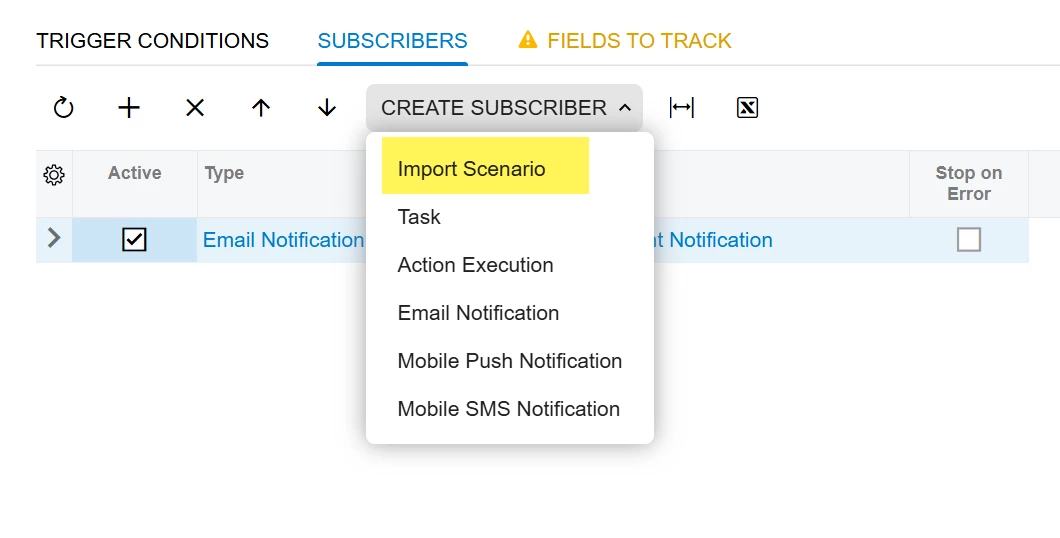
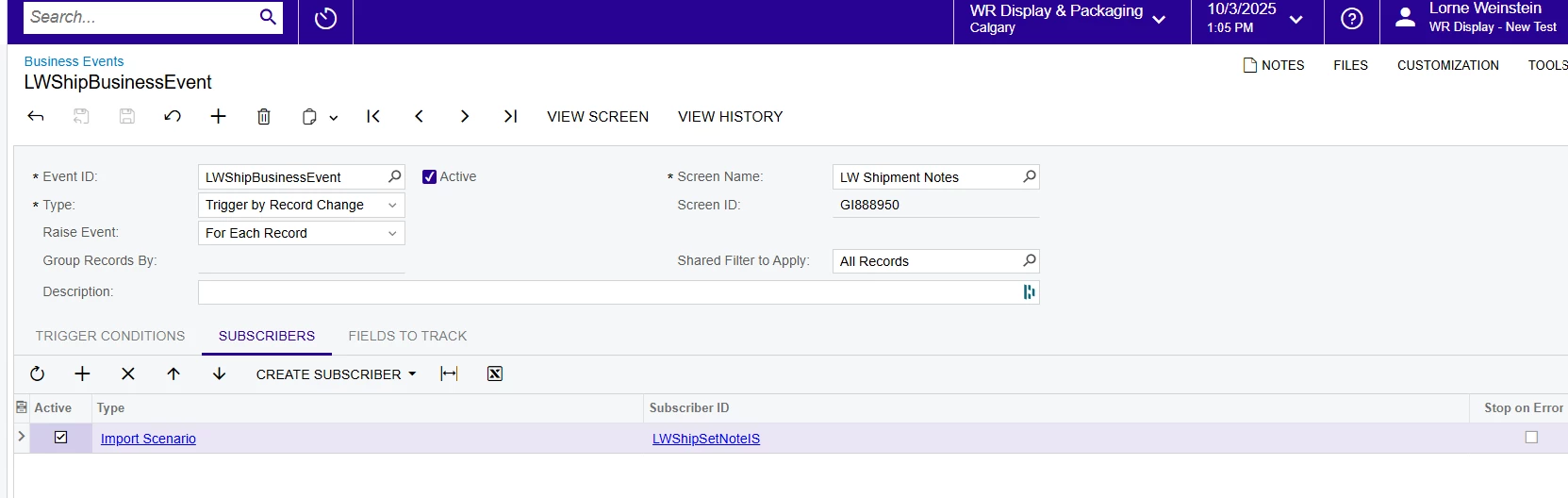
You need to create the import scenario from the business event screen. Go to the subscriber tab of your business event screen and create the import scenario through this button...


This will automatically create a data provider linked to your generic inquiry. It will be called BusinessEvent_GI123456 for example. 


  1. Where is [Paramter.LocationNoteText] coming from? I’m not seeing that in your GI results grid  
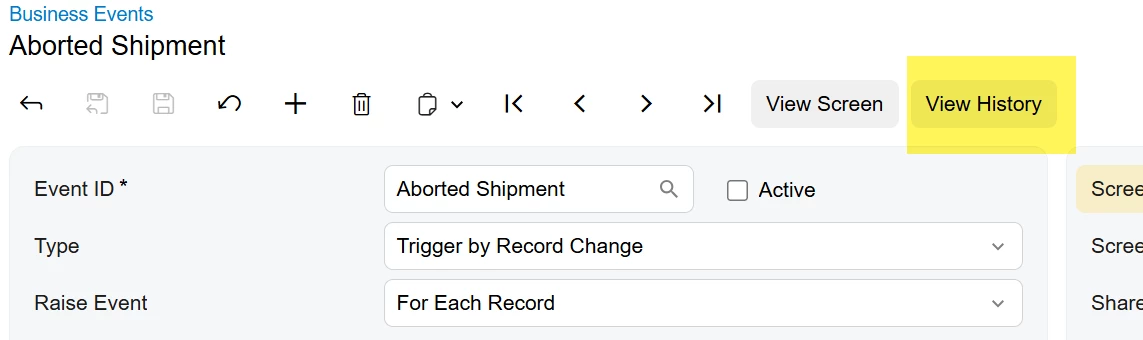
  2. When creating a new business event, it’s often easiest to start with a trigger by action type business event. This way, you can manually run the business event for 1 or 2 lines in your inquiry to see if it’s doing what you want it to do. You can assess errors in the business event history screen. Once it works as expected, THEN you can change it to a trigger by record change or by schedule.


Forum|alt.badge.img
  • Author
  • Freshman I
  • October 3, 2025

Thanks so much for your response. With regard to your question number 2 about where the Parameter.locationnotetext is coming from…..   I have very little experience creating these and so was using chat gpt for guidance on building it.   Here is where it says that the parameter is supposed to come from...

Right now your Import Scenario is referencing:


=[Parameter.ShipmentNbr] =[Parameter.LocationNoteText]

That means it’s expecting those values to be passed in as parameters from the Business Event subscriber. But we haven’t actually provided them yet.

Where Parameter.LocationNoteText should come from

  • It’s not something you manually type in.

  • It should come from the Generic Inquiry you built (LW Shipment Notes).

  • That GI returns two important columns:

    • SOShipment.ShipmentNbr

    • Location.NoteText

When you set up your Business Event:

  • The Trigger GI = LW Shipment Notes.

  • In the Subscribers tab, you pick your Import Scenario (IS_Shipment_SetNote).

  • Then you map GI fields → Import Scenario parameters:

    • GI field ShipmentNbr → Import Scenario parameter ShipmentNbr

    • GI field Location.NoteText → Import Scenario parameter LocationNoteText

That’s how the Parameter.LocationNoteText placeholder actually gets its value.

Why it’s not working yet

Your Import Scenario is fine — but your Data Provider is still Excel-based (ShipmentNoteProvider with Object = Template). That means the BE can’t push GI results into your Import Scenario.

Fix Path

  1. Make a new Data Provider (Generic Inquiry Provider) for your GI LW Shipment Notes → call it ShipmentNoteGIProvider.

  2. Switch your Import Scenario to use ShipmentNoteGIProvider instead of ShipmentNoteProvider.

    • Provider: ShipmentNoteGIProvider

    • Provider Object: Data

  3. In your Import Scenario mapping, keep:

    • <Key: ShipmentNbr> = =[ShipmentNbr]

    • Note Text = =[LocationNoteText]
      (Now they’re coming directly from the GI, not just “Parameters”.)


bwhite49
Captain II
Forum|alt.badge.img+10
  • Captain II
  • October 3, 2025

Oh, ChatGPT is trash for Acumatica. Have not seen a helpful AI response yet. Use at your own peril. 

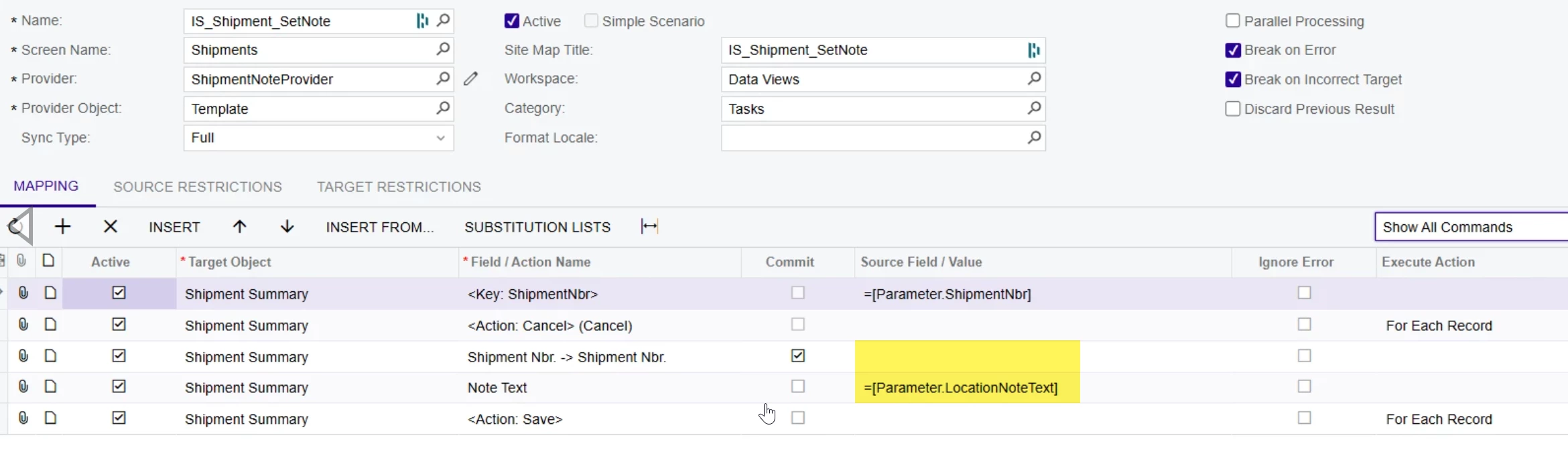
In the “source field/value” column, those should be your inputs from your generic inquiry. Recreate the import scenario from the BE.

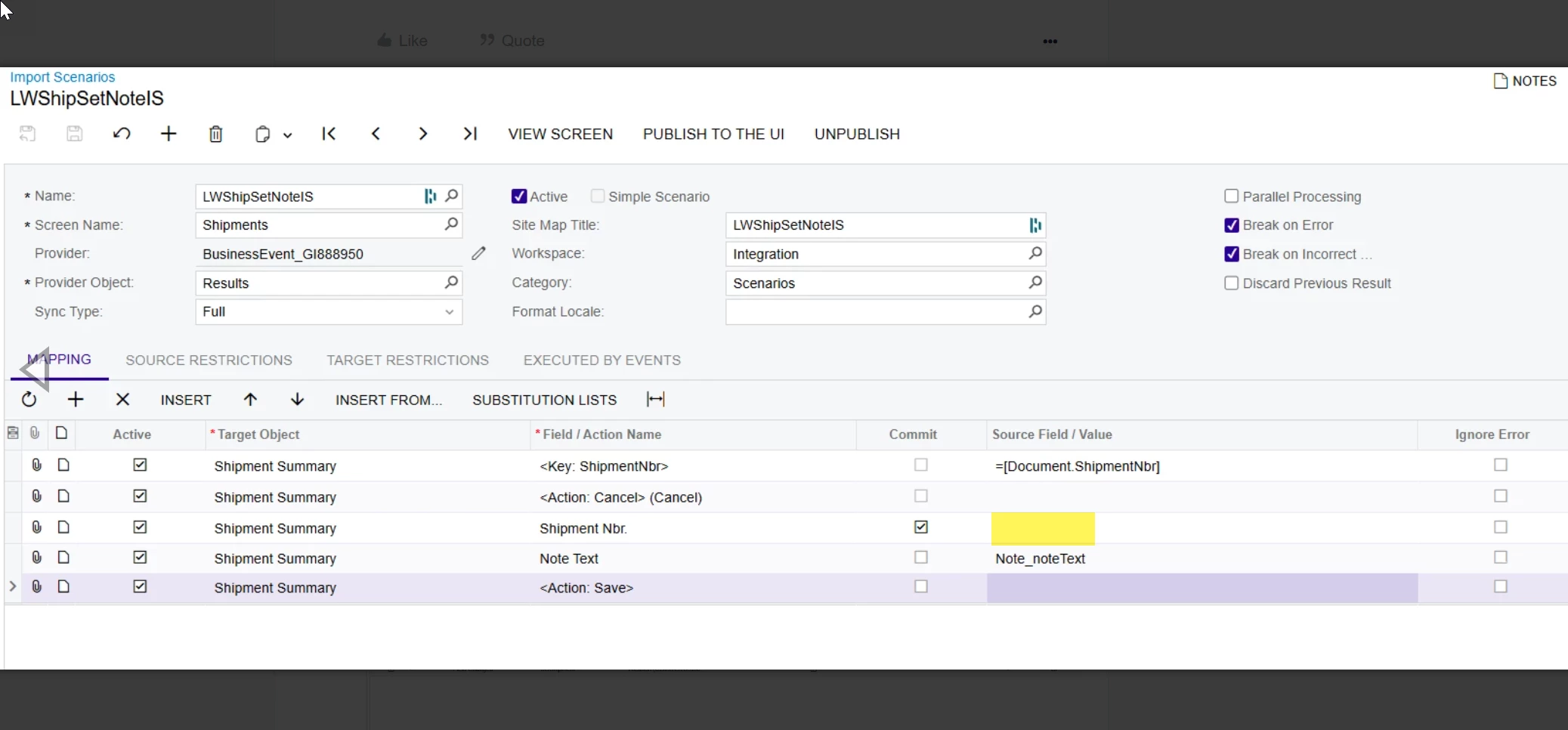
In the new screen add the shipment nbr field into the import scenario grid. DO NOT change the first 2 line that that are auto-created for you. 

Change these two values highlighted below to be the field from your generic inquiry. You should be able to find the in the drop-down selector. Note_NoteText and SOShipment_ShipmentNbr


mohammadnawaz51
Jr Varsity I
Forum|alt.badge.img+4

@lorneweinstein Did you added all the Key Yellow fields for every table you added in the BE.


Forum|alt.badge.img
  • Author
  • Freshman I
  • October 3, 2025

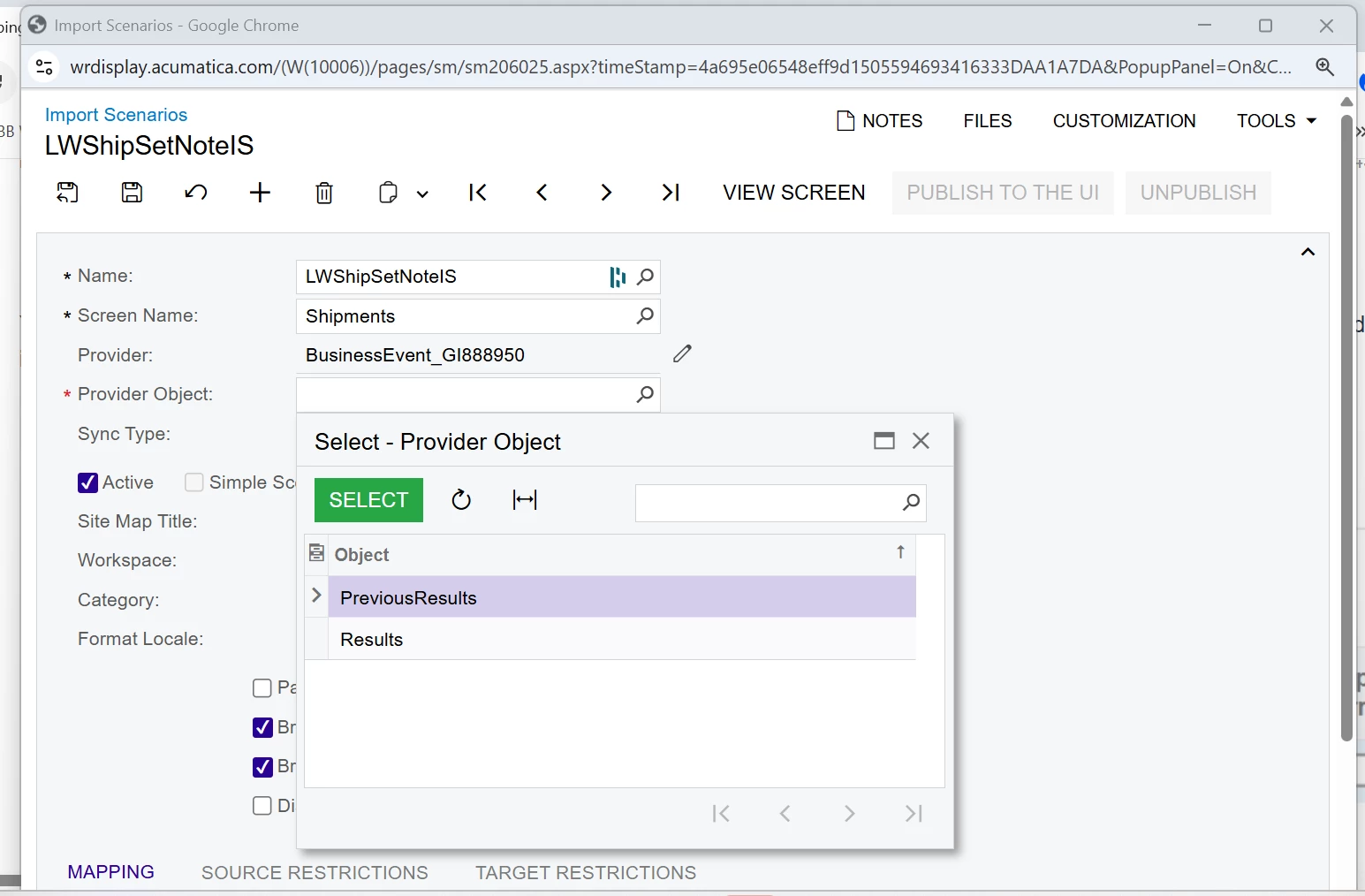
Ok, I created an import scenario from the business event and used shipments screen name same as before but now when I go to select provider object my only options are results or previous results


bwhite49
Captain II
Forum|alt.badge.img+10
  • Captain II
  • October 3, 2025

Choose “results”


mohammadnawaz51
Jr Varsity I
Forum|alt.badge.img+4

@lorneweinstein Results.


Forum|alt.badge.img
  • Author
  • Freshman I
  • October 3, 2025

I recreated the Import Scenario from the Business Event, but it still does not work.  I think I am missing something


bwhite49
Captain II
Forum|alt.badge.img+10
  • Captain II
  • October 3, 2025

You need the shipment nbr field here…

After that and still has not run, click on the history button to see if it attempted to run


Forum|alt.badge.img
  • Author
  • Freshman I
  • October 3, 2025

Amazing!!! It worked.  The first time was a bit delayed but now its instant.  
 

Question, This entire project was done in our test instance.  Do you advise that I recreate them in the live company or can they all be copied over?   If copied over is there one that should go over first?


Really appreciate your super helpful feedback.


bwhite49
Captain II
Forum|alt.badge.img+10
  • Captain II
  • October 3, 2025

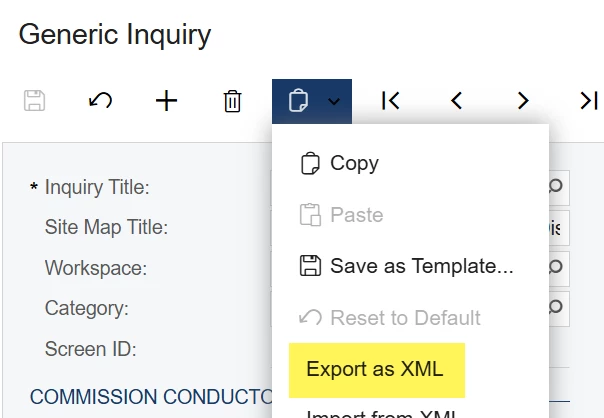
When migrating a business event, you need to export 3 components. The generic inquiry, the business event, and also the import scenario (don’t worry about the data provider)


Once you have downloaded all 3 XML documents, go to the generic inquiry screen in live, click the plus button like you are making a new GI, then click the import XML button (if you import the wrong file it will let you know!)

Next go to the business event screen and import the BE xml, then go to the import scenario screen and import the import scenario xml. 

and that’s it!


Forum|alt.badge.img
  • Author
  • Freshman I
  • October 3, 2025

Thank you.   I will try it this weekend.


Forum|alt.badge.img
  • Author
  • Freshman I
  • October 4, 2025

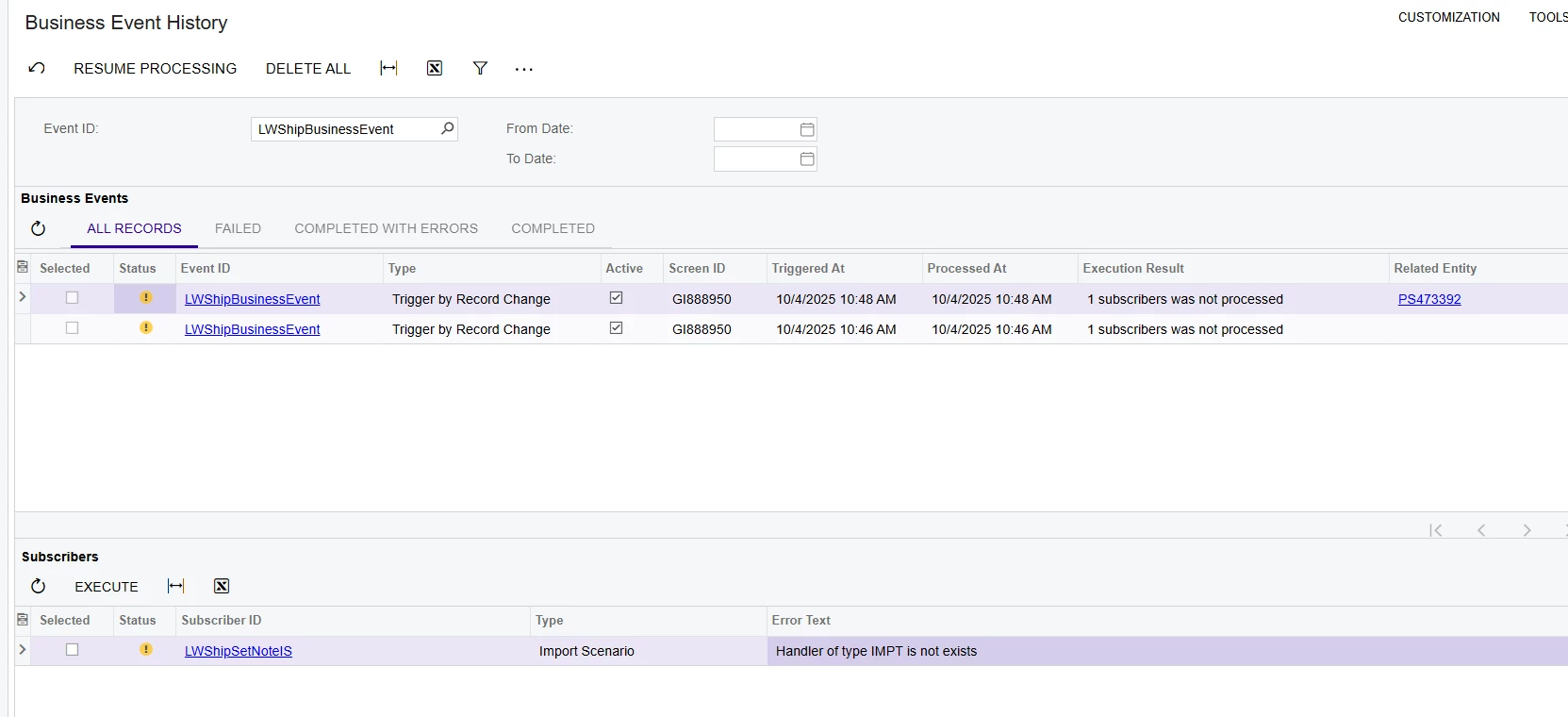
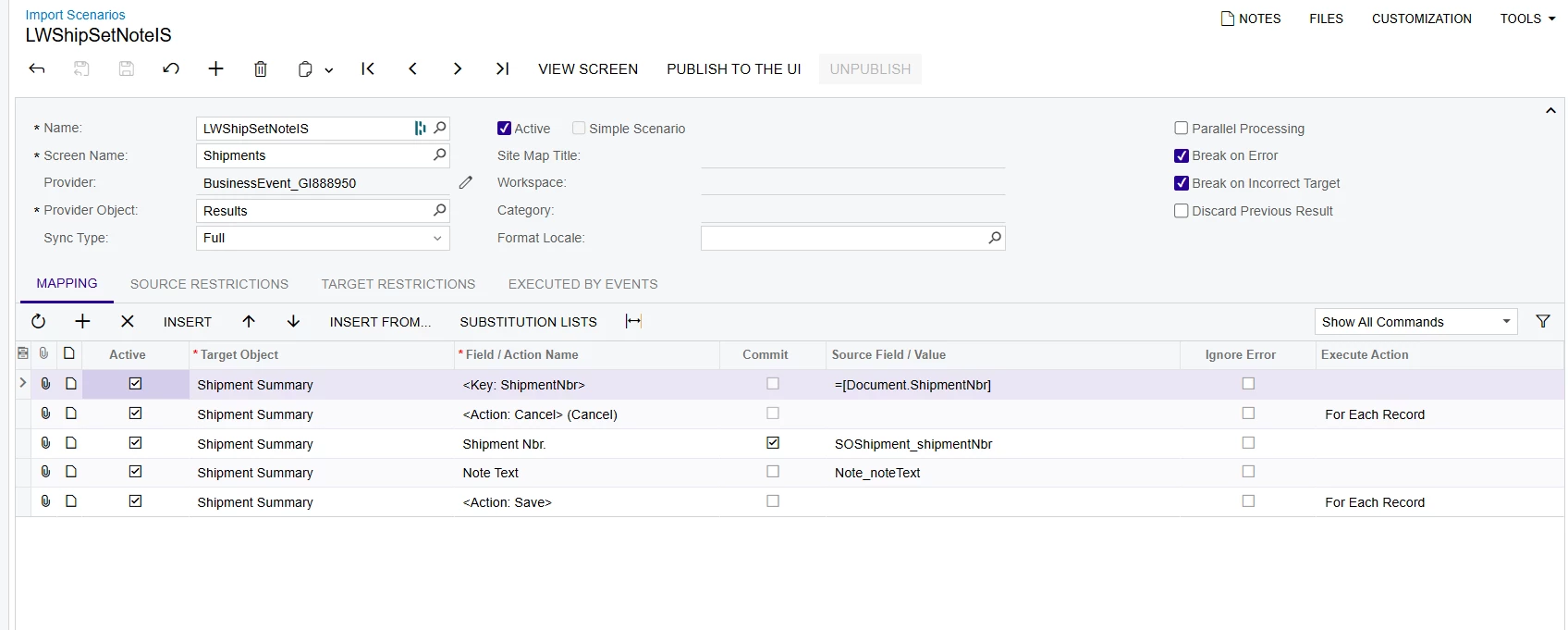
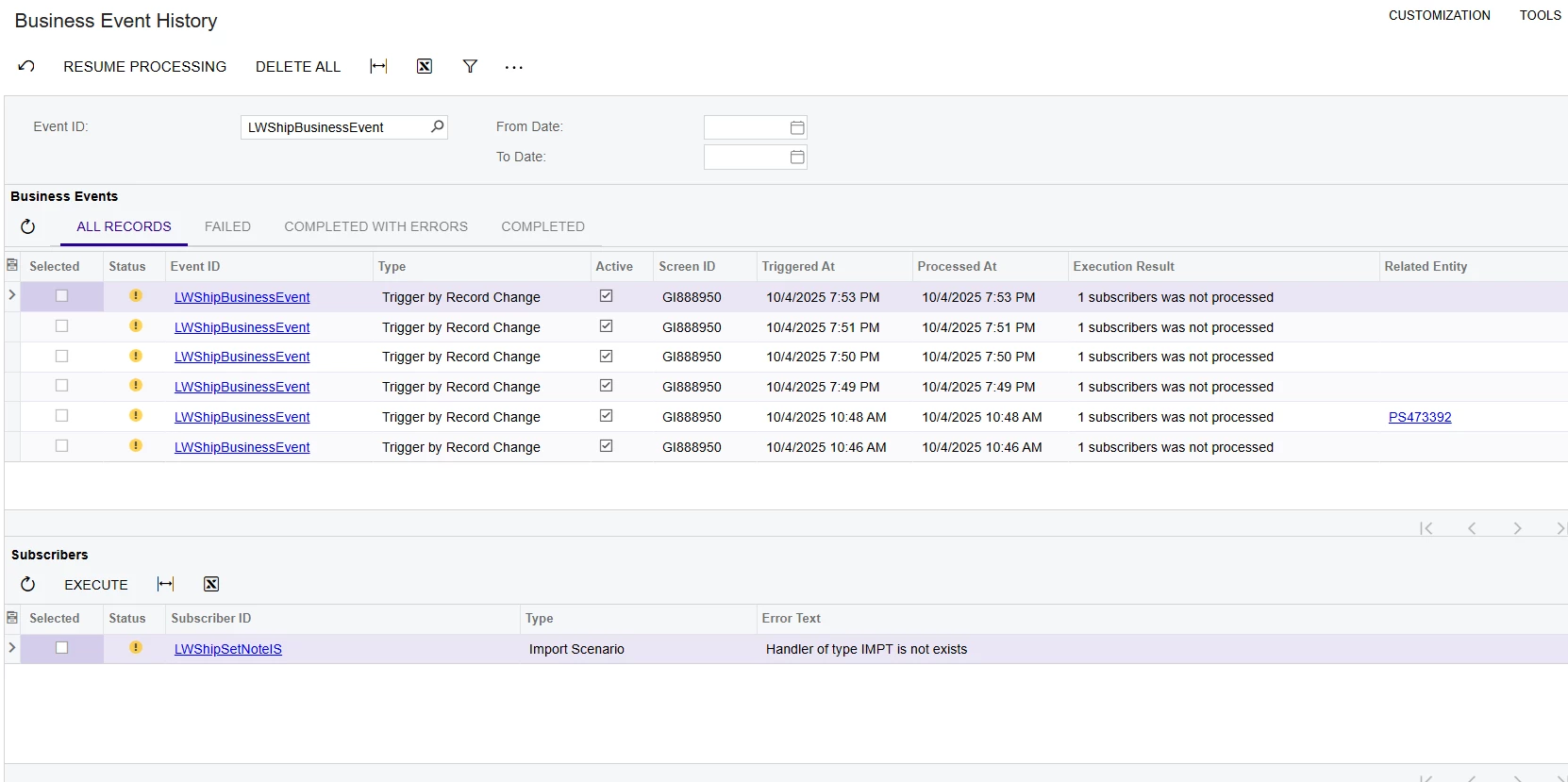
I tested it.  Ran into a few problems.  First was that there was a GI already with this number in live instance.  I deleted the old GI and then was able to import it.  Secondly, something got rerouted and I am not sure what it meant, but I said okay to that.


It did not work and here is the business event history screen where it says that “Handler of type impt is not exists”


bwhite49
Captain II
Forum|alt.badge.img+10
  • Captain II
  • October 5, 2025

The good news is that the BE is working, we just need to figure out why the import scenario is not working.


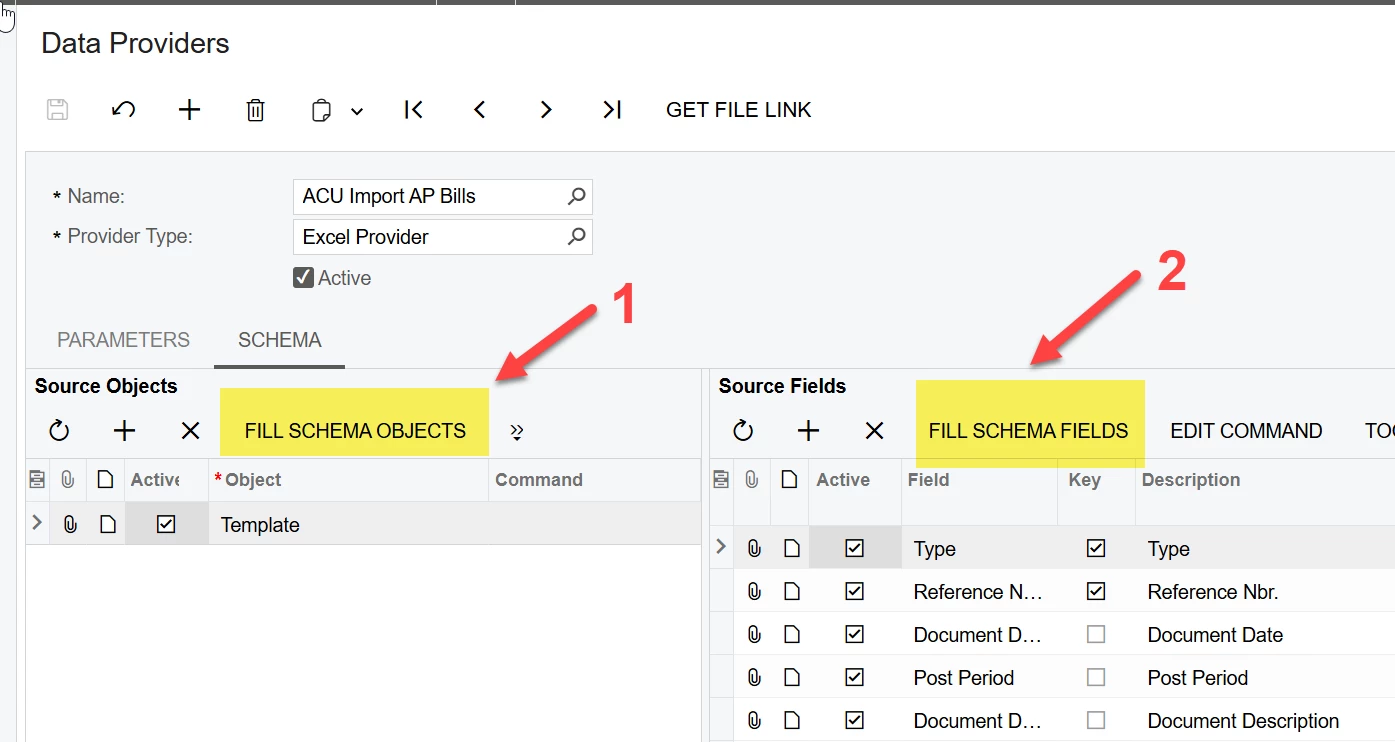
Can you go to the data provider for this BE and click these two buttons?


Once you do that, try to test this again.

If still failing, please share a screenshot of your import scenario again.


Forum|alt.badge.img
  • Author
  • Freshman I
  • October 5, 2025

Unforunately, it did not work.


Here is the shot of both the import scenario and the business event history


bwhite49
Captain II
Forum|alt.badge.img+10
  • Captain II
  • October 5, 2025

Hmm, looks good to me.

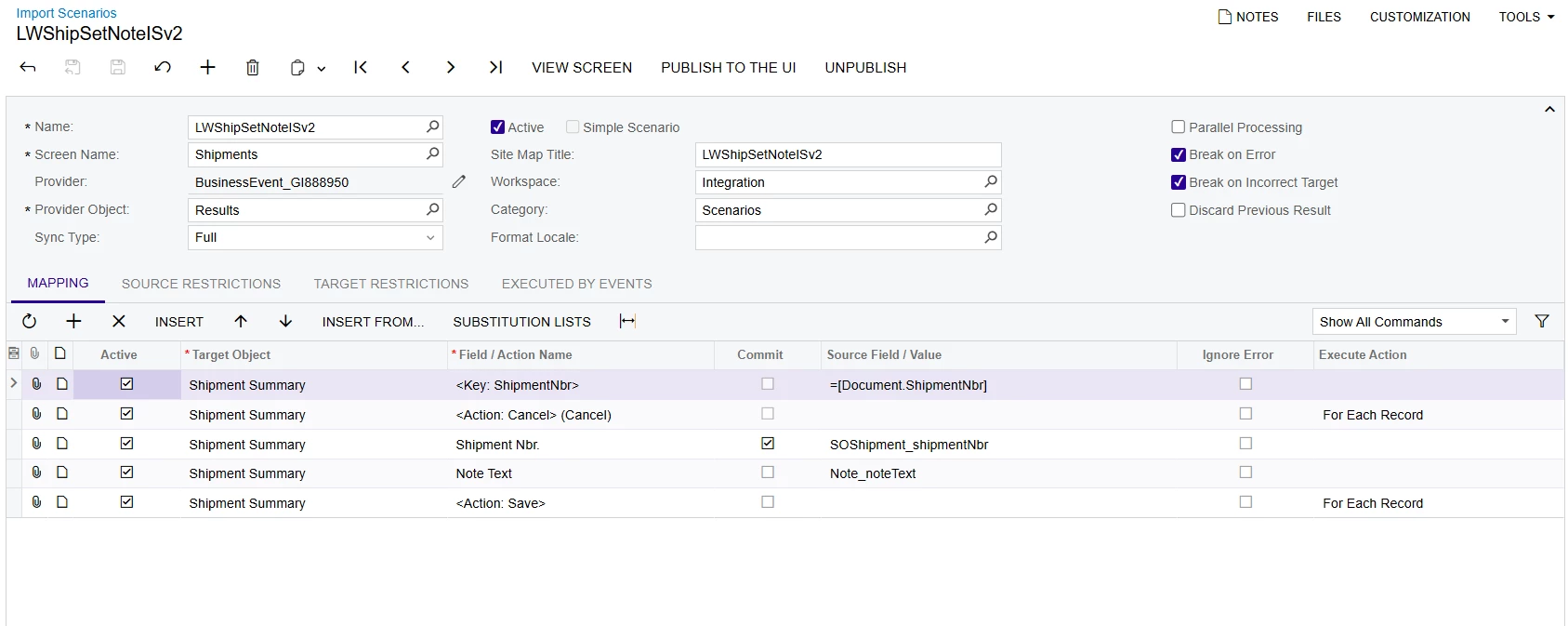
I would deactivate the import scenario, delete it, then recreate from the “create subscriber” button on the business event.

It should be working from what you have shared.


Forum|alt.badge.img
  • Author
  • Freshman I
  • October 5, 2025

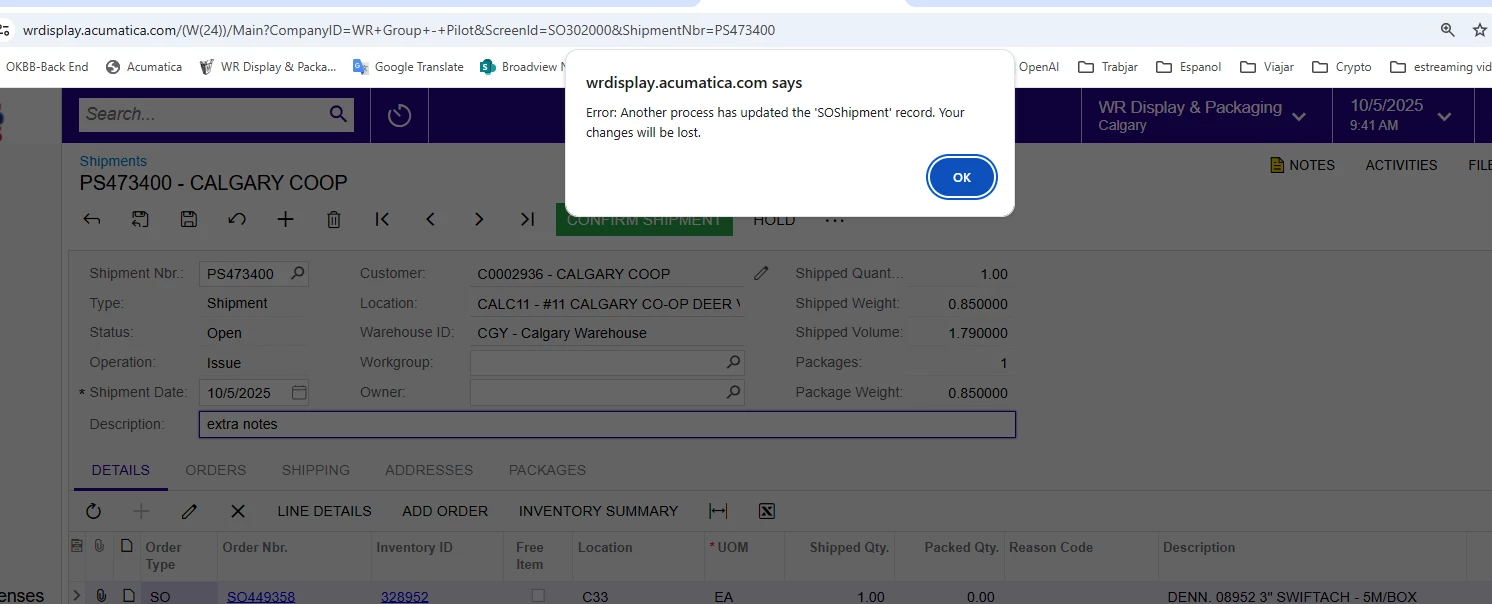
I remade it and now it works but with one glitch.  When I create the new shipment it applies the business event and puts the notes into the shipment.  However when I try to modify the shipment I get an error saying that another business process has updated the shipment and that my changes will be lost.  Here is the error and also here is the new import scenario screenshot.   Am I missing a step?


bwhite49
Captain II
Forum|alt.badge.img+10
  • Captain II
  • Answer
  • October 5, 2025

Unfortunately, that is the problem with BE import scenarios. They function as a separate user making updates to the screen. So, if another user made an update to the shipment while you were also editing the same shipment and they clicked the save button before you did, you would receive the same error. 

If you create all of your shipments automatically through the “process orders” screen, then you might never know this BE exists.

If creating the shipment manually, you will just need to refresh your screen after shipment creation before making updates.

The alternative to all of this is customization, but that brings another layer of issues when it comes time for updates.


Forum|alt.badge.img
  • Author
  • Freshman I
  • October 5, 2025

But in this case, I was the only user in the system and it does not do this behavoir in the test instance.  I wonder if I need to recreate from scratch in the live instance to get rid of any potential bugs?


bwhite49
Captain II
Forum|alt.badge.img+10
  • Captain II
  • October 5, 2025

That’s not a bug. That error is to be expected when running import scenarios on open transactions. I’m not sure why it was not happening in test, but you may have been refreshing the screen.


Forum|alt.badge.img
  • Author
  • Freshman I
  • October 5, 2025

Ok, thank you again for your help.  I really appreciate it


Forum|alt.badge.img
  • Author
  • Freshman I
  • October 6, 2025

Today we went live and while it had worked for me over the weekend, others have not had the same success.,


Here are the two reasons for failures.  The save button error is the most common error.


Any thoughts?


bwhite49
Captain II
Forum|alt.badge.img+10
  • Captain II
  • October 6, 2025

I think you just need to add some conditions to the GI 

You need to exclude shipments that are confirmed. That should help with the save button error. 

It also looks like you are creating shipment directly from the shipment screen which might be why you are getting the customer ID error.

I personally very rarely use trigger by record change BEs because they are less reliable and are 100% annoying to the user. I use scheduled or manual BEs because they are more reliable and tend to rarely impact the user, but it really depends on your workflow through the shipments screen.

If your shipments site around for a few hours and are generated from the “process orders” screen then a business event works great here. If you got from the sales order, to shipment, to confirmed within 3 minutes, then maybe a business event does not work here. You might need a customization that updates the shipment differently.


Forum|alt.badge.img
  • Author
  • Freshman I
  • October 7, 2025

Looks like the generic inquiry needed to be published.  Additionally I made the GI for Open and on Hold status shipments only.   Seems to be working at the moment