Answer

Shipment Confirmation Duplication of Lines

  • October 3, 2025
  • 11 replies
  • 106 views

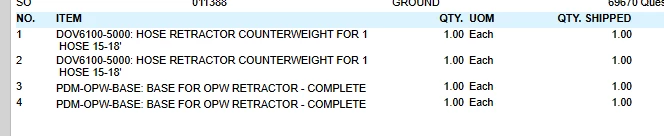
On the print confirmation the lines and qty duplicate. 

lines nbrs 1 and 3. 

 

Best answer by bwhite49

You could add a condition in that join where SOPackageDetailex.LineNbr = 1. This would exist right below SOShipment.ShipmentNbr = SOPackageDetailex.ShipmentNbr

This should show the first tracking number in the list but it’s messy because I think it’s possible that line nbr 1 could not exist in some cases.

You best bet is to create a sub report to display all tracking numbers. Basically, you will embed the tracking number list inside the form, but it will not affect the behavior of the form (no more duplicates).

Creating a sub report can be tricky though. I’m not sure if I can point you to the best resource to create one.


11 replies

bwhite49
Captain II
Forum|alt.badge.img+10
  • Captain II
  • October 5, 2025

Hi Sunny,

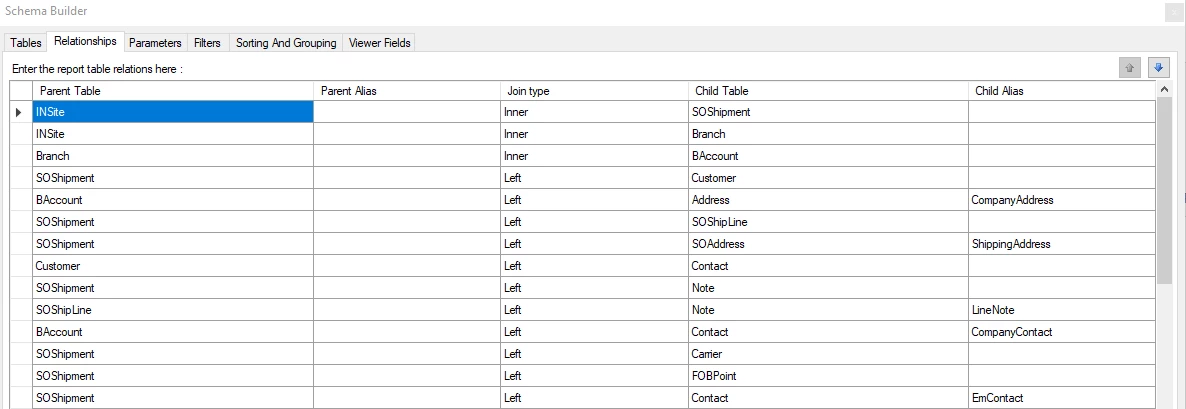
This is caused by an issue with a join in the report form. If you share the data relations in the report form, we likely can help you identify what is causing the duplication.

If you are not comfortable with report designer, you may need to get your Acumatica partner to assist.


Dana Moffat
Community Manager
Forum|alt.badge.img+2
  • Community Manager
  • October 6, 2025

Hi ​@SunnyM,

I’m wondering if the report has been customized or if there are any customizations in place because when i printed the out-of-box Shipment Confirmation, i didn’t have duplicated lines.

-Dana


Forum|alt.badge.img
  • Jr Varsity III
  • October 6, 2025

As bwhite49 stated, it is likely a join issue.  We put our customer part number on a handful of reports and if a user has two customer part numbers populated for a single internal stock item, it will duplicate the lines.  Maybe check something like that?


Manikanta Dhulipudi
Captain II
Forum|alt.badge.img+15

@SunnyM Could you please provide the screenshot of your Joins.


  • Author
  • October 6, 2025
​@Manikanta Dhulipudi here you are. 


bwhite49
Captain II
Forum|alt.badge.img+10
  • Captain II
  • October 6, 2025
​@Manikanta Dhulipudi here you are. 


Probably SOPackageDetailEx is your issue. That will split by the number of packages on the shipment.


  • Author
  • October 6, 2025

@bwhite49 any way to fix it. It is used for the tracking number. 


bwhite49
Captain II
Forum|alt.badge.img+10
  • Captain II
  • Answer
  • October 6, 2025

You could add a condition in that join where SOPackageDetailex.LineNbr = 1. This would exist right below SOShipment.ShipmentNbr = SOPackageDetailex.ShipmentNbr

This should show the first tracking number in the list but it’s messy because I think it’s possible that line nbr 1 could not exist in some cases.

You best bet is to create a sub report to display all tracking numbers. Basically, you will embed the tracking number list inside the form, but it will not affect the behavior of the form (no more duplicates).

Creating a sub report can be tricky though. I’m not sure if I can point you to the best resource to create one.


  • Author
  • November 7, 2025

@bwhite49  still not working. 


bwhite49
Captain II
Forum|alt.badge.img+10
  • Captain II
  • November 7, 2025

Did you create the sub report? You have to create the sub report then add that sub report to this form to display the tracking numbers and not cause duplication. You should have you partner assist as it’s not an easy task.


  • Author
  • November 17, 2025

@bwhite49 I spoke with Acumatica about it and they mentioned when you have multiple lines on the package tab that is the cause of the issue. They can not assist me further on it. They mentioned the fix would be in the relationship section within report designer. Anyone know how to fix that?