

Solved

Selling items with specific increments

  • March 5, 2026
  • 4 replies
  • 27 views

Forum|alt.badge.img

Hi Everyone!

Is there a way to set-up an item to only allow sales in specific increments? As an example, we might buy a roll of 1000’ of wire, but I only want to be able to use (via BOM) or sell (via SO) in increments of 100’. Is there a way to set that up?

Best answer by npetrosov31

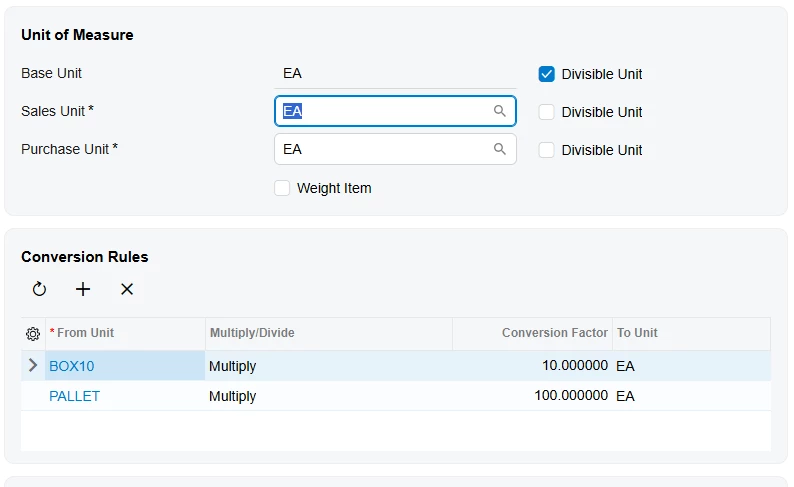
here is an example of the Sales Demo system. the base unit is EA which is equivalent to your feet. And it has conversions for BOX10 and PALLET. Box10 is 10 EA, Pallet 100 EA. So if you put 1 feet as your base Unit and create a 100feet unit for sales, the only thing there will be to add quantity. On the sales order you will need to add 1 quantity of 100feet to get 100, 2 quantity of 100feet to get 200, etc. and that multiplier will be controlled by the quantity already and not the uom. 

4 replies

npetrosov31
Jr Varsity I
Forum|alt.badge.img+1
  • Jr Varsity I
  • March 5, 2026

Hi ​@jbedwards, check unit of measures in Acuamtica. You can set base uom, sales uom and purchase uom on the inventory item screen. That will be used everywhere in the system. But as far as I know that will be just defaults and can be changed manually on the sales order document itself after adding the item to the record


Forum|alt.badge.img
  • Author
  • Freshman II
  • March 5, 2026

Thanks - but as I understand UOM, that won’t fix the issue. In my scenario, the UOM is always the same(ex. feet), but it’s the amount of material that varies. 100 feet, 200 feet, 300 feet, but not 125 feet or 225 feet. Increments of 100 only. 


npetrosov31
Jr Varsity I
Forum|alt.badge.img+1
  • Jr Varsity I
  • Answer
  • March 5, 2026

here is an example of the Sales Demo system. the base unit is EA which is equivalent to your feet. And it has conversions for BOX10 and PALLET. Box10 is 10 EA, Pallet 100 EA. So if you put 1 feet as your base Unit and create a 100feet unit for sales, the only thing there will be to add quantity. On the sales order you will need to add 1 quantity of 100feet to get 100, 2 quantity of 100feet to get 200, etc. and that multiplier will be controlled by the quantity already and not the uom. 


Forum|alt.badge.img
  • Author
  • Freshman II
  • March 5, 2026

Thanks - I think I understand. I’ll take a look at the demo and will mess around in our test tenant. Thanks for the extra explanation!