Answer

restrict the ability to prevent any discount from happening on a hand full of stock items

  • August 20, 2025
  • 6 replies
  • 95 views

How do you restrict the ability to prevent any discount from happening on a hand full of stock items when a sales order is done? 

Best answer by bwhite49

You could introduce an approval map/approval workflow. This is something that needs to be turned on from the enable/disable screen and then there are a series of steps to get it working after that.

Basically, you would set a rule that if there is a discount applied to an order then somebody (a manager or senior level person) would need to approve the order before the order can get to the “open” status. You can go a bit more granular in the logic to push it to approval, but there are some limitations.

Another alternative solution could be that when an order has a discount you can have a business event create a system task/activity or an email to notify you of the discount applied to the order if you don’t want to deal with the approval system.

You could also hide or disable the discount field through access rights. This way, specific users can’t modify the discounts on an order. They can only be auto applied or applied by somebody with different access rights. 

If none of those options work, you can look into customizations.


6 replies

Forum|alt.badge.img

I think we probably need more information on the issue.

You have items A, B, C, D.  A and B are ineligible for discount.

Do you have Group Discounts, Line Discounts, or are people putting manual discounts on the Sales Order Lines?

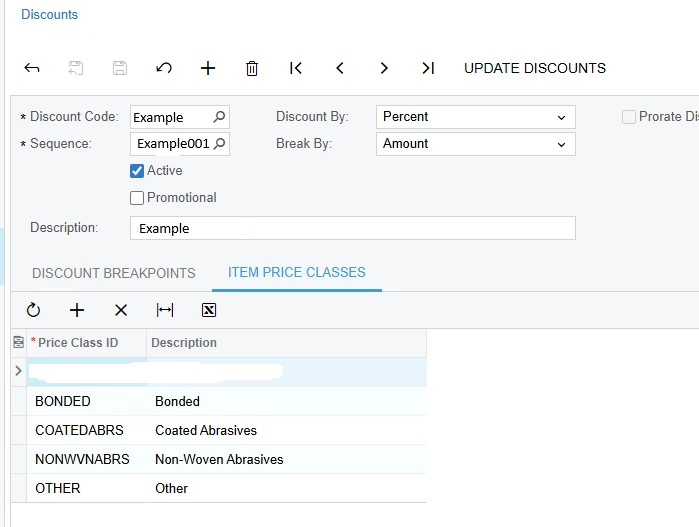
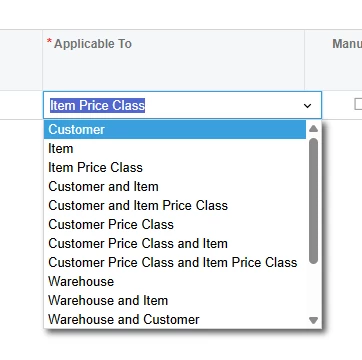
If it is the first two.  I would review how the discounts are applied in AR209000 and adjust your settings.

For us we had to move the items to a Price Class that is not set in the Discount settings.

IN202500

AR209500


This one, the discount would be applied to Other.  So we would either remove Other, or remove/change the name of the price class on the item(s).

There are a lot of settings in AR209000, depending on how you need to approach this.  We found Item Price Class to be the cleanest for our current need.


  • Author
  • August 21, 2025

@adaughenbaugh95 thank you for the response. 


You have items A, B, C, D.  A and B are ineligible for discount. Yes for non stock and stock component. 

Do you have Group Discounts, Line Discounts, or are people putting manual discounts on the Sales Order Lines? Sales team is manually putting in a discount % or dollar amount on the sales order. What you stated above prevent them from using the two fields when they create a sales order/quote? 


Forum|alt.badge.img

@adaughenbaugh95 thank you for the response. 


You have items A, B, C, D.  A and B are ineligible for discount. Yes for non stock and stock component. 

Do you have Group Discounts, Line Discounts, or are people putting manual discounts on the Sales Order Lines? Sales team is manually putting in a discount % or dollar amount on the sales order. What you stated above prevent them from using the two fields when they create a sales order/quote? 

Unfortunately, it will NOT keep a sales person from manually discounting the item.

I’m fairly new at Acumatica (~6 months), but I would think this might require an attribute flag on the item, and a customization on the Sales Order Entry to flag/keep those items from getting any manual discount.

We can see if anyone else has a better idea though.


bwhite49
Captain II
Forum|alt.badge.img+11
  • Captain II
  • Answer
  • August 21, 2025

You could introduce an approval map/approval workflow. This is something that needs to be turned on from the enable/disable screen and then there are a series of steps to get it working after that.

Basically, you would set a rule that if there is a discount applied to an order then somebody (a manager or senior level person) would need to approve the order before the order can get to the “open” status. You can go a bit more granular in the logic to push it to approval, but there are some limitations.

Another alternative solution could be that when an order has a discount you can have a business event create a system task/activity or an email to notify you of the discount applied to the order if you don’t want to deal with the approval system.

You could also hide or disable the discount field through access rights. This way, specific users can’t modify the discounts on an order. They can only be auto applied or applied by somebody with different access rights. 

If none of those options work, you can look into customizations.


Forum|alt.badge.img

You could introduce an approval map/approval workflow. This is something that needs to be turned on from the enable/disable screen and then there are a series of steps to get it working after that.

Basically, you would set a rule that if there is a discount applied to an order then somebody (a manager or senior level person) would need to approve the order before the order can get to the “open” status. You can go a bit more granular in the logic to push it to approval, but there are some limitations.

Another alternative solution could be that when an order has a discount you can have a business event create a system task/activity or an email to notify you of the discount applied to the order if you don’t want to deal with the approval system.

You could also hide or disable the discount field through access rights. This way, specific users can’t modify the discounts on an order. They can only be auto applied or applied by somebody with different access rights. 

If none of those options work, you can look into customizations.

 

Can they only require approval for certain part #s, though?  It sounds like they have some low margin items they cannot discount and others they can.


bwhite49
Captain II
Forum|alt.badge.img+11
  • Captain II
  • August 21, 2025

Yes, you can have an approval map for certain item IDs or Item classes.