Answer

Restocking the Default Issue From location in combination with FIFO issue method

  • December 10, 2021
  • 10 replies
  • 341 views

brothe58
Jr Varsity II
Forum|alt.badge.img

I’m currently upgrading to 21r2. I have a business need for a warehouse restocking report. This is different than a replenishment or purchasing report.

My goal is to make it so a warehouse picker never arrives at an empty Default Issue From location because it’s already been refilled by restocker. FIFO must be factored, when applicable.

Consider an example Inventory ID `12345` that is Lot Tracked with a FIFO issue method. This item is stored in 4 different locations within a single warehouse:

Location IDs for `12345`:
——————
PRIMARYPICKDefault Issue From location (this is where we pick from)
STORAGE1 — Lot #3 (newest inventory)
STORAGE2 — Lot #2 (older inventory)
STORAGE3 — Lot #1 (oldest inventory)

I need a report (or generic inquiry) to tell my restockers to refill the PRIMARYPICK for `12345` *before* the inventory runs out. It needs to direct them to the correct Location ID that should be used for restocking the PRIMARYPICK. In the example above, this would be STORAGE3 because it’s the oldest inventory.

The Create Shipment action sort of does this now. If the PRIMARYPICK is empty, the shipment will use correctly use STORAGE3 for the inventory transaction.

It’s easy enough to identify Default Issue From locations with a qty less than X. But I can’t figure out a way to identify which random storage location should be used to restock the Default Issue From location with lot or serial tracked items.

Is there anyway to mimic whatever logic Create Shipment is using in a report and/or Generic Inquiry so I can be proactive about restocking the Default Issue From location?


Best answer by brothe58

@SSwim I've attached my reports as an example. (Public Dropbox links.)

I ended up embedding a sub-report (psrestocklocation.rpx) in the main report (IN641030.rpx) because I needed a sub-select and Report Designer doesn't allow for that.

The heavy lifting is done in the sub-report. Basically, you pass in a SiteID and InventoryID and the query looks for non-empty locations sorted by pick priority, expiry date, or receipt date.

Hope this helps.

10 replies

mvolshteyn
Acumatica Moderator
Forum|alt.badge.img+3
  • Technical Account Manager in the ISV Team
  • December 13, 2021

@brothe58 , info about which lots with receipt dates are contained in which locations is stored in the InLotSerialStatus table (LocationId, LotSerialNbr, ReceiptDate).Can you clarify if you need the report show all available lots ordered by Receipt Date or you just need to show only lots which are necessary to replenish the quantity in the primary location (and no more)?


brothe58
Jr Varsity II
Forum|alt.badge.img
  • Author
  • Jr Varsity II
  • December 13, 2021

Ideally, I need to show only lots which are necessary to replenish the quantity in the primary location. I'll take a look at the InLotSerialStatus table. Having access to the ReceiptDate may be all I need to make this work.

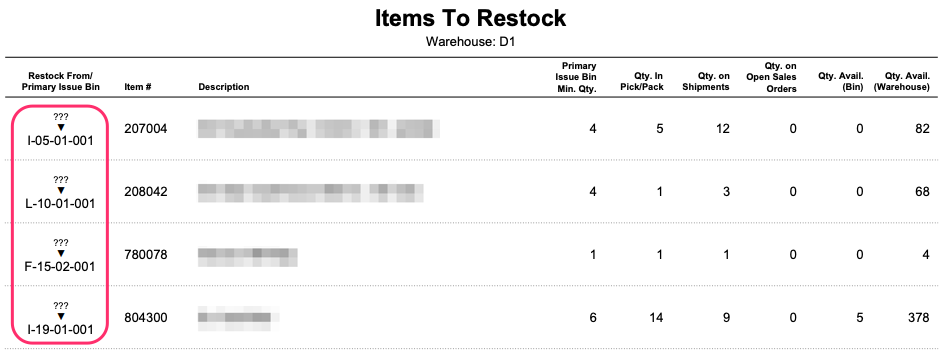
Here's a screenshot of a report I've started. I need to populate the ??? in the leftmost column. The Location ID under the triangle is the Primary Location ID. The ??? is where a restocker should go to find more inventory (with FIFO being a factor, when applicable.)

You're right. I need to also consider that there might be multiple lots that need to move from potentially multiple locations.

Step 1 is getting my restockers pointed in the right direction. Thanks for the tip about [InLotSerialStatus].[ReceiptDate].


Chris Hackett
Community Manager
Forum|alt.badge.img
  • Acumatica Community Manager
  • January 25, 2022

Hi @brothe58 were you ever able to work this out? Thanks!


  • Freshman I
  • October 2, 2024

I am trying to create this exact same report and am having similar issues to what you are experiencing. Did you ever get this report to work? If so could you share it with me? Our system is not using lots to track material so that is less important but I can not figure out how to get inventory for our default issue location and all other locations that have stock so we can identify what the from location for the transfer is.


brothe58
Jr Varsity II
Forum|alt.badge.img
  • Author
  • Jr Varsity II
  • Answer
  • October 9, 2024

@SSwim I've attached my reports as an example. (Public Dropbox links.)

I ended up embedding a sub-report (psrestocklocation.rpx) in the main report (IN641030.rpx) because I needed a sub-select and Report Designer doesn't allow for that.

The heavy lifting is done in the sub-report. Basically, you pass in a SiteID and InventoryID and the query looks for non-empty locations sorted by pick priority, expiry date, or receipt date.

Hope this helps.


  • Freshman I
  • October 9, 2024

@brothe58 I ended up doing the same thing. I had to build 2 imbedded reports to get this to work. Thanks for the reply.


Forum|alt.badge.img
  • Freshman II
  • June 27, 2025

Helllo ​@brothe58

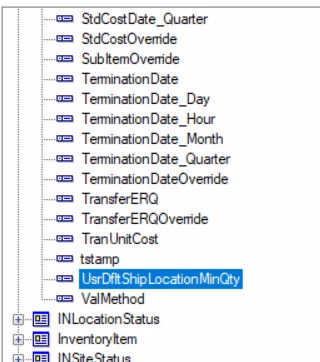
I noticed a Usr field on the INitemSite. Is that the minimum quantity on a location or is that on the warehouse. 

I take it you had to create that field via a customization project. 


brothe58
Jr Varsity II
Forum|alt.badge.img
  • Author
  • Jr Varsity II
  • June 28, 2025

Hi @acheesman,

It’s the location, not the warehouse.

You’re right that UsrDfltShipLocationMinQty was created via a customization project.

It’s a user entered threshold for a minimum qty that should always be in that location. If the qty avail in that location (plus the qty of that item moving through the sales/pick/pack process) falls below this threshold, a restock condition is applicable and the item will show on this restock report.

Our warehouse foreman is responsible for updating the value based on seasonal velocity.

For example: We always want to have at least 8 heat lamps in the primary location. (See screenshot.)


Forum|alt.badge.img
  • Freshman II
  • July 1, 2025

@brothe58 - Thanks for the information. I think we are close with this. We have some scenarios where paper goods are bought and sold in sheets, then cases, then pallets. Should we do this minimum qty on the base UOM? Or should we build the report differently if we want different results based on UOM? Thanks, Alan


brothe58
Jr Varsity II
Forum|alt.badge.img
  • Author
  • Jr Varsity II
  • July 2, 2025

@acheesman - Base UOM would give you the most flexibility.

My recollection is that the field comparing it against ([INLocationStatus].[QtyAvail]) assumes Base UOM.