

Question

qty on shipping

  • August 21, 2026
  • 6 replies
  • 48 views


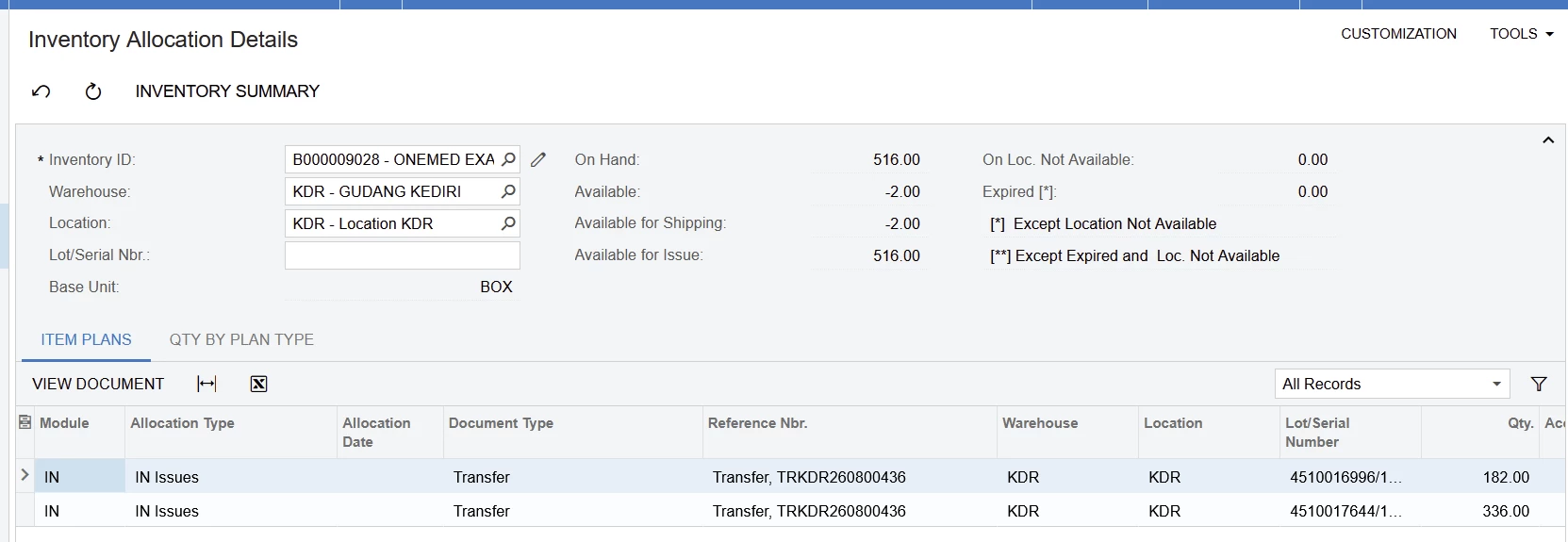
I want to ask, is it true that the “Available for Shipping” can be negative ? 


6 replies

Manikanta Dhulipudi
Captain II
Forum|alt.badge.img+16

@stevenihsg Yes if any items allocated to any open transactions or if item is marked as allow negative checkbox in the item class.

See availablity calculation rule.

https://help-2024r2.acumatica.com/Wiki/Print.aspx?pageid=36d6e854-c66e-4d9f-b150-6abbf0ece76b


jinin
Pro I
Forum|alt.badge.img+12
  • Pro I
  • August 21, 2026

Hi ​@stevenihsg 

Yes, a negative Available for Shipping is expected behavior — it isn't a display bug.

Acumatica calculates it as on-hand minus allocations, and there's no floor at zero. In your case the two IN Issues plan rows for transfer TRKDR260800436 total 182 + 336 = 518 against 516 on hand, which gives you the −2.

Common reasons it goes negative:

  • The item is lot-tracked, so allocations are pinned to specific lots. If another document consumed one of those lots after the transfer allocated it, the plan row keeps its original qty while on-hand drops.

  • The transfer was created when on-hand was higher and something else consumed the difference in between.

  • Allow Negative Quantity is enabled on the item class or warehouse.

  • Leftover INItemPlan records from deleted or partially released documents.

Also worth noting: Available for Issue still showing 516 is normal. Different plan types decrement different availability buckets, so the two figures won't always agree.

To identify which case applies, open transfer TRKDR260800436 and check whether it really holds 518 across those lots. If yes, the negative is real and clears on release or correction. If not, run Validate Inventory (IN505000) for that item/warehouse to rebuild the status and plan records from actual transaction history — best done off-hours, since it locks the item while recalculating.


  • Author
  • Freshman I
  • August 21, 2026

why acumatica create system like that? available for shipping can allow negative if i create transfer or issue but cannot allow negative if i create shipment.


Hi ​@stevenihsg,

Yes, it can appear negative.

The Available for Shipping value is an estimated quantity calculated from the on‑hand quantity minus several deductions, including:

  • Quantities on unreleased IN issues
  • Quantities allocated for shipping
  • Quantities shipped
  • Quantities in unreleased assembly demand (kits, etc.) 

Because these deductions are based on documents that are not yet released, the system may temporarily show a negative value while those transactions are still pending. 

In your screenshot, the IN issues (Transfer) lines are likely the reason the value shows ‑2.00 until the related documents are released.

So the negative value is possible as an intermediate calculated estimate, even though the system still validates availability when creating shipments.


jinin
Pro I
Forum|alt.badge.img+12
  • Pro I
  • August 21, 2026

Hi ​@stevenihsg ,

Issues and Transfers record what already happened. Someone physically moved or pulled the stock. If Acumatica blocked it, you'd be forced to record something different from what actually happened in the warehouse. So it lets the number go negative and expects you to fix it later — usually a missing receipt or a count difference.

A Shipment is a promise about something that hasn't happened yet. It says stock will leave for a customer. Allowing that to go negative means committing goods you don't have, and it flows straight into Invoice, COGS, and AR. So the system stops you earlier.

Available for Shipping is a calculated number, not a controlled one. IN documents write to it and nothing stops it at zero. The shipment process reads it and refuses to work with a negative balance.


  • Author
  • Freshman I
  • August 21, 2026

okay, ill try to accept all the explanation. thank you ​@jinin ​@WasanaWishmini21 ​@Manikanta Dhulipudi



