Question

Prepayment Invoice from the Sales Order screen

  • September 10, 2025
  • 6 replies
  • 158 views


Hello,

I’m having difficulty creating an import scenario to generate a Prepayment Invoice from the Sales Order screen.

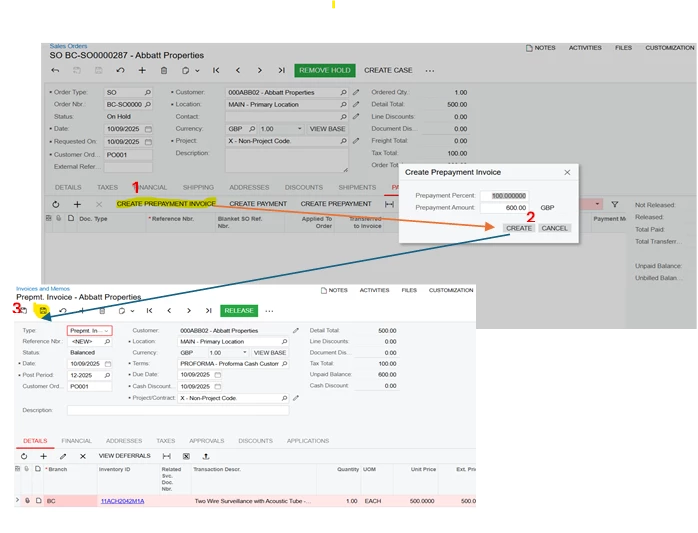
In the manual process, the user clicks the Prepayment Invoice button, which opens a pop-up window asking for the amount or percentage of the sales order. After confirming, the system navigates to the AR Invoice and Memo screen, automatically copying all relevant data from the Sales Order screen. At this point, the user simply needs to click Save to complete the creation of Prepayment Invoice.

Please see screenshot below  the whole process.
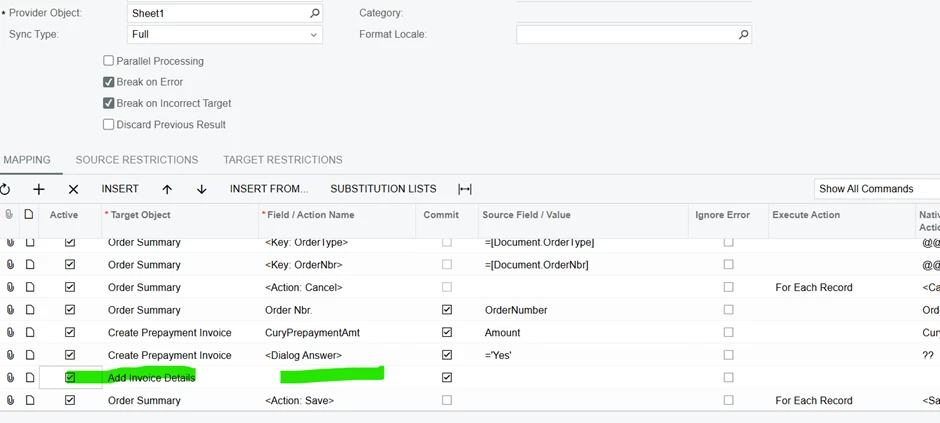
Based on the manual process, I attempted to create an import scenario. I tried using the Add Invoice Details object under the sales Order screen, but I noticed that this object does not include a Save Action. Could someone please advise or guide me on how to proceed with this . We need prepayment Invoice due to VAT requirement,



6 replies

Hey Muhammad, did you get anywhere with this? I am looking to implement the same thing.


Sorry for late reply. I couldnt find any solution for this. In the end asked the user to create manually.  We are looking to develop something to automate it.


dgodsill97
Varsity I
Forum|alt.badge.img+3
  • Varsity I
  • November 18, 2025

The basic steps when dealing with a sub form are:

  1. Fill in all the required fields with the subform as the target option
  2. Then from the Document Summary target option, invoke the action

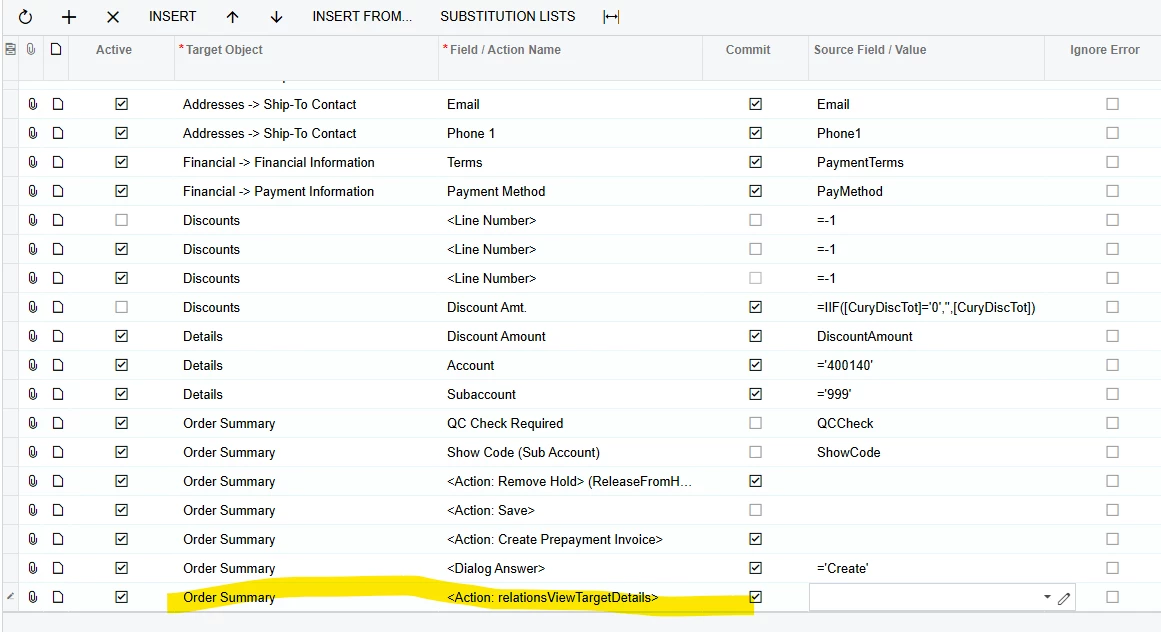
I’m having difficulty understanding how the Target Object option works in this import scenario, and I haven’t been able to find much technical documentation explaining the functionality. If you can provide some guidance, it would be greatly appreciated. Please see the screenshot below for reference.


dgodsill97
Varsity I
Forum|alt.badge.img+3
  • Varsity I
  • November 20, 2025

The target option is the heading of the group on the screen and usually has summary in the name.  All key fields are entered in the summary area and most form actions are called from the summary.  A subform, which opens from a detail line, have their own fields to enter.


Your import example above has multiple duplicate lines.  If you are a partner, enter a support case, which may be billable, or watch this video. 

.  


According to Acumatica Support Desk, it is not possible to create a Prepayment Invoice. While there are a few duplicate discount lines, they do not prevent the order from being created successfully. The real issue is that I am unable to create a Prepayment Invoice which was asked in my orignal question.

In my screenshot, I assumed that when you mentioned the target object action, you were referring to “RelationsViewTargetDetails.” You may need to review the original question again and provide any applicable solutions rather than refering me to general topic or thread.