Question

PI Types - Unfreeze Stock When Counting Finishes

  • August 5, 2026
  • 4 replies
  • 69 views

Forum|alt.badge.img

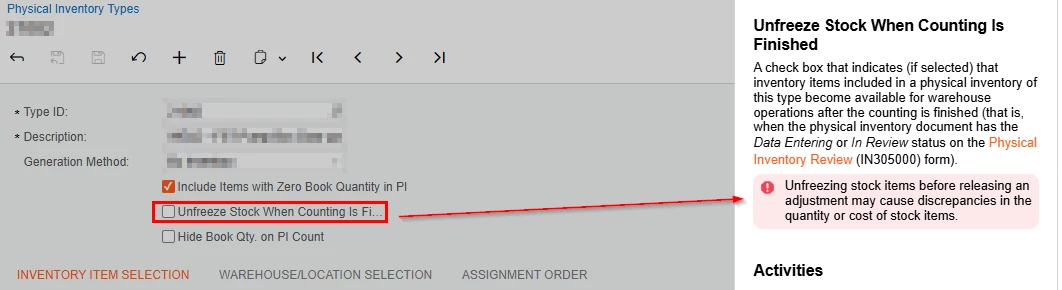
Any idea as to what transaction this warning is referring to? or is there a scenario where the unfreezing won’t work?
 

4 replies

  • Freshman II
  • August 5, 2026

I have not attempted this in Acumatica but in a previous ERP I worked with they had a similar function. I assume the reasoning is the same.

The reason in that case was due to how Physical Inventory transactions work. You are essentially taking a snapshot of your inventory at a point in time and you are supposed to “lock your inventory” during the Physical Inventory count. The inventory snapshot will say something like for Part A we have 10 onhand in this location. If you consume that inventory in Acumatica through some transaction while  that Physical Inventory Sheet is open, and then you post it after the consumption of inventory, you’re basically causing an inventory discrepancy. The worksheet thinks you have 10 onhand, you then consume it, now when it tries to post the Physical Inventory worksheet it creates an issue because the inventory no longer exists.

It really is best practice to lock your inventory down during the duration of a Physical Inventory and to generate the worksheets right before you do the Physical Inventory and get them posted as quickly as possible. Don’t generate the sheets days in advance or take days to post them after the counts are finished. 


mohammadnawaz51
Varsity I
Forum|alt.badge.img+7

@amorey 

This is because after counting is complete but before the adjustment is released, the system still hasn't updated the inventory balances.

For example:

  1. System quantity = 100
  2. Physical count = 95
  3. Counting is completed.
  4. Stock is unfrozen.
  5. A warehouse employee ships 10 units.
  6. The adjustment is later released.

Now the system has to reconcile both:

  • The physical count adjustment (-5)
  • The shipment (-10)

Depending on the sequence of transactions, this can lead to temporary quantity or cost discrepancies that need to be reconciled.


Forum|alt.badge.img
  • Author
  • Jr Varsity III
  • August 5, 2026

@mohammadnawaz51  Have you used this flag and encountered a discrepancy?


Testing this flag, we received a purchased part before the PI adjustment was release and Acumatica processed/displayed the transactions in the correct order, but the last cost displayed in the Stock Item-Price/Cost tab was what the purchased receipt had, instead of the actual last transaction which was the PI adjustment (Don’t think this is a big deal if you have in mind what actually happened).


ShoKetchum
Acumatica Employee
Forum|alt.badge.img+1
  • Acumatica Employee
  • September 23, 2026

Hi ​@ldjmarcog !

The information others have shared is spot on.

I wanted to add that items that use “FIFO” valuation would be affected by this flag. Specific Cost setups would also face possible issues; however Average and Standard Cost setups would probably not notice discrepancies as much.

This is because FIFO (and Specific Cost) tracks in layers (Item Costs and Valuation Methods: FIFO Method • Inventory Management Guide • Acumatica Beacon / Item Costs and Valuation Methods: Specific Method • Inventory Management Guide • Acumatica Beacon)

Another common reason to prevent the practice, is due to the possible creation of negative On Hand quantities.

If an IN Issue was created removing items, but then a PI Count is created further removing the items, what cost is used for the items removed? Negative On Hand represents items that have not yet been received/purchased, so Acumatica will “guess” the cost on these items. If the actual purchase does not match the difference (and a PPV transaction was also not created), this can cause discrepancies.


I think this is one of the primary reasons it's a best practice to lock down inventory of items being counted. If your team has really strong control over your Warehouse, On Hand, and Available, it should be fine to enable this setting. However, if you often find discrepancies during your PI counts, or do not use negative On Hand quantities often, I recommend not using “Unfreeze stock when counting is done”

I personally look at the count as acting like a “source of truth” moment. Moving items while the count is occurring can cause incorrect data entry (which can cause further downstream issues).


I hope this additional information is helpful! 😁