
Question

Override "Generate" Button in PO Receipt Line Details

  • September 24, 2025
  • 1 reply
  • 41 views

Forum|alt.badge.img+1

Hi Everyone,

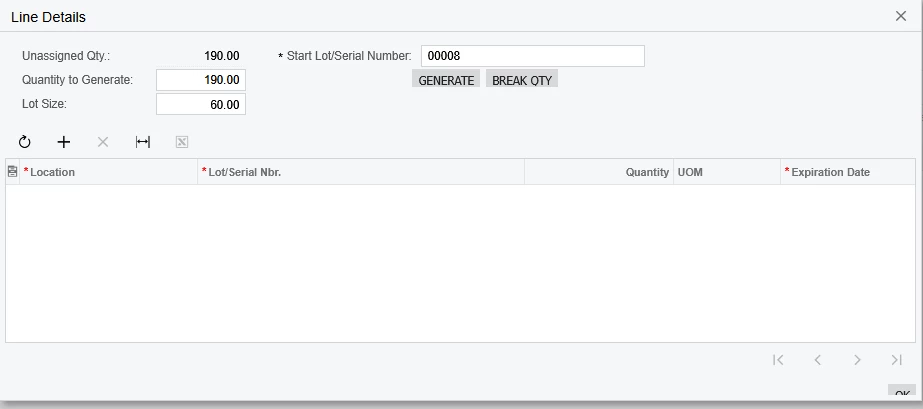
Has anyone overridden the "Generate" button in the PO Receipts > Line Details popup?

I need to split a line quantity (e.g., 190) based on a custom field BreakQty (e.g., 60), so it generates lines like:

  • Line 1 – 60

  • Line 2 – 60

  • Line 3 – 60

  • Line 4 – 10

Each with a new sequential lot number.
Thanks in advance!

1 reply

Forum|alt.badge.img
  • Varsity I
  • October 14, 2025

@svwk05 

  1. Create a Custom Field

    • Add a custom field to the PO Receipt Line screen (e.g., UsrBreakQty) to store the break quantity.

    • Ensure it’s accessible in the Line Details popup.

  2. Override the Generate Button

    • In Customization Project, navigate to PO Receipt (POReceiptEntry) → Line Details (POReceiptLineSplit).

    • Add a graph extension and create an event handler for the Generate button.

  3. Custom Generate Logic

    • Instead of the standard logic, loop through the total UnassignedQty and split it according to BreakQty.

    • For each split:

      • Create a new POReceiptLineSplit record.

      • Assign the quantity (BreakQty or remaining).

      • Assign a new sequential Lot/Serial Number.

      • Insert the split record into the transaction.

Pseudo-Code Example


public class POReceiptEntry_Extension : PXGraphExtension<POReceiptEntry> { public PXAction<POReceiptLine> customGenerate; [PXButton(CommitChanges = true)] [PXUIField(DisplayName = "Generate Custom")] protected void CustomGenerate() { var row = Base.ReceiptLines.Current; if (row == null) return; decimal remainingQty = row.UnassignedQty ?? 0m; decimal breakQty = row.GetExtension<POReceiptLineExt>().UsrBreakQty ?? 1m; int lotNumber = 0; while (remainingQty > 0) { decimal qtyToGenerate = Math.Min(breakQty, remainingQty); lotNumber++; POReceiptLineSplit split = new POReceiptLineSplit { ReceiptType = row.ReceiptType, ReceiptNbr = row.ReceiptNbr, LineNbr = row.LineNbr, Quantity = qtyToGenerate, LotSerialNbr = (row.StartLotSerialNbr ?? "0000") + lotNumber.ToString("D2") }; Base.splits.Insert(split); remainingQty -= qtyToGenerate; } Base.splits.View.RequestRefresh(); } }