Answer

Need Help with IF Statement in GI

  • November 17, 2024
  • 6 replies
  • 99 views

Forum|alt.badge.img

Hello,

I wanted to add a custom column in SO3030PL that any invoice due date smaller than today’s date plus 5 days and the status of the invoice is “Open,” then it should say Past Due, otherwise it should say “Current.” Here is my IF statement that is working normally without considering the invoice status:

=IIf([ARInvoice.DueDate] + Day( 5) < Today(), 'Past Due','Current') 

I just need help on how to add the invoice status to the statement. Also, I could not name the column. 
Best answer by Laura03

Hello,

Please try :

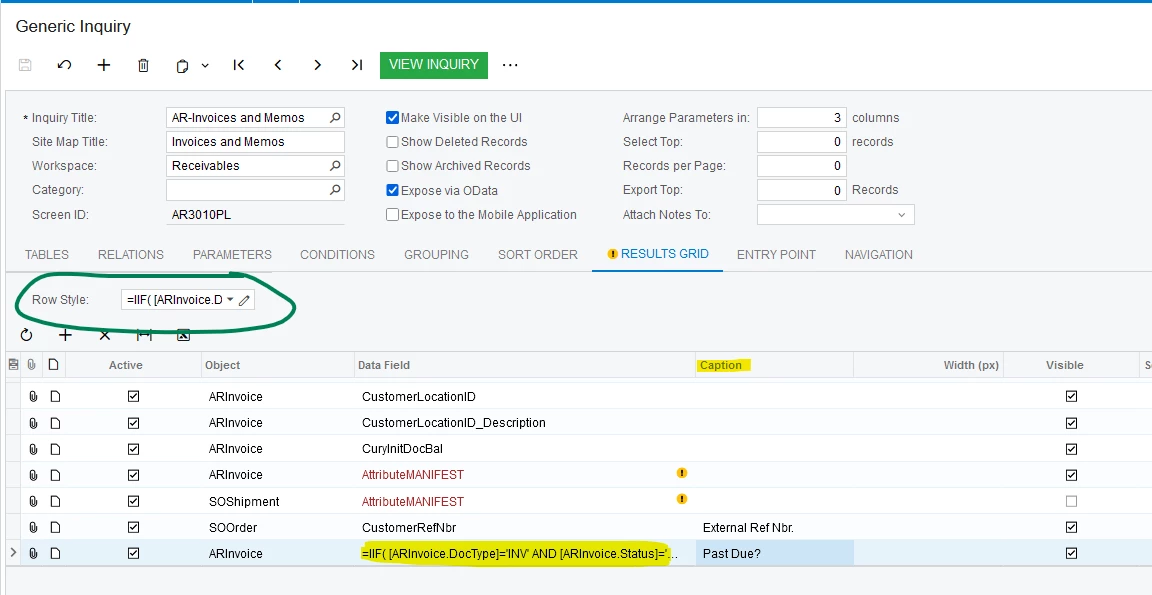
=IIF( [ARInvoice.DocType]='INV' AND [ARInvoice.Status]='N' and [ARInvoice.DueDate] + Day( 5) < Today(), 'Past Due','Current') 

Column Name may be added in Caption:


You may like to have the color of the rows change, for the items that are Past Due. Row Style (circled) can be used with a similar formula, to change the color of the rows:

=IIF( [ARInvoice.DocType]='INV' AND [ARInvoice.Status]='N' AND
 [ARInvoice.DueDate] + Day( 5) < Today(), 'red40')

Laura

6 replies

Laura03
Captain II
Forum|alt.badge.img+19
  • Captain II
  • Answer
  • November 17, 2024

Hello,

Please try :

=IIF( [ARInvoice.DocType]='INV' AND [ARInvoice.Status]='N' and [ARInvoice.DueDate] + Day( 5) < Today(), 'Past Due','Current') 

Column Name may be added in Caption:


You may like to have the color of the rows change, for the items that are Past Due. Row Style (circled) can be used with a similar formula, to change the color of the rows:

=IIF( [ARInvoice.DocType]='INV' AND [ARInvoice.Status]='N' AND
 [ARInvoice.DueDate] + Day( 5) < Today(), 'red40')

Laura


Laura03
Captain II
Forum|alt.badge.img+19
  • Captain II
  • November 17, 2024

Hello,

On the last formula I provided above,  another color may be needed, after ‘red40’, for the “else” - name the color for lines that are not late.

For example, ‘red40’, ‘yellow,).

Laura 


Forum|alt.badge.img
  • Author
  • Jr Varsity III
  • November 17, 2024

Hello ​@Laura02 ,

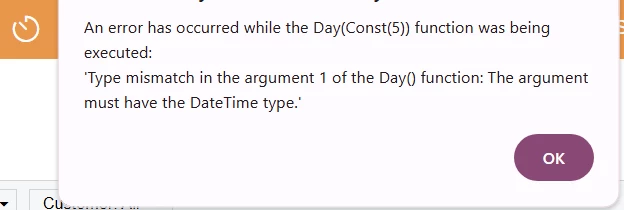
Thank you so much for correcting the IF statement. I used the statement for style, and I got this error message:


Here is my formulla:


Laura03
Captain II
Forum|alt.badge.img+19
  • Captain II
  • November 17, 2024

Hello,

Mine works fine like this:

=IIF( [ARInvoice.DocType]='INV' AND [ARInvoice.Status]='N' AND [ARInvoice.DueDate]<Today(), 'red40','default')


This doesn’t work for me:

=IIF( [ARInvoice.DocType]='INV' AND [ARInvoice.Status]='N' AND [ARInvoice.DueDate]<(Today()-5), 'red40','default')


In this previous post answered by Daryl Bowman, I found the following suggestion:


Use DateAdd(date, interval, number) instead:

=IIf([SOOrder.CustomerRefNbr]='PRO FORMA' And [SOOrder.Status]='R' And [SOOrder.OrderDate] < DateAdd(Today(),'d',-7),'red20', 'default')


Laura


Forum|alt.badge.img
  • Author
  • Jr Varsity III
  • November 17, 2024

Hello ​@Laura02 ,

Thanks for sending this, and I will look at Daryl Bowman's answer later. Where you see the invoice type is “INV” and the invoice status is “N.” In my screen the invoice type is either “Invoice,” or “Credit Memo,” etc. same thing with the status is either “Open,” or “Closed,” etc. 

Because I wonder what the invoice type would be for a credit memo or the status for closed. 


Laura03
Captain II
Forum|alt.badge.img+19
  • Captain II
  • November 18, 2024

Hello ​@Dawood ,

Please open a new post if you have additional questions.  I am the only person receiving notifications when you continue posting on an answered thread. This is the last question I will answer here. 🤐

To see the possible values for a field, click Customization → Inspect Element, and then click the field. In this example I have clicked on Document Type:

Laura