Answer

Modifying the qty of stock items to 0

  • October 8, 2024
  • 15 replies
  • 190 views

Forum|alt.badge.img

Hello all,

I have been looking out for ways where I have some stock items that have the qty more than 0. I am looking to mark them as 0. The only option that comes to my mind is to create Issue trxns. Are there any other options available? The end user is fine if GL trxns are created.

Best answer by dcomerford

Ok so your Qty will be -190 in this case the Cost will auto populate with what the cost is on the item (average cost of the item).

If average cost is zero Unit Cost is zero then 190 will be taken out of stock and there will be no GL impact as 190*0 is 0.

If they have an average cost for example of $1 then they are valued at $190 in stock so when you do adjustment the GL will credit 190 out of stock and debit the stock adjustment with 190. If you change the Unit Cost on the line it wont matter it will still take them out of stock at $1 as it cannot leave a value in inventory for them item if there is no stock qty.

Hope this makes sense.

15 replies

Laura03
Captain II
Forum|alt.badge.img+19
  • Captain II
  • October 8, 2024

Hello @Harry ,

Negative quantity Adjustment transactions may also be used to remove quantities from inventory.

Laura


Forum|alt.badge.img
  • Author
  • Semi-Pro II
  • October 8, 2024

Hello @Harry ,

Negative quantity Adjustment transactions may also be used to remove quantities from inventory.

Laura

So I would then need to create trxn under Adjustments screen? What if I enter 0 under unit cost. How would that be effected?


Forum|alt.badge.img+8
  • Captain II
  • October 8, 2024

@Harry This would hit standard cost variances, wouldnt recommend it.


Better to adjust off and realise stock loss.


Aleks


Forum|alt.badge.img
  • Author
  • Semi-Pro II
  • October 8, 2024

@Harry This would hit standard cost variances, wouldnt recommend it.


Better to adjust off and realise stock loss.


Aleks

And how can we achieve that?


Forum|alt.badge.img
  • Author
  • Semi-Pro II
  • October 8, 2024

@Harry This would hit standard cost variances, wouldnt recommend it.


Better to adjust off and realise stock loss.


Aleks

So does it mean that if I would create an adjustment with Unit Cost = 0, it will hit my overall cost for that particular stock item?


dcomerford
Captain II
Forum|alt.badge.img+15
  • Captain II
  • October 8, 2024

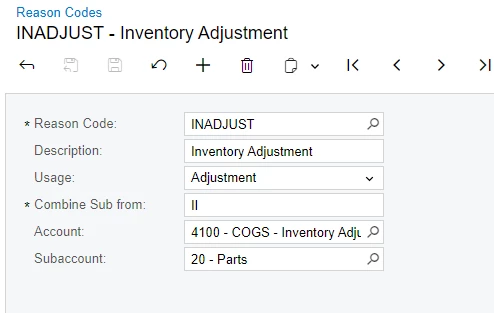
@Harry It will hit what ever Inventory account you have specified on the reason code you pick


Forum|alt.badge.img
  • Author
  • Semi-Pro II
  • October 8, 2024

@Harry It will hit what ever Inventory account you have specified on the reason code you pick


And what would be other account code? that would be balancing out the debit and credit side of such a trxn?


Forum|alt.badge.img
  • Author
  • Semi-Pro II
  • October 8, 2024

Also, @dcomerford  & @aiwan , the last & avg cost is 3.50. if I would create a adjustment trxn with Unit Cost/Ext Cost = 0, how would the cost get updated?


dcomerford
Captain II
Forum|alt.badge.img+15
  • Captain II
  • October 8, 2024

If the qty is -1 it will credit the Inventory account with 3.50 and debit the reason code Account with 3.50 


Forum|alt.badge.img
  • Author
  • Semi-Pro II
  • October 8, 2024

If the qty is -1 it will credit the Inventory account with 3.50 and debit the reason code Account with 3.50 

And what if the qty is 0? Since, negative qty isnt allowed for their stock items.


dcomerford
Captain II
Forum|alt.badge.img+15
  • Captain II
  • October 8, 2024

Why would you be trying to adjust items that have a 0 quantity? 

If you use a 0 it will do nothing.


Forum|alt.badge.img
  • Author
  • Semi-Pro II
  • October 8, 2024

Why would you be trying to adjust items that have a 0 quantity? 

If you use a 0 it will do nothing.

basically the currenty on hand qty is 190 , which the end user has requested to mark them as 0. So for marking them as 0 I am confused shall I use the Unit Cost = 0 or Unit Cost = Last cost of the respective stock item, as the cost of the stock items shouldnt be effected.


dcomerford
Captain II
Forum|alt.badge.img+15
  • Captain II
  • Answer
  • October 8, 2024

Ok so your Qty will be -190 in this case the Cost will auto populate with what the cost is on the item (average cost of the item).

If average cost is zero Unit Cost is zero then 190 will be taken out of stock and there will be no GL impact as 190*0 is 0.

If they have an average cost for example of $1 then they are valued at $190 in stock so when you do adjustment the GL will credit 190 out of stock and debit the stock adjustment with 190. If you change the Unit Cost on the line it wont matter it will still take them out of stock at $1 as it cannot leave a value in inventory for them item if there is no stock qty.

Hope this makes sense.


Forum|alt.badge.img
  • Author
  • Semi-Pro II
  • October 8, 2024

Ok so your Qty will be -190 in this case the Cost will auto populate with what the cost is on the item (average cost of the item).

If average cost is zero Unit Cost is zero then 190 will be taken out of stock and there will be no GL impact as 190*0 is 0.

If they have an average cost for example of $1 then they are valued at $190 in stock so when you do adjustment the GL will credit 190 out of stock and debit the stock adjustment with 190. If you change the Unit Cost on the line it wont matter it will still take them out of stock at $1 as it cannot leave a value in inventory for them item if there is no stock qty.

Hope this makes sense.

Shall I enter the qty as -190 or 190?
Also the current last/avg cost for the stock item is $3.50.

So I would just enter the unit cost = 3.50 and then the adjustment reason code and release the adj trxn?


dcomerford
Captain II
Forum|alt.badge.img+15
  • Captain II
  • October 8, 2024

@Harry Yes the Quantity will be -190 as you want to reduce the quantity (positive if you were finding them) and i would not change the cost as no point. Then Release it.