Answer

Mass Items Change ID with Import Scenerio

  • January 19, 2022
  • 12 replies
  • 980 views

Forum|alt.badge.img

Can someone share with me a import scenerio screen shot to mass update item ID?


Thanks in advance

Best answer by Terry65

We tried the configuration provided by vkumar, but the results were wrong. The items code that was changed was actually the next record, so verify your results!

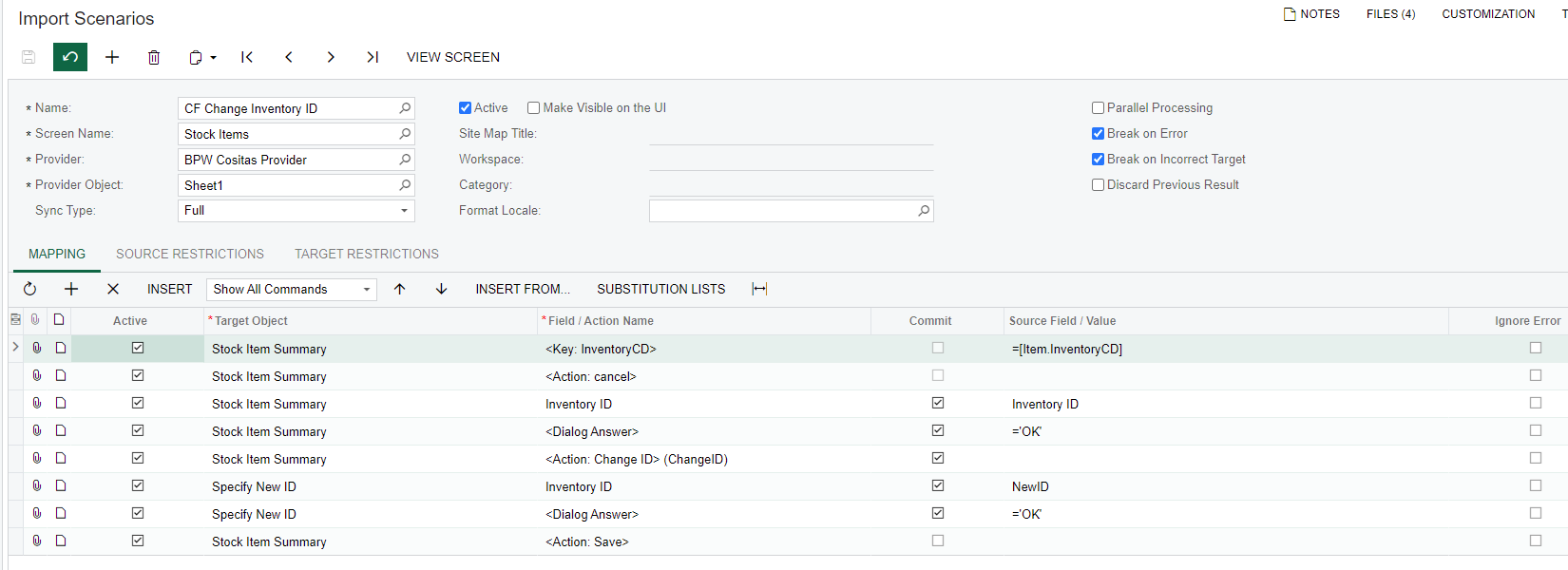
Here is our final working configuration using the Change ID action:

 

Thanks.

Terry

12 replies

Naveen Boga
Captain II
Forum|alt.badge.img+19
  • Captain II
  • January 20, 2022

Hi @john25 

The Change ID action, I have done for the Customers screen and was working as expected.  Could you please try for the Stock Items screen and verify.

Please find the screenshot below and let me know if you have any queries.


Forum|alt.badge.img+12
  • Acumatica Support Team
  • January 20, 2022

Hi @john25 

Here is one for Inventory Item code change :

Hope this helps,

Regards,


  • Freshman II
  • Answer
  • June 9, 2022

We tried the configuration provided by vkumar, but the results were wrong. The items code that was changed was actually the next record, so verify your results!

Here is our final working configuration using the Change ID action:


Thanks.

Terry


martingaxiola
Varsity I
Forum|alt.badge.img

Hola @Terry65 ,


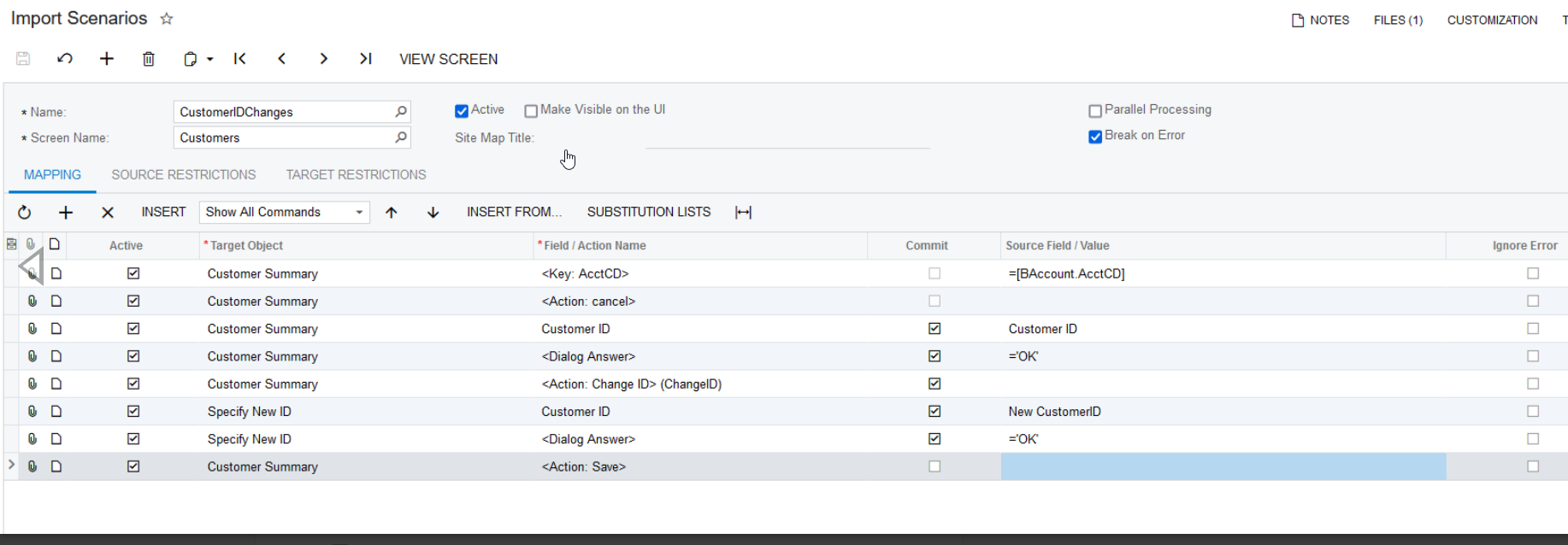
Thank you so much for your answer, I did the Client import as explained in this treat, and also got results incorrect, here is my Customer ID change:


Thank you for your import, as I base the customer import on yours. 


Michaelh
Pro I
Forum|alt.badge.img+2
  • Pro I
  • June 28, 2023

Can we change the marked answer dated 1/20/2022 please? It does not work with the current builds and actually wrecks your system. It processes the NEXT record as your New ID:

For example:
OLD ID  -  NEW ID

       1     -      2

       A     -      B


The marked answer ends up changing A to 2 instead of 1 to 2 and A to B. The 6/9/2022 answer from Terry65 is the right answer.


  • Freshman I
  • July 31, 2025

I get the error: “object reference not set to an instance of an object”. Does anyone know why?


Michaelh
Pro I
Forum|alt.badge.img+2
  • Pro I
  • July 31, 2025

@angelacmagnumtool - You’ll need to paste a snippet of your import scenario friend! It’s likely some seemingly trivial box that isn’t checked or field that’s missing in the import. If you post your import rows as shown above, we can look into it with you!


  • Freshman I
  • July 31, 2025

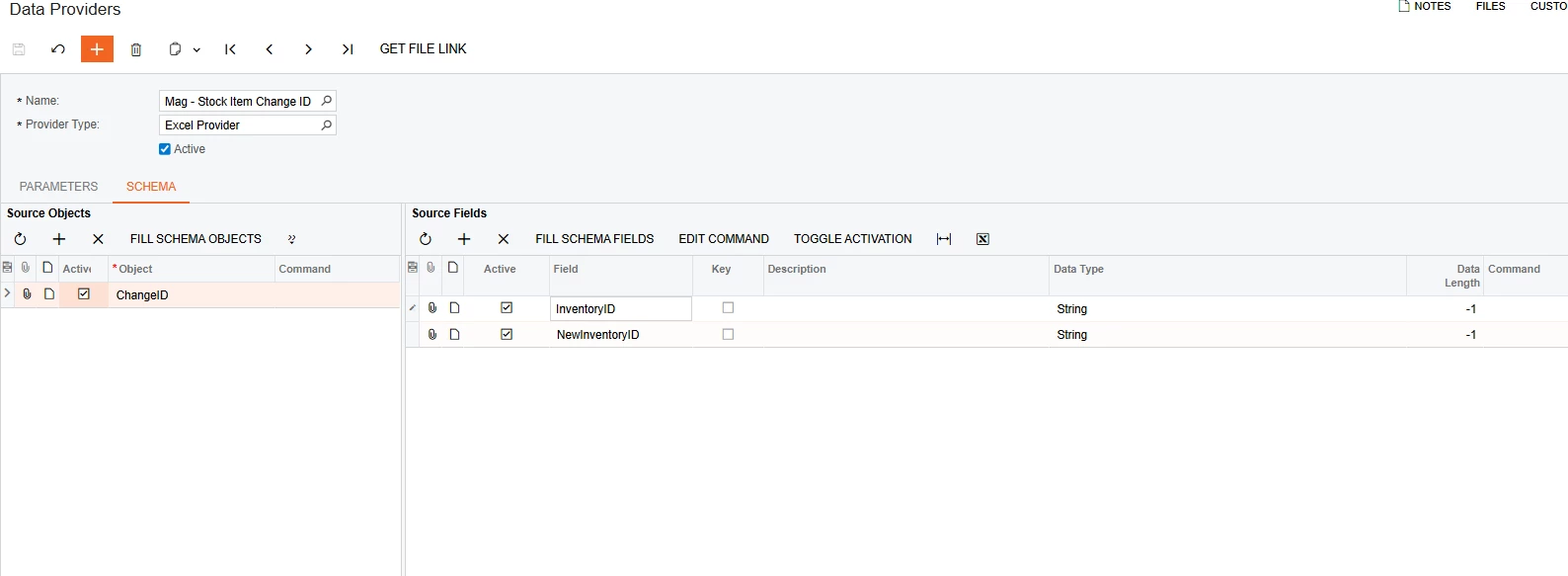
Here it is, thank you. I attached the Data Provider too. It might not be the issue, but I can’t see why it doesn’t work when I used the same logic. I also tried it with the Action at the end like the examples in this post and it gave the same error. 


Michaelh
Pro I
Forum|alt.badge.img+2
  • Pro I
  • July 31, 2025

Actions and responses feel very backward in Acumatica and you have that problem here.

in your import it should be ordered as followed:
OLD ID
NEW ID
DIALOG = OK
ACTION - CHANGE ID

When an action gets called, it looks for pre-stored data. You called your action before storing an ID and a repsonse to be passed over to that action. So if you can drop your action call down two lines, you should see better results.


Michaelh
Pro I
Forum|alt.badge.img+2
  • Pro I
  • July 31, 2025

Sorry, I just saw you mentioning that you’ve put it in the order above. Let’s assume you matched Terry65 perfectly. The other issues could be one of the following:

1. Your OLD ID is invalid, has a whitespace in front of it or something
2. Your NEW ID is an ID that has been used previously (The NEW ID has to have never existed in your tenant before)

I’ve goofed on both of those before...


Forum|alt.badge.img
  • Freshman II
  • August 20, 2025

Is anyone able to share their import excel file and XML for this import scenario?


Forum|alt.badge.img
  • Freshman II
  • August 21, 2025

Is anyone able to share their import excel file and XML for this import scenario?

Have this sorted and working using the screenshots above & a bit of trial and error. Thank you