Solved

Lot Tracked Inventory Not Matching Available Qty during Pick/Ship - Best Practice?

  • May 6, 2025
  • 6 replies
  • 96 views

Forum|alt.badge.img

Hi everyone,

We’re running into recurring issues in our Distribution Center related to lot-tracked inventory and availability for shipping. We are semi-new to Acumatica, having gone live in March, so we’re still ironing out some processes.

Our Lot/Serial Class is set to “User - Lot Tracked”, meaning the system does not assign specific lot numbers when generating pick lists - only the location is specified.

Here’s the problem:

  • The picker is directed to a location (e.g. F-A01-) to pick any available lot.
  • However, the lot they select is often showing an error (Something like “lot unavailable” or “inventory will go negative”), even though it physically exists in that location.
  • Other times, picking and packing go smoothly, but at Confirm Shipment, we get an error saying the inventory will go negative - even though nothing appears to be oversold or misallocated.
  • When we double-check the Inventory Summary screen, it shows more than enough quantity available to complete the pick lists, yet Acumatica still throws the negative inventory error.

This is creating confusion for our team and causing delays in order fulfillment.

Has anyone else experienced this behavior?

I’d love to hear how your picking process is structured, especially if you’re also using “User - Lot Tracked.” 

Any insight or best practices would be greatly appreciated!

Thank you!

Best answer by jsiburt

After several months of troubleshooting, we discovered the root cause of our negative inventory and “lot unavailable" errors wasn’t a system bug, but how we were structuring allocations and shipments.

  • Auto Allocations: Our Automation Schedule was running too frequently, which caused inventory to get tied up unnecessarily.
  • Shipment Timing: We were creating shipments too far in advance. Inventory was being allocated to the locations based on FIFO and Pick/Path Priority at the time of shipment creation, even though they weren’t the ones physically being picked first.
  • Shipping Out of Order: Because newer shipments were sometimes processed before older ones, allocations ended up crossing, which led to the “inventory will go negative” errors despite stock being physically available.

Our Solution:

We now limit shipment creation to about one week ahead. This ensures allocations remain in sync with the actual order-picking sequence and prevents conflicting claims on the same inventory. Since making this adjustment, the errors and delays have essentially disappeared.

6 replies

Forum|alt.badge.img
  • Author
  • Jr Varsity II
  • Answer
  • September 30, 2025

After several months of troubleshooting, we discovered the root cause of our negative inventory and “lot unavailable" errors wasn’t a system bug, but how we were structuring allocations and shipments.

  • Auto Allocations: Our Automation Schedule was running too frequently, which caused inventory to get tied up unnecessarily.
  • Shipment Timing: We were creating shipments too far in advance. Inventory was being allocated to the locations based on FIFO and Pick/Path Priority at the time of shipment creation, even though they weren’t the ones physically being picked first.
  • Shipping Out of Order: Because newer shipments were sometimes processed before older ones, allocations ended up crossing, which led to the “inventory will go negative” errors despite stock being physically available.

Our Solution:

We now limit shipment creation to about one week ahead. This ensures allocations remain in sync with the actual order-picking sequence and prevents conflicting claims on the same inventory. Since making this adjustment, the errors and delays have essentially disappeared.


cramesh00
Freshman II
Forum|alt.badge.img
  • Freshman II
  • December 9, 2025

@jsiburt  - Thanks for posting. I had a follow up question as I have a client experiencing a similar issue with Lot Tracking and Picking items. 
When demoing the Pick, Pack, Ship process on a scanner, I was limited to only pulling from 2 specific lots, even though there were a handful or more Lots to choose from. I realize we were in a test environment using the same part we have been testing with so it is possible the allocation details have something to do it with it, however, we did try testing the Pick, Pack Ship process with a new “lot” of the test part so they were not allocated yet, but also couldn’t be picked.
The client is wanting to be able to pull from any location or any lot that is not allocated but they also want to follow FIFO. After seeing this, I am curious if the FIFO process is messing this process up as it won’t allow for a newer lot to be picked since there are “older” lots needing to be used up.


Forum|alt.badge.img
  • Author
  • Jr Varsity II
  • December 10, 2025

Hi ​@cramesh00 - Is your client utilizing Pick Priority? We also wanted to follow FIFO logic, but given that we prefer our team to pull from any available lot within a specific location (primary pick location first--then warehouse locations), it seems like allocations and pick lists follow the location’s Pick Priority more than strict FIFO

I haven’t been able to fully prove how FIFO fits into the picking process, but I have confirmed that allocations definitely follow Pick Priority. In our case, FIFO mainly comes into play during bin replenishment, especially when restocking our pick priority 1 location bins--not so much during standard picking or shipment generation.

Not sure if that directly answers your question, but it sounds like we’re dealing with some of the same gray areas.


cramesh00
Freshman II
Forum|alt.badge.img
  • Freshman II
  • December 10, 2025

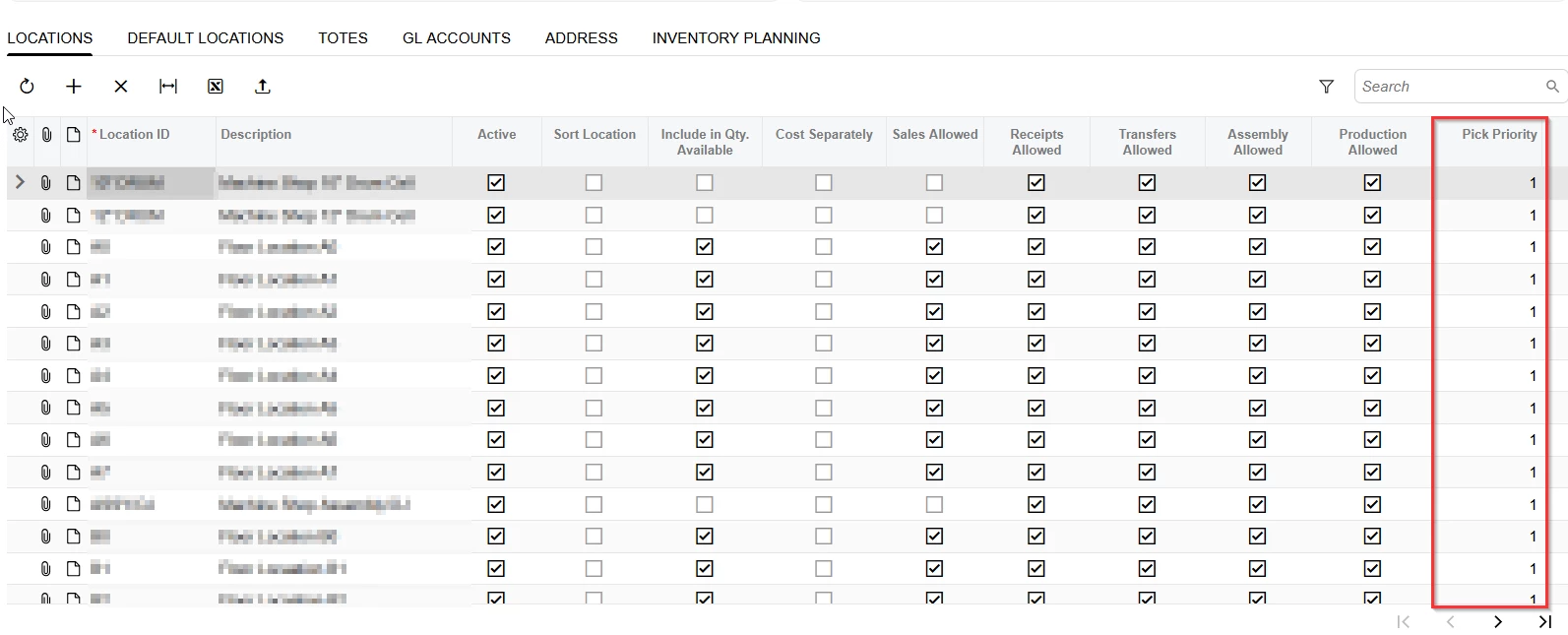
@jsiburt  I don’t believe so. Everything listed on their warehouse screen shows a Pick Priority of 1.


Forum|alt.badge.img
  • Author
  • Jr Varsity II
  • December 10, 2025

@cramesh00 - If all your client’s locations are set to Pick Priority 1, then Acumatica should be relying solely on FIFO when allocating lots--based on receipt date and availability at the time of shipment creation.

However, a few things can still interfere with that:

  • Allocations happen at shipment creation, not during picking. FIFO is applied when the shipment is generated, and Acumatica doesn’t automatically re-evaluate that logic afterward. So if an older lot wasn’t available at the time, it will allocate from the next oldest--and won’t reallocate even if the original lot becomes available later, unless the shipment is manually updated or recreated.
  • Scanners only display what’s been allocated, so even if other lots are physically present and unallocated, the picker is locked into what the system assigned. In your example, even though a new lot was created, the system likely continued allocating to the original (older) lot based on FIFO--and since that allocation already existed on the shipment, it wasn’t updated to include the newer lot.
    • This rigidity around mobile picking is actually one of the reasons why I personally don’t use the Acumatica app for picking. We instead use tablets running Chrome in Desktop Mode and complete everything from the Pick, Pack, and Ship screen. I also keep the Inventory Summary screen open in another tab to get a better view of what’s allocated, lot availability, and to make troubleshooting easier--especially when inventory looks available but can’t be picked due to conflicts.
  • Expiration dates can also interfere. If expiration control is enabled in the Lot/Serial Class, Acumatica will automatically skip expired lots--event if they’re technically FIFO-eligible. That’s not something we run into (our products don’t expire), but it’s worth checking into.

We do use Pick Priority with different values assigned to each bin. Based on our testing, Acumatica allocates based on Pick Priority first, then applies FIFO logic within that priority tier.


cramesh00
Freshman II
Forum|alt.badge.img
  • Freshman II
  • December 11, 2025

@cramesh00 - If all your client’s locations are set to Pick Priority 1, then Acumatica should be relying solely on FIFO when allocating lots--based on receipt date and availability at the time of shipment creation.

However, a few things can still interfere with that:

  • Allocations happen at shipment creation, not during picking. FIFO is applied when the shipment is generated, and Acumatica doesn’t automatically re-evaluate that logic afterward. So if an older lot wasn’t available at the time, it will allocate from the next oldest--and won’t reallocate even if the original lot becomes available later, unless the shipment is manually updated or recreated.
  • Scanners only display what’s been allocated, so even if other lots are physically present and unallocated, the picker is locked into what the system assigned. In your example, even though a new lot was created, the system likely continued allocating to the original (older) lot based on FIFO--and since that allocation already existed on the shipment, it wasn’t updated to include the newer lot.
    • This rigidity around mobile picking is actually one of the reasons why I personally don’t use the Acumatica app for picking. We instead use tablets running Chrome in Desktop Mode and complete everything from the Pick, Pack, and Ship screen. I also keep the Inventory Summary screen open in another tab to get a better view of what’s allocated, lot availability, and to make troubleshooting easier--especially when inventory looks available but can’t be picked due to conflicts.
  • Expiration dates can also interfere. If expiration control is enabled in the Lot/Serial Class, Acumatica will automatically skip expired lots--event if they’re technically FIFO-eligible. That’s not something we run into (our products don’t expire), but it’s worth checking into.

We do use Pick Priority with different values assigned to each bin. Based on our testing, Acumatica allocates based on Pick Priority first, then applies FIFO logic within that priority tier.


Thank you so much for the informative answer. I’ve ran multiple testing scenarios to track the allocation details as to “when” inventory is changed. Like you said, once allocation happens at the shipment creation - SO Booked or SO Shipped - is when everything is set in motion. 
I really like the tablet idea as opposed to the scanner option. I will keep that in my back pocket as a suggestion if ever needed. 
I also have not checked expiration dates. Thanks for that idea too!