Hi everyone,
I’m curious what other companies’ picking processes look like in Acumatica — especially if you’re using any customizations or third-party integrations to make picking faster.
Our current process feels very tedious. To pick an item, our warehouse staff has to:
-
Scan the location
-
Scan the inventory ID
-
Scan the lot number
-
Manually click “Set Qty” if we’re selecting more than a quantity of 1
In our previous ERP, each box had its own lot number. When picking, we could simply scan that lot number, and the system would automatically know the location, inventory ID, and quantity from that single scan.
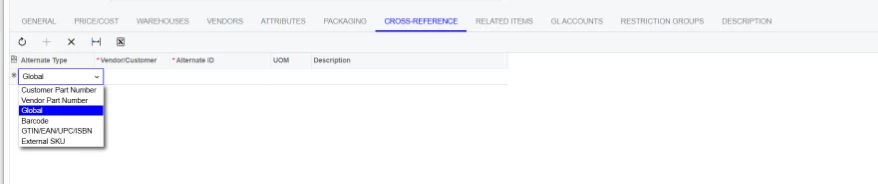
We tried to eliminate the “Set Qty” step in Acumatica by creating cross-reference barcodes tied to the UOM (BOX or CS). That way, when we scan the alternate ID, the system automatically sets the quantity based on the UOM.
For example, for product F8032-052LG:
-
Inner pack (BOX) = 6 units
-
Full case (CS) = 72 units
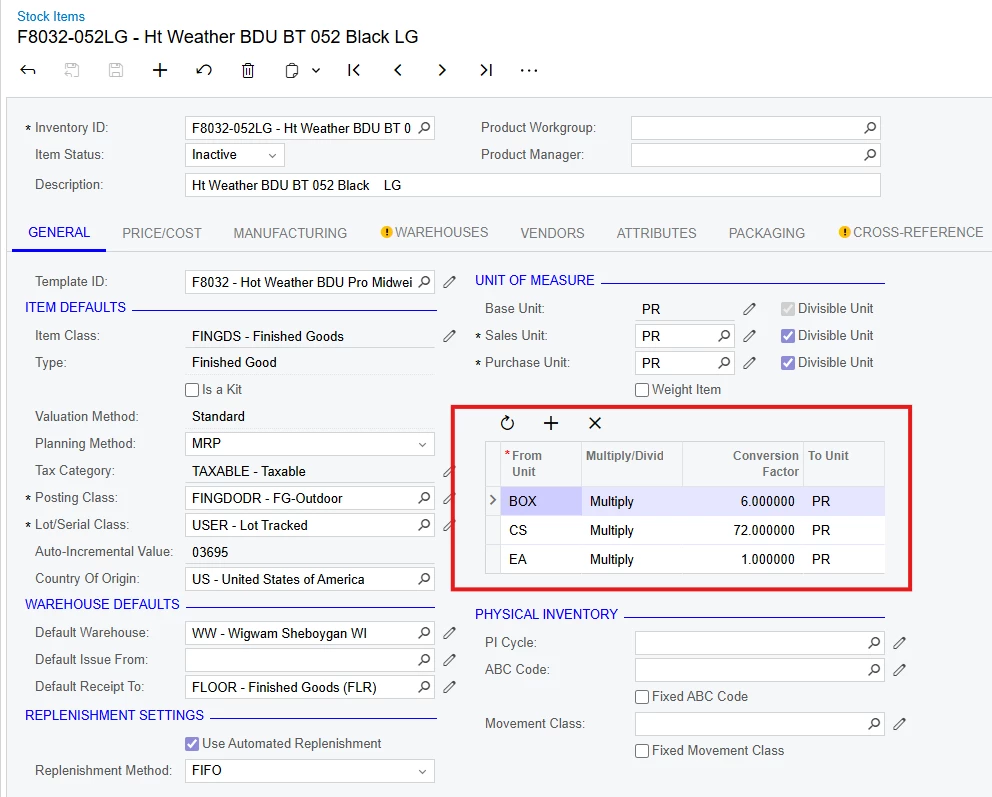
So, if I need a full case, I scan the F8032-052LG-CS barcode once, then the lot number once.
If I need 12 units, I scan the F8032-052LG-BOX barcode once, then the lot number twice.
This helped a bit, but we run into issues when we need a quantity that isn’t a multiple of the box or case qty.
For example, if I need 7 units, I have to scan the BOX barcode once and the lot number, click reset, then scan the single-unit barcode once and the lot number.
Has anyone found a way — via customization, barcode scanning setup, or third-party integration — to replicate the single-scan workflow we had before, where the lot number alone could populate all details and quantity?
Thanks in advance for your input!