Answer

Issuing stock items to projects from Inventory Issue screen

  • January 16, 2023
  • 12 replies
  • 1079 views

Forum|alt.badge.img

Our company typically has 1,000 projects open at any time.  We also have over 1,000 stock items at our warehouses.  Any of these stock items can be used on a project.  How do we issue a stock item to a project where the inventory at the warehouse is relieved and the item quantity and cost are captured on the project?  This seems like a very basic scenario that is difficult in Acumatica.  Thanks for your comments.

Best answer by brockinl

Thank y’all for the replies.  We are mid way through implementation and have figured out the issue.

12 replies

Kandy Beatty
Captain II
Forum|alt.badge.img+17
  • Captain II
  • January 16, 2023

HI @brockinl 

Have you looked at the Help at Project Inventory? There are a few different ways to track project inventory. 

https://help-2022r1.acumatica.com/Help?ScreenId=ShowWiki&pageid=c88fde12-24c2-4b9b-af43-25854318d4f9


kristianharianja
Semi-Pro I
Forum|alt.badge.img+3

@brockinl The easiest way to issue stock to project is using IN Issue transaction, simply type in project ID and task (plus cost code if enabled).

If you want to reserve the stocks for project, you can create a custom SO order type to be used as bill of materials for project. The goal here is to be able to list stock items to be later used for a particular project, allocate them in warehouse, and issue partially from there as project need. Configure the order type so that it doesn’t require AR invoice to be created, just to issue stocks.


Forum|alt.badge.img
  • Author
  • Jr Varsity III
  • Answer
  • February 13, 2023

Thank y’all for the replies.  We are mid way through implementation and have figured out the issue.


Heidi Dempsey
Community Manager
Forum|alt.badge.img+3
  • Community Manager
  • February 13, 2023

@brockinl What inventory tracking method are you using on projects?


  • Freshman I
  • November 4, 2024

I have similar issue with my clients here. The problem is that if you select track by project, then it’s project specific inventory, so we are trying to use standard option track by location, but then you have to create a location in the warehouse for every new project and actually transfer stock between locations. These stock items can be used on a project or not, so they shouldn’t be associated with a specific project or location. And we have thousands of projects open at the same time. Any suggestions? 


  • Freshman I
  • November 9, 2024

I have similar issue with my clients here. The problem is that if you select track by project, then it’s project specific inventory, so we are trying to use standard option track by location, but then you have to create a location in the warehouse for every new project and actually transfer stock between locations. These stock items can be used on a project or not, so they shouldn’t be associated with a specific project or location. And we have thousands of projects open at the same time. Any suggestions? 

@fsemin34 - Did you find a resolution to this? Not being able to use free stock on projects is a huge issue for my team. We also have thousands of projects open at one time and no set list of stock items that will or could be used on them. Each project is a bit different. approx 80% of our business is project based but if we have to transfer inventory every time we’re planning on sending something to a customer, it would be crippling. 


  • Freshman I
  • November 12, 2024

I have similar issue with my clients here. The problem is that if you select track by project, then it’s project specific inventory, so we are trying to use standard option track by location, but then you have to create a location in the warehouse for every new project and actually transfer stock between locations. These stock items can be used on a project or not, so they shouldn’t be associated with a specific project or location. And we have thousands of projects open at the same time. Any suggestions? 

@fsemin34 - Did you find a resolution to this? Not being able to use free stock on projects is a huge issue for my team. We also have thousands of projects open at one time and no set list of stock items that will or could be used on them. Each project is a bit different. approx 80% of our business is project based but if we have to transfer inventory every time we’re planning on sending something to a customer, it would be crippling. 

Agree … not yet, I was hoping to get an answer from Acumatica :) But I’ll post an update here if I have any 


  • Freshman I
  • November 13, 2024

@brockinl The easiest way to issue stock to project is using IN Issue transaction, simply type in project ID and task (plus cost code if enabled).

If you want to reserve the stocks for project, you can create a custom SO order type to be used as bill of materials for project. The goal here is to be able to list stock items to be later used for a particular project, allocate them in warehouse, and issue partially from there as project need. Configure the order type so that it doesn’t require AR invoice to be created, just to issue stocks.

Can you please clarify this easiest way? I don’t think you can type your project ID unless you have purchased inventory specifically for this project (if Track by Project selection is used). And if you use Track by Location (default) option, then you have to create a location in the warehouse for each project … and if you have thousands of projects this becomes an issue. 


Heidi Dempsey
Community Manager
Forum|alt.badge.img+3
  • Community Manager
  • November 13, 2024

@fsemin34 @brockinl @kristianharianja @scmaxim1   Track by location is definitely cumbersome for construction customers so we implemented project specific inventory which works very smoothly.  Here is some documentation Tracking Project Inventory.   There are also some learning activities you can go through to learn different workflows.  You can issue stock from Project X to Specific project, you just need to pick the right cost layer.  Hope this helps.


  • Freshman I
  • November 13, 2024

@Heidi Dempsey Hi Heidi, thank for your reply. 

I understand we can change the cost layer, but this will also change the qty on hand. So, it seems like the items have to be purchased for the project specifically. Not sure if I’m missing something else. 

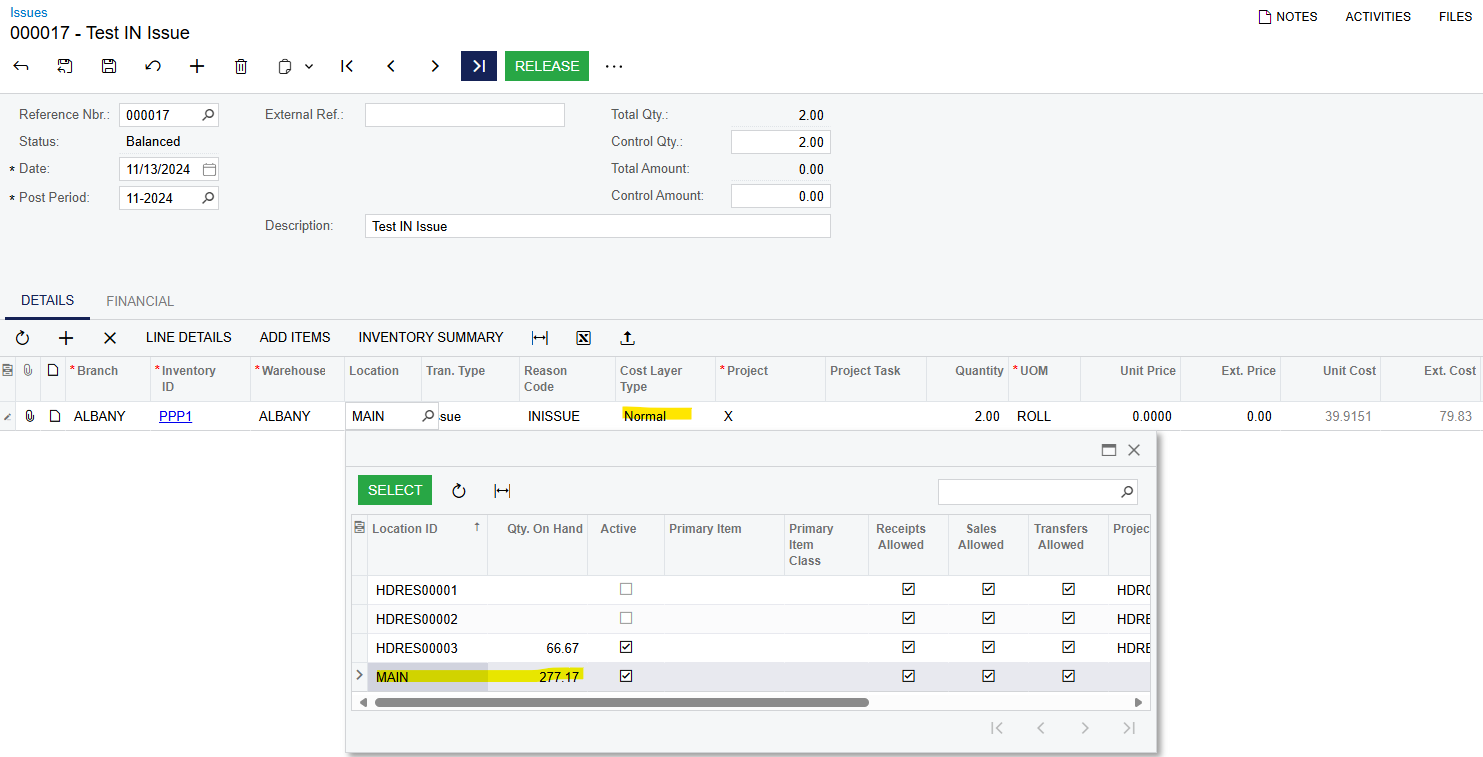
It shows quantity on hand with Normal cost layer selected: 


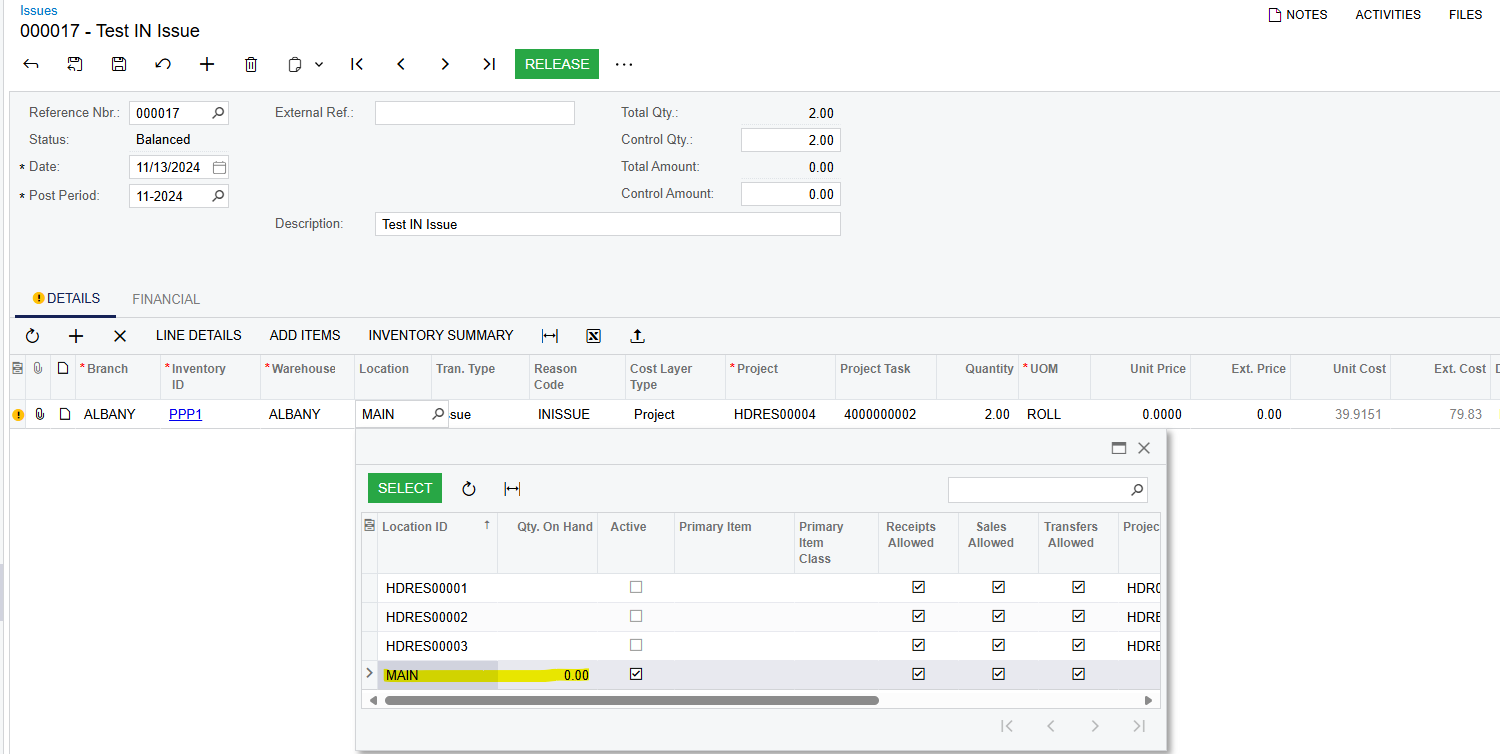
But if I change the cost layer to Project, the system changes the quantity to 0

And displays this error: 


Not sure what I’m missing here. Any help appreciated. 

Thanks,

Felix 


DariaChuprova52
Acumatica Employee
  • Acumatica Employee
  • February 13, 2025

@fsemin34 Hi Felix!

In 2025R1 release we have updated the behavior of project-specific inventory and added an ability to issue materials not allocated to any projects to the project without transferring them to the project-specific layer first. You can find more information in the release notes https://acumatica-builds.s3.amazonaws.com/builds/preview/25.1/ReleaseNotes/AcumaticaERP_2025R1_Beta_ReleaseNotes.pdf (Projects and Construction: Usage of Free Stock for Projects with Project-Specific Inventory section)


Thank you!


Best regards,

Daria Chuprova

Senior Business Analyst in Acumatica Projects&Construction


  • Freshman I
  • May 29, 2025

thanks Daria...that was a huge need for folks who have Project Specific Inventory enabled in their system...but what about the companies that do not….the FREE STOCK vs. PROJECT STOCK inventory issue has made the ISSUE TO PROJECT process a bit more difficult for those without it enabled.

meaning, on each line of my ISSUE screen now we have to choose PROJECT STOCK at the detail line-item level rather than FREE STOCK in order to open up the PROJECT ID column to pick from.

would be good if there was an option in inventory preferences to have it default to one or the other, but in the absence of such a setting, what's the best way for us to have it default to PROJECT STOCK at the detail line-item level….CUSTOMIZATION?

thanks again

Mitch