



How to Calculate Landed Cost for items in Drop-Ship Order . In Normal Practice Yes its Not Possible since drop-ship orders are shipped directly from the supplier to the customer without passing through your warehouse
Solved
Is it t Possible to calculate Landed cost of item of a Drop Ship Order ie; Need to add the cost to Item
Best answer by TimRodman
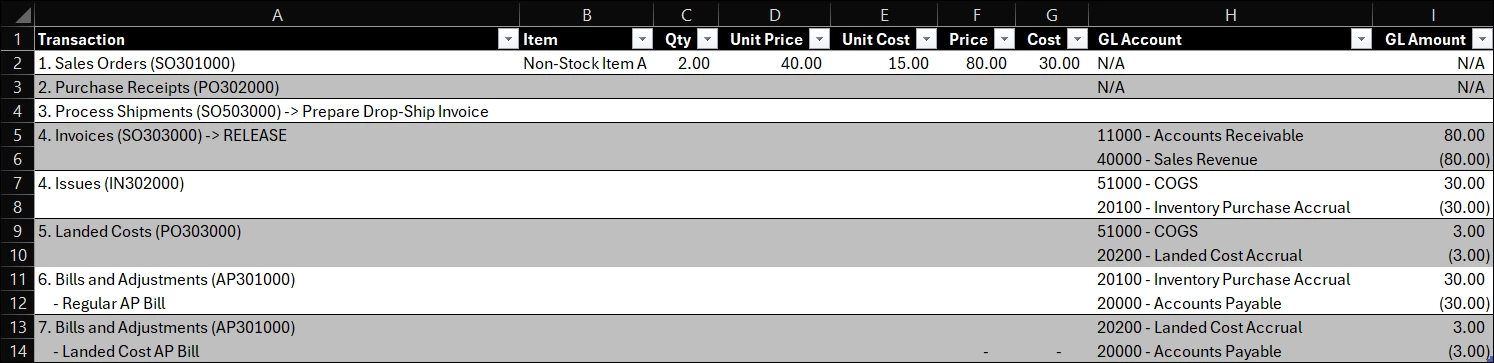
I ran through a scenario with a Non-Stock Item on a Drop Shipment, then added a Landed Cost document into the mix. See screenshot below for order of transactions and General Ledger journal entries produces.
Two challenges that I ran into:
- By using Landed Costs, it’s using the same GL Account as the regular Item (see Line #9 below). Would you want to use a separate Non-Stock Item and no Landed Cost transaction so you can control the GL Account?
- The Landed Cost amount does not automatically get passed along to the Customer on the AR Invoice.
An Idea:
- Don’t use the official Landed Cost functionality
- Use separate Non-Stock Items for tracking each type of Landed Cost
- Set the GL Account on those Non-Stock Items to a Balance Sheet account, something like “Unbilled Landed Costs” to catch Landed Costs that still need to be billed to Customers
- Manually add those Non-Stock Items to the Customer AR Invoice
- Add the “Unbilled Landed Costs” GL Account as a Cash Account so you can reconciled it like you do a Bank Account, matching up the ins and outs.
Have you found a way to automatically add the Landed Cost charges from Vendors to Customer Invoices?





Enter your E-mail address. We'll send you an e-mail with instructions to reset your password.