Answer

Inventory counting method for file upload

  • January 9, 2025
  • 6 replies
  • 112 views

Forum|alt.badge.img

Is there a way to do an excel upload of the exact SKU list of inventory IDs we wish to have counted? (that do not share the same ABC code, class, or otherwise – Just a literal list of which ids we wish to have counted)


I have read around and seen articles on importing the sheets of the inventory count totals, how to set up inventory counts by code or class or warehouse – However, this is about uploading the actual list of requested specific SKUs to count. 

Best answer by lairdtim

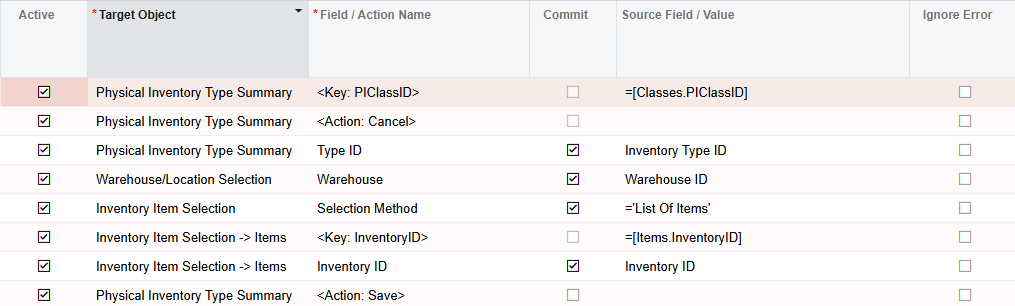
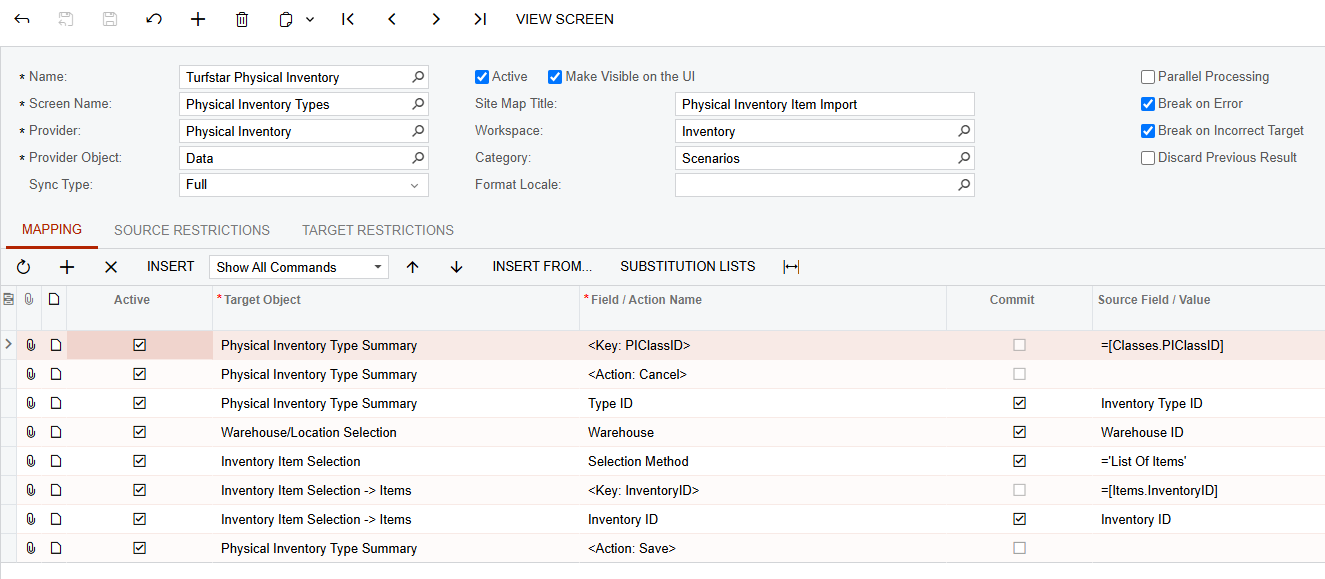
Here’s our XML and a screenshot.  The XML should contain the data provider; it’s just product codes so I don’t think there is anything I’d need to worry about confidentiality on.  Like I mentioned above, we learned after this that limiting ourselves in a count type to a specific warehouse isn’t the best idea (at least for us)--take advantage of the system having multiple layers of filters that get applied when the PI is created.

 

6 replies

nhatnghetinh
Captain II
Forum|alt.badge.img+11
  • Captain II
  • January 9, 2025

Hi ​@AHanke 

Please refer to the youtube link below, hope it helps you.


Best Regards,

NNT


Forum|alt.badge.img
  • Author
  • Freshman I
  • January 9, 2025

@nhatnghetinh  This video instructs how to select a specific item to count, but not how to upload a file that contains a list of item ids to count as requested. Entering in one by one like that is not possible for us when we need to upload hundreds at a time which do not share the same ABC, class, etc otherwise. 


Forum|alt.badge.img+1
  • Semi-Pro I
  • January 14, 2025

We’ve done this with an import scenario.  Create a physical inventory type of “By Inventory”, and the “Selection Method” under Inventory Item Selection is “List of Items”.  I’ve included a screenshot of our import scenario below.  The source file just has three columns--the Inventory Type ID (a physical inventory type you’ve already created), the warehouse ID (which you can leave off as we discovered--see below) and the inventory item ID.

What we’ve learned as we’ve worked through figuring out how to do physical counts is that you can do quite a bit with the combination of a list of stock items in Inventory Item Selection, the warehouse when preparing a count, and the “Location Selection” either in the type or when preparing the count.  Don’t limit your count type by plugging in any more detail than you need.


Forum|alt.badge.img
  • Author
  • Freshman I
  • January 17, 2025

@lairdtim  That looks/sounds like it might work for us!

Would you be able to either share the XML or let me know which screen to select in the header of the scenario? I can otherwise copy your row rules there, but wasn’t sure which screen to put in the settings up top. Either or. Thank you.


rfairchild58
Varsity I
Forum|alt.badge.img+1
  • Varsity I
  • January 17, 2025

we also do it via an import scenario


Forum|alt.badge.img+1
  • Semi-Pro I
  • Answer
  • January 18, 2025

Here’s our XML and a screenshot.  The XML should contain the data provider; it’s just product codes so I don’t think there is anything I’d need to worry about confidentiality on.  Like I mentioned above, we learned after this that limiting ourselves in a count type to a specific warehouse isn’t the best idea (at least for us)--take advantage of the system having multiple layers of filters that get applied when the PI is created.