

Hello,
I am finding that inventory reports do not reflect cost or quantity properly after using Inventory Adjustments and Inventory Counts.
Here’s an example below - we do have a net of 42 and the total cost is appropriate of $312.06. However, we are showing -84 in our Receiving Location (we run everything in/out of a single location). This part number was counted, and adjusted up 126, and it was adjusted through the Receiving location, however it’s showing as blank on the report. Note also that the average cost will be $7.43.

Now, if we look at the Inventory Balance report, since it doesn’t filter to Location, it shows the quantity of 42, but it also shows a Unit Cost of $2.4767, which would be $312.06/126 (total cost divided by the quantity in the ‘phantom’ location’).

Looking through the Transaction History we can also see that the Adjustments were always made through the Receiving Location and not a ‘Blank’ Location.
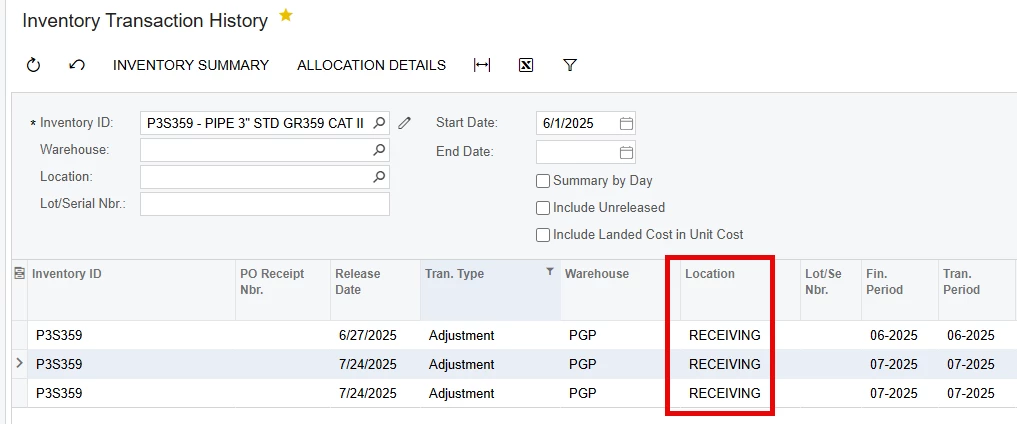
If I add the Part to a Sales Order, it will correctly bring in an Average Cost of $7.43, but if I look at the Item Warehouse Details, it gives me the incorrect cost of $2.4767.
SO Value:

Item Warehouse Value:
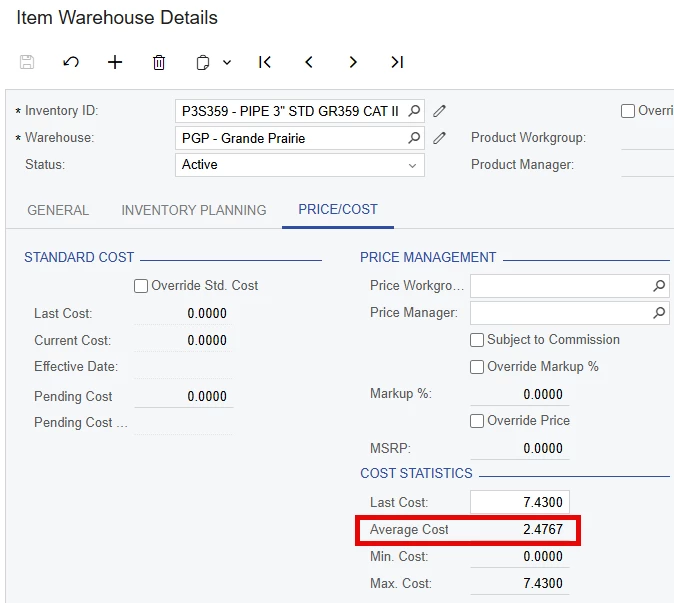
For reference, I have also run the “Recalculate Inventory” and it hasn’t updated anything.
Does anyone have any insight into this? Is there any way to force the system to reread or update itself and reflect the proper values?
My GL is correct, but several of our inventory reports are rendered useless, and worse can be very misleading.
Any help is very much appreciated.

